Day 20: Multi-File Workflows — When a Task Touches Everything at Once
Learn to handle multi-file tasks without context drift. Three prevention methods: map before touching, anchor pattern, checkpoint reviews. 7-page example.
Hey, it's G.
Day 20 of the Claude Code series.
Single-file tasks with Claude Code are easy.
You point it at one file. It reads it. It makes the change.
Multi-file tasks are where most developers run into trouble.
Claude Code starts strong. Then it drifts.
By file six, it's making slightly different choices than it made in file one.
Inconsistent naming. Different error handling. A pattern that quietly diverged somewhere in the middle.
Today I'm sharing how to structure multi-file sessions so they stay coherent from start to finish.
The Problem (Context Drift Breaks Multi-File Sessions)
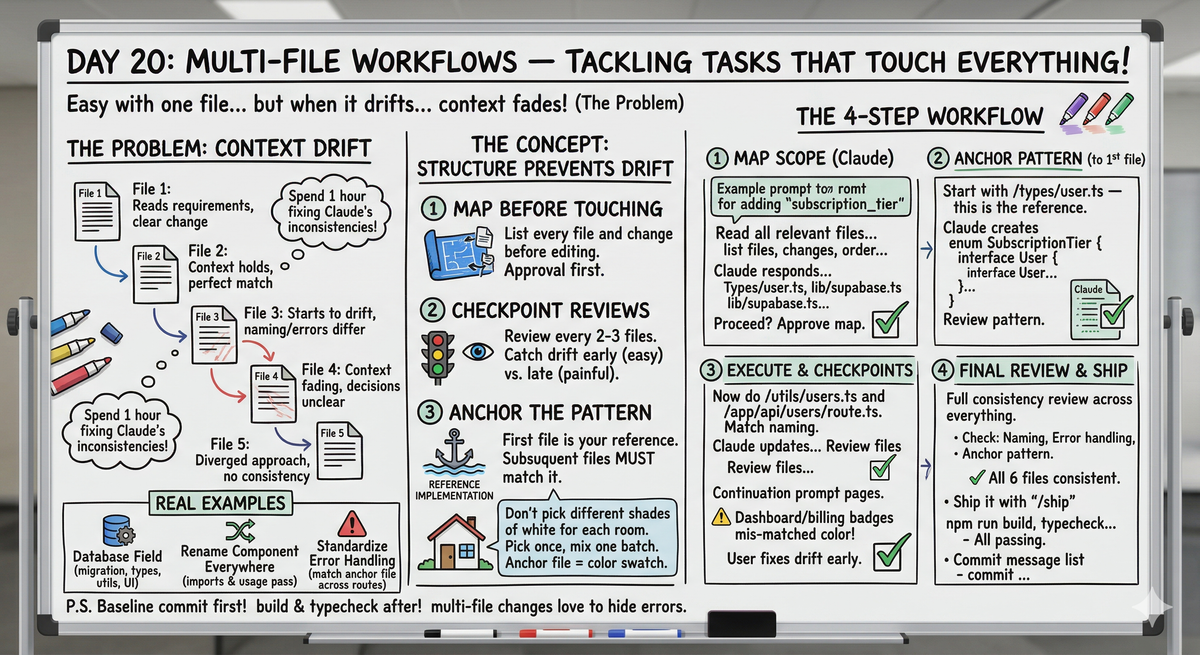
Here's what happens in an unstructured multi-file session:
File 1
Claude Code reads the requirements. Makes a clean, well-reasoned change.
File 2
Still has full context. Change matches File 1 perfectly.
File 3
Starting to drift slightly. Variable named differently. Error handling similar but not identical.
File 4
Context is fading. The early decisions aren't as clear anymore.
File 5
Pattern is diverging. Still works, but doesn't match the early files.
File 6
Completely different approach. Error handling doesn't match anything else.
By the end:
Six files changed. Six slightly different implementations. No consistency.
You spend an hour fixing the inconsistencies Claude created during the session.
The Concept (Structure Prevents Context Drift)
Multi-file tasks fail for one reason: context drift.
Claude Code starts a task with full understanding of what it's doing.
But as the session gets longer and more files get touched, the early decisions start to fade.
By file six it's making slightly different choices than file one.
The fix is not to avoid multi-file tasks.
It's to structure them so context stays sharp throughout.
Three things that prevent context drift:
1. Map Before Touching
Before any file gets edited, Claude Code lists every file that needs to change and what the change is.
This creates an explicit plan it can refer back to.
2. Checkpoint Reviews
After every two or three files, run a quick review to catch drift before it compounds.
Fixing drift after 3 files is easy. After 10 files is painful.
3. Anchor the Pattern
Identify the first file as the reference implementation. Every subsequent file should match it.
Tell Claude Code this explicitly.
Think of it like painting a house.
You don't pick a slightly different shade of white for each room as you go.
You pick the color once. Mix one big batch. Use it throughout.
The anchor file is your color swatch.
The Four-Step Multi-File Workflow
Step 1: Map the Full Scope (Before Touching Anything)
Open Claude Code and give the mapping instruction:
claude
Then prompt:
I need to make a change that touches multiple files.

Before editing anything, read all the relevant files
and give me a complete map of:
- Every file that needs to change
- What specifically changes in each file
- What order you'll make the changes in
- Any risks or dependencies between the changes

Do not write any code until I approve the map.
Claude responds:
Reading relevant files to map changes...

Complete change map:

Files that need changes:

1. /types/user.ts
   - Add subscription_tier field to User interface
   - Add SubscriptionTier enum

2. /lib/supabase.ts
   - No changes needed (reads from database schema)

3. /utils/users.ts
   - Update getUser() to include subscription_tier
   - Update updateUser() to handle subscription_tier

4. /app/dashboard/page.tsx
   - Display subscription tier in user info
   - Add upgrade prompt for Free tier users

5. /app/billing/page.tsx
   - Show current subscription tier
   - Disable upgrade button for Pro users

6. /app/api/users/route.ts
   - Include subscription_tier in GET response
   - Handle subscription_tier in PATCH request

Order of changes:
1. Types first (everything depends on this)
2. Utils (depends on types)
3. API routes (depends on types + utils)
4. Components (depends on types + utils + API)

Dependencies:
- All files depend on types being updated first
- Components depend on API route changes

Risks:
- Existing user data has no subscription_tier field
- Need database migration before this code ships

Proceed with this plan?
You review the map.
If something's missing or wrong, fix it now.
Once approved, Claude has a clear roadmap for the entire session.
Step 2: Anchor the Pattern to the First File
Give the anchor instruction:
Start with /types/user.ts — this is the reference
implementation.

Every other file should follow the exact same naming
and structure you use here.

Show me this file when done before moving to the next.
Claude responds:
Creating reference implementation in /types/user.ts...

Changes made:

Added SubscriptionTier enum:
export type SubscriptionTier = 'Free' | 'Pro'

Updated User interface:
export interface User {
  id: string
  email: string
  displayName: string
  subscription_tier: SubscriptionTier  // ← new field
  created_at: string
}

Pattern established:
- Field name: subscription_tier (snake_case to match database)
- Type: SubscriptionTier (our custom enum)
- Required field (not optional)

This is the reference. All other files will match this naming.

Ready to continue?
You review the anchor file.
This sets the pattern for everything else.
If it's wrong, fix it now before it propagates.
Step 3: Execute with Checkpoint Reviews
Continue with the next batch:
Good. Now do /utils/users.ts and /app/api/users/route.ts

Match the naming from /types/user.ts exactly:
- Field name: subscription_tier
- Type: SubscriptionTier

Show me both when done.
Claude updates both files.
You review them. Both match the anchor pattern. ✓
Continue with next batch and add checkpoint:
Continue with /app/dashboard/page.tsx and /app/billing/page.tsx

After finishing both, do a consistency check:
- Are both using subscription_tier (not subscriptionTier)?
- Are both using SubscriptionTier type?
- Is the error handling consistent?

Report any inconsistencies before moving on.
Claude responds:
Updated both component files.

Consistency check across dashboard and billing pages:

✓ Both use subscription_tier field name (matches types)
✓ Both use SubscriptionTier type (matches types)
✓ Both handle loading state the same way
✓ Both handle missing subscription_tier gracefully
⚠️ Dashboard shows "Free" as green badge, billing shows as gray
   Should these match?

Inconsistency found. Fix before continuing?
You catch the drift early:
Make both show Free as gray, Pro as green.
Match the billing page style.
Claude fixes it. Drift caught and corrected.
Step 4: Final Consistency Review
After all files are done:
All files have been changed.

Now do a full consistency review across every file
you touched in this session.

Check for:
- Naming inconsistencies (subscription_tier vs subscriptionTier)
- Different error handling approaches
- Any file that diverged from the reference pattern

Fix anything inconsistent before we commit.
Claude responds:
Full consistency review across 6 files:

✓ All files use subscription_tier (snake_case)
✓ All files use SubscriptionTier type
✓ All files handle null/undefined consistently
✓ All files follow the anchor pattern from /types/user.ts

No inconsistencies found.
Ready to commit.
Clean. Ship it:
/ship
Then verify:
Run npm run build and npm run typecheck
All passing. Commit.
Six files changed. Fully consistent. Zero cleanup needed.
Real Multi-File Session (Complete Example)
Let me walk you through adding loading states to all pages in a real project.
The Task
Seven pages in /app currently show blank screens while fetching data.
Add consistent loading states to all of them.
Step 1: Map the Scope
Start Claude Code:
cd ~/projects/resiboko
claude
Give mapping instruction:
I need to add consistent loading states to all pages
in /app that currently show blank screens while fetching.

Read through /app/ and map every page that fetches data
and has no loading state.

List every file, what the loading state should look like,
and what order you'll tackle them in.

Do not touch anything yet.
Claude responds:
Reading all pages in /app...

Pages without loading states (7 total):

1. /app/dashboard/page.tsx
   - Fetches expense data
   - Currently blank until data loads
   - Needs: skeleton loader for cards and charts

2. /app/expenses/page.tsx
   - Fetches expense list
   - Currently blank until data loads
   - Needs: skeleton loader for table rows

3. /app/billing/page.tsx
   - Fetches subscription data
   - Currently blank until data loads
   - Needs: skeleton loader for plan card

4. /app/profile/page.tsx
   - Fetches user data
   - Currently blank until data loads
   - Needs: skeleton loader for profile form

5. /app/analytics/page.tsx
   - Fetches analytics data
   - Currently blank until data loads
   - Needs: skeleton loader for charts

6. /app/settings/page.tsx
   - Fetches settings data
   - Currently blank until data loads
   - Needs: skeleton loader for settings panels

7. /app/receipts/page.tsx
   - Fetches receipt images
   - Currently blank until data loads
   - Needs: skeleton loader for image grid

Recommended order:
Start with dashboard (most complex), then simpler pages follow

Loading state pattern to use:
- Same skeleton component structure for all
- Matches page layout exactly
- Uses Tailwind's animate-pulse
- Shows during loading, hides when data arrives

Proceed?
I approve the map.
Step 2: Anchor the Pattern
Give anchor instruction:
Start with /app/dashboard/page.tsx — this becomes the
reference implementation for loading states.

Use a skeleton loader that matches the page layout.
Show me the result before moving to the next page.
Claude creates skeleton loader for dashboard.
I review it. Looks good. This is the anchor.
Step 3: Execute with Checkpoints
Continue with first batch:
Good. Now do /app/billing/page.tsx and /app/profile/page.tsx

Match the dashboard pattern exactly:
- Same skeleton approach
- Same loading state logic (if (!data) return <Skeleton />)
- Same animate-pulse Tailwind class

Show me both when done.
Claude updates both pages.
I review. Both match dashboard pattern. ✓
Continue with checkpoint instruction:
Continue with the remaining 4 pages.

After each two pages, do a consistency check.
Make sure everything still matches the dashboard pattern.
Claude updates expenses and analytics pages.
Checkpoint response:
Consistency check after 4 pages:

✓ All use same skeleton component approach
✓ All use if (!data) return <Skeleton /> pattern
✓ All use animate-pulse
⚠️ Analytics page uses different skeleton structure
   (doesn't match page layout as well)

Fix before continuing?
Drift caught early. Give fix instruction:
Fix analytics skeleton to match page layout better.
Look at dashboard for reference.
Fixed. Continue.
Claude finishes remaining 3 pages.
Step 4: Final Review
Give final review instruction:
Do a full consistency review across all 7 pages you touched.

Check:
- Loading state logic consistent?
- Skeleton structure matches page layouts?
- Tailwind classes identical?

Fix anything inconsistent.
Claude responds:
Full consistency review across 7 pages:

✓ All use if (!data) return <Skeleton /> pattern
✓ All skeletons match their page layouts
✓ All use animate-pulse
✓ All loading states show during fetch, hide when loaded

Verified each page:
- Dashboard ✓
- Expenses ✓
- Billing ✓
- Profile ✓
- Analytics ✓ (fixed earlier)
- Settings ✓
- Receipts ✓

No inconsistencies. All 7 pages follow the same pattern.
Step 5: Ship It
Run ship command:
/ship
Verify build:
Run npm run build and npm run typecheck
All passing.
Commit in terminal:
git add .
git commit -m "add consistent loading states to all pages

Implemented skeleton loaders for 7 pages:
- Dashboard, expenses, billing, profile, analytics, settings, receipts
- All follow same pattern and loading state logic
- No more blank screens while fetching"
Seven pages. Consistent loading states. One clean session.
Common Multi-File Scenarios
Scenario 1: Adding a Field to the Database
Start Claude Code:
claude
Give mapping instruction:
I need to add a `subscription_tier` field to the user model.
This touches multiple layers.

Map every file that needs updating:
- Database migration
- TypeScript types in /types/user.ts
- Supabase queries in /utils/users.ts
- Any component that displays user data
- Any API route that returns user data

List all affected files before touching anything.
I'll approve the map then you execute in order.
Scenario 2: Renaming a Component Used Everywhere
Start Claude Code:
claude
Give mapping instruction:
I need to rename the Button component to PrimaryButton.

Before touching anything:
1. Find every file that imports Button
2. List them all
3. Confirm the rename plan

Then update all imports and usages in one pass.
Do not leave any file still importing the old name.
Scenario 3: Standardizing Error Handling Across API Routes
Start Claude Code:
claude
Give mapping and anchor instruction:
Look at /app/api/users/route.ts — this has the correct
error handling pattern.

Now find every other API route in /app/api/ that uses
a different error handling approach.

List them first, then update each one to match
/app/api/users/route.ts exactly.

Check your work after every three files.
The Complete Multi-File Session Structure
Here's the workflow I use every time:
Before Starting
Create baseline in terminal:
git add . && git commit -m "before multi-file change"
Baseline for easy revert.
During Session
1. Map first — start Claude Code:
claude
Give mapping prompt:
Map all files that need to change. No code yet.
2. Approve the map
Review Claude's file list and plan.
3. Anchor to first file:
Start with [anchor file]. Show me when done.
4. Review anchor
This sets the pattern for everything else.
5. Continue with next batch:
Continue with the next 2-3 files. Match pattern exactly.
6. Checkpoint:
Consistency check before continuing.
7. Repeat steps 5-6 until all files are done.
8. Final consistency review:
Full consistency review across everything you touched.
9. Ship:
/ship
10. Verify build:
Run npm run build and npm run typecheck
After Session
Always run build and typecheck after multi-file changes.
Type errors love to hide in multi-file refactors.
Why This Matters
Multi-file changes are where Claude Code sessions most often go wrong.
And they're where the most valuable work happens.
Features rarely touch just one file.
Database changes ripple through types, queries, components, and API routes.
Refactors span entire layers.
Getting multi-file workflows right means you can tackle the big structural changes that actually move a codebase forward.
Not just the small isolated fixes.
My Raw Notes (Unfiltered)
Context drift is the real enemy in long sessions.
The "map first" habit completely changed how my multi-file sessions go — having an explicit list means Claude can refer back to it when it starts to drift.
The anchor file idea came from a session where I noticed file 6 had slightly different error handling than file 1 and I couldn't figure out why until I realized Claude had just gradually drifted.
Checkpoint reviews feel like they slow things down but they actually save time — catching drift after 3 files is way easier than fixing it after 10.
Always run build and typecheck at the end — multi-file changes are where type errors like to hide.
Tomorrow (Day 21 Preview)
Topic: Phase 2 Wrap-Up — Your full productive workflow from prompt to shipped code, everything from Days 8-20 combined into one repeatable system.
What I'm sharing: The complete workflow. CLAUDE.md + slash commands + vibe coding + debugging + refactoring + testing + APIs + multi-file workflows all working together. The system.
This is the final day of Phase 2: Getting Productive.
Following This Series
Phase 3 (Days 15-21): Vibe Coding ⬅️ Almost complete!
So far in Phase 3:
- Day 14: Vibe coding mindset
- Day 15: Feature-first workflow
- Day 16: Debugging with Claude Code
- Day 17: Refactoring with Claude Code
- Day 18: Writing tests with Claude Code
- Day 19: Working with APIs
- Day 20: Multi-file workflows (today)
- Day 21: Phase 2 wrap-up (tomorrow)
G
P.S. - Three things prevent context drift: map before touching, anchor to first file, checkpoint every 2-3 files. Structure the session and multi-file changes become easy wins.
P.P.S. - Always run build and typecheck after multi-file sessions. Type errors love to hide in multi-file refactors.
P.P.P.S. - The anchor file is your pattern reference. Every subsequent file should match it exactly. Tell Claude this explicitly.