Day 21: Your Complete Productive Workflow — Everything From Phase 2 in One System
Complete Claude Code workflow combining everything from Phase 2. Before/during/after system, 6 workflow patterns, 12 commands. Real session example included.
Hey, it's G.
Day 21 of the Claude Code series.
Phase 2 complete.
14 days. Three tracks. One complete productive workflow.
CLAUDE.md mastery. Slash commands. Vibe coding. Debugging. Refactoring. Testing. API integrations. Multi-file workflows.
Today I'm tying all of it together into one system.
Not a checklist to follow rigidly — but a repeatable flow I now run on autopilot.
The pieces only become powerful when they work together.
The Problem (Knowing Techniques ≠ Having a System)
Here's what happens when you learn techniques but don't have a system:
You learn about CLAUDE.md.
You learn about slash commands.
You learn about vibe coding workflows.
But when you sit down to build something, you still have to figure out:
- Which technique applies here?
- What order should I do things in?
- Did I forget something important?
- How do I know when I'm done?
Every session starts with decision fatigue.
Do I write the feature brief first? Do I review after every file? Do I write tests before or after? Do I commit now or later?
You know the tools. You just don't know how to use them together.
The developers who get the most out of Claude Code aren't the ones who know the most tricks.
They're the ones who have internalized a reliable workflow and run it consistently.
The Concept (Every Session Has Three Stages)
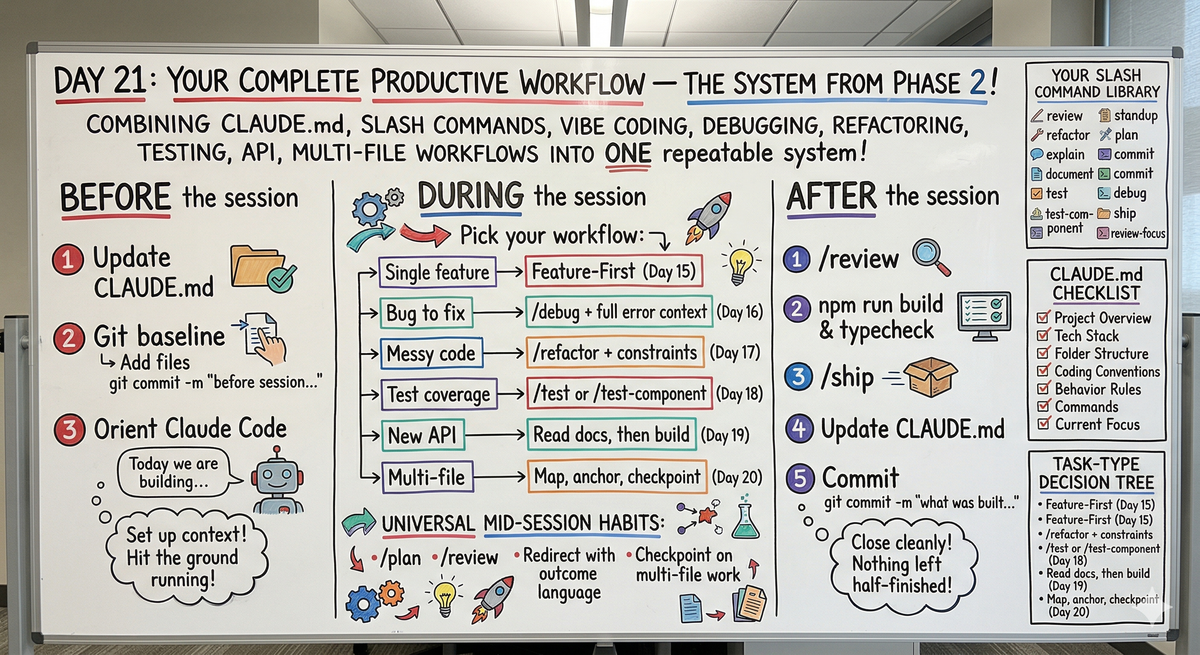
Every productive Claude Code session has three stages:
Before the Session
Set up the context so Claude Code hits the ground running.
During the Session
Execute the work with the right workflow for the task type.
After the Session
Close cleanly so nothing gets left in a half-finished state.
Most developers only think about the during part.
The before and after are what separate a productive session from a chaotic one.
The system isn't about following every step perfectly every time.
It's about having defaults you reach for automatically — the same way an experienced developer reaches for git before touching anything without consciously thinking about it.
Think of it as your personal operating procedure for working with Claude Code.
You built the tools across Phase 2.
Today is how you use them together.
The Complete System
BEFORE Every Session
1. Make sure CLAUDE.md is current:
claude
Is there anything in my CLAUDE.md that's outdated
based on what we've been building lately?
2. Clean git baseline:
git add . && git commit -m "before session: [what you're about to work on]"
3. Orient Claude Code:
Today we're working on: [feature or task]

Here's the context: [any relevant background]
DURING the Session — Pick the Right Workflow
The task-type decision tree:
Starting a new feature? → Feature-First Workflow (Day 15)
Found a bug? → /debug with full error context (Day 16)
Code feels messy? → /refactor with constraints (Day 17)
Missing test coverage? → /test or /test-component (Day 18)
Integrating a new API? → Read docs first, then build (Day 19)
Change touches 5+ files? → Map first, anchor pattern, checkpoint (Day 20)
The universal mid-session habits:
Plan before touching anything non-trivial:
/plan
Review after each logical chunk:
/review
Redirect with outcome language, not line numbers:
The [thing] should [behavior] — fix that.
Checkpoint on multi-file work every 2-3 files:
Consistency check before continuing.
AFTER Every Session
1. Final review:
/review
2. Build and typecheck:
Run npm run build and npm run typecheck. Report errors.
3. Ship:
/ship
4. Update CLAUDE.md if anything changed:
We added [new thing] today. Update CLAUDE.md to reflect that.
5. Commit:
git add . && git commit -m "[what was built or changed]"
Your Complete Toolkit From Phase 2
Your Slash Command Library
These 12 commands cover every workflow:
~/.claude/commands/
├── review.md          # code review, findings only
├── refactor.md        # clean up without changing behavior
├── explain.md         # understand unfamiliar code
├── document.md        # generate JSDoc comments
├── test.md            # write unit tests with Vitest
├── test-component.md  # write component tests
├── standup.md         # daily standup from git log
├── plan.md            # plan before touching anything
├── commit.md          # write commit message from git diff
├── debug.md           # find root cause and fix
├── ship.md            # pre-commit workflow in one command
└── review-focus.md    # review with specific focus area
Your CLAUDE.md Checklist
Every CLAUDE.md should have:
✓ Project Overview — what it does in plain English
✓ Tech Stack — exact versions, not just names
✓ Folder Structure — key folders Claude needs to navigate
✓ Coding Conventions — specific and enforceable rules
✓ Behavior Rules — what needs approval vs. what runs freely
✓ Commands — exact commands for common tasks
✓ Current Focus — what you're actively building right now
Rules that stick:
✓ Direct language — never, always, must, do not
✓ Add the why for critical rules
✓ ⚠️ symbol for anything you truly can't afford Claude to get wrong
✓ Verify monthly — ask Claude to flag anything outdated
Your Workflow Decision Tree
Quick reference for which workflow to use:
Starting a new feature?
→ Write feature brief → /plan → execute → /review → /ship

Found a bug?
→ /debug with error + location + trigger → review fix → write test

Code feels messy?
→ Commit baseline → /refactor → git diff → build → commit

Missing test coverage?
→ /test or /test-component → run tests → fix failures → commit

Integrating an API?
→ Read docs first → set up client → build helpers → /test → /ship

Change touches many files?
→ Map scope → anchor pattern → execute → checkpoint → final review → /ship
Complete Real Session (Start to Finish)
Let me walk you through adding email notifications to a production app.
The feature: Send email when subscription renews.
BEFORE the Session
Create baseline:
git add . && git commit -m "before session: add email notifications"
Start Claude Code:
claude
Orient:
Today we're adding email notifications using Resend.

Users should get an email when their subscription renews.

Resend is already configured in /lib/resend.ts
Email helpers are in /utils/email.ts
DURING the Session
Plan first:
/plan
Claude responds:
Plan for subscription renewal email notifications:

Changes needed:

1. Create email template
   - New file: /emails/renewal.tsx
   - React Email component
   - Include renewal date, plan name, amount

2. Add helper function
   - File: /utils/email.ts
   - Function: sendRenewalEmail(user, subscription)
   - Uses template from step 1

3. Update webhook handler
   - File: /app/api/webhooks/stripe/route.ts
   - On invoice.payment_succeeded event
   - Call sendRenewalEmail()

4. Add TypeScript types
   - File: /types/email.ts
   - RenewalEmailPayload interface

5. Write tests
   - File: /utils/__tests__/email.test.ts
   - Mock Resend client
   - Test sendRenewalEmail()

Order:
1. Types first
2. Email template
3. Helper function
4. Webhook update
5. Tests

Proceed?
Approve and execute:
Looks good. Go ahead.
Claude builds the feature.
After email template is done:
/review
Looks good.
After helper function is done:
/review
Looks good.
After webhook update:
/review
Looks good.
All code done — run build:
Run npm run build and npm run typecheck
All passing.
Write tests:
Write tests for sendRenewalEmail()

Mock Resend client — no real emails sent
Cover success and failure cases
Tests written and passing.
AFTER the Session
Final review:
/review
All clear.
Ship:
/ship
Claude suggests commit message:
add subscription renewal email notification

Users now receive email when subscription renews.
Created Resend email template, helper function, and webhook handler.
Includes comprehensive tests.
Update CLAUDE.md:
We added a renewal email notification today.

Update CLAUDE.md to note that renewal emails
are handled in /utils/email.ts
CLAUDE.md updated.
Commit in terminal:
git add . && git commit -m "add subscription renewal email notification

Users now receive email when subscription renews.
Created Resend email template, helper function, and webhook handler.
Includes comprehensive tests."
Start to finish. Clean session. Everything in its place.
The Six Workflow Patterns You Built
Pattern 1: Feature-First Workflow (Day 15)
When: Building a new feature from scratch
Flow:
- Write feature brief (what, where, what exists, what done looks like, what to avoid)
- /plan
- Execute in order
- /review after each component
- Build and typecheck
- /ship
Pattern 2: Debug Workflow (Day 16)
When: Something's broken and you need to fix it
Flow:
- /debug with full error + stack trace + location + trigger
- Claude explains before fixing
- Review the fix
- Write regression test
- Run tests
- /ship
Pattern 3: Refactor Workflow (Day 17)
When: Code works but feels messy
Flow:
- Commit baseline
- /refactor with constraints (never mix with features)
- git diff to review changes
- Build and typecheck
- Commit or revert
- Never mix refactoring with new features
Pattern 4: Testing Workflow (Day 18)
When: Missing test coverage
Flow:
- /test or /test-component
- Run tests immediately
- Fix any failures
- Commit tests with feature
- Always mock external dependencies
Pattern 5: API Integration Workflow (Day 19)
When: Integrating third-party service
Flow:
- Read docs first — summarize auth, limits, gotchas
- Set up client config following existing pattern
- Build helper functions
- Handle webhooks if needed
- /test with mocked client
- /ship
Pattern 6: Multi-File Workflow (Day 20)
When: Change touches 5+ files
Flow:
- Map scope before touching anything
- Anchor to first file — sets pattern
- Execute in batches
- Checkpoint every 2-3 files
- Final consistency review
- Build and typecheck
- /ship
What Phase 2 Built
Track 1: CLAUDE.md Mastery (Days 8-10)
Day 8: Six essential sections every CLAUDE.md needs
Day 9: Writing rules Claude actually follows
Day 10: Evolving your CLAUDE.md over time
Track 2: Slash Commands (Days 11-13)
Day 11: What slash commands are, first custom one
Day 12: Building your command library (8 essential commands)
Day 13: Advanced commands with parameters and chaining
Track 3: Vibe Coding Workflows (Days 14-21)
Day 14: Vibe coding mindset — director not coder
Day 15: Feature-first workflow — complete feature in one session
Day 16: Debugging — let Claude find and fix its own mistakes
Day 17: Refactoring — clean code without breaking things
Day 18: Testing — make Claude write the tests too
Day 19: APIs — let Claude handle integration
Day 20: Multi-file workflows — when tasks touch everything
Day 21: Complete productive workflow (today)
Why This Matters
The goal of Phase 2 was never to learn a list of techniques.
It was to build a system.
Individual techniques help occasionally.
A system helps every single day.
The difference:
Without a system:
- Every session feels different
- You forget steps
- Code quality varies
- Sessions end messy
- Nothing feels automatic
With a system:
- Every session follows the same structure
- You know exactly what to do next
- Quality is consistent
- Sessions close cleanly
- The workflow becomes muscle memory
You stop thinking about how to work with Claude Code.
You just work.
My Raw Notes (Unfiltered)
Tying it all together felt satisfying.
The decision tree is the part I actually use daily — knowing which workflow to reach for depending on the task type means I spend zero time figuring out how to start a session.
The before and after stages are the ones most developers skip and it's obvious in their output — messy commits, stale CLAUDE.md, no tests.
The system isn't about being perfect. It's about having defaults that keep you moving without thinking.
Phase 2 done.
Phase 3 is going to be a different level entirely.
Phase 2 Complete — What's Next
Phase 2 (Days 8-21): Getting Productive ✅
You now have:
- CLAUDE.md that Claude actually follows
- 12 slash commands covering every workflow
- 6 vibe coding patterns for every task type
- A complete before/during/after system
Phase 3 (Days 22-30): Advanced Workflows
Starting with Day 22: What MCP Is and Why It Matters — connecting Claude Code to the outside world.
What's coming:
- MCP (Model Context Protocol)
- Skills
- Subagents
- Multi-agent workflows
- Production deployment patterns
This is where it gets serious.
Following This Series
Phase 1 (Days 1-7): Foundations ✅ Phase 2 (Days 8-21): Getting Productive ✅ ⬅️ You are here Phase 3 (Days 22-30): Advanced Workflows ⬅️ Starting next
G
P.S. - The system is simple: before (clean baseline + orient), during (right workflow for task type), after (review + build + ship + update CLAUDE.md). Run it every session.
P.P.S. - Individual techniques help occasionally. A system helps every single day. That's what Phase 2 built.
P.P.P.S. - Phase 3 starts tomorrow. MCP, Skills, Subagents. This is where Claude Code becomes something else entirely.