Day 22: What MCP Is and Why It Matters
Learn Model Context Protocol (MCP) for Claude Code. Connect to GitHub, databases, Linear, Notion. No more manual copying. Real external service integration.
Hey, it's G.
Day 22 of the Claude Code series.
Phase 3 starts now.
Phase 2 was about being productive inside your project.
Phase 3 is about connecting Claude Code to the entire world.
It starts with MCP — Model Context Protocol.
The Problem (Claude Code Is Powerful But Isolated)
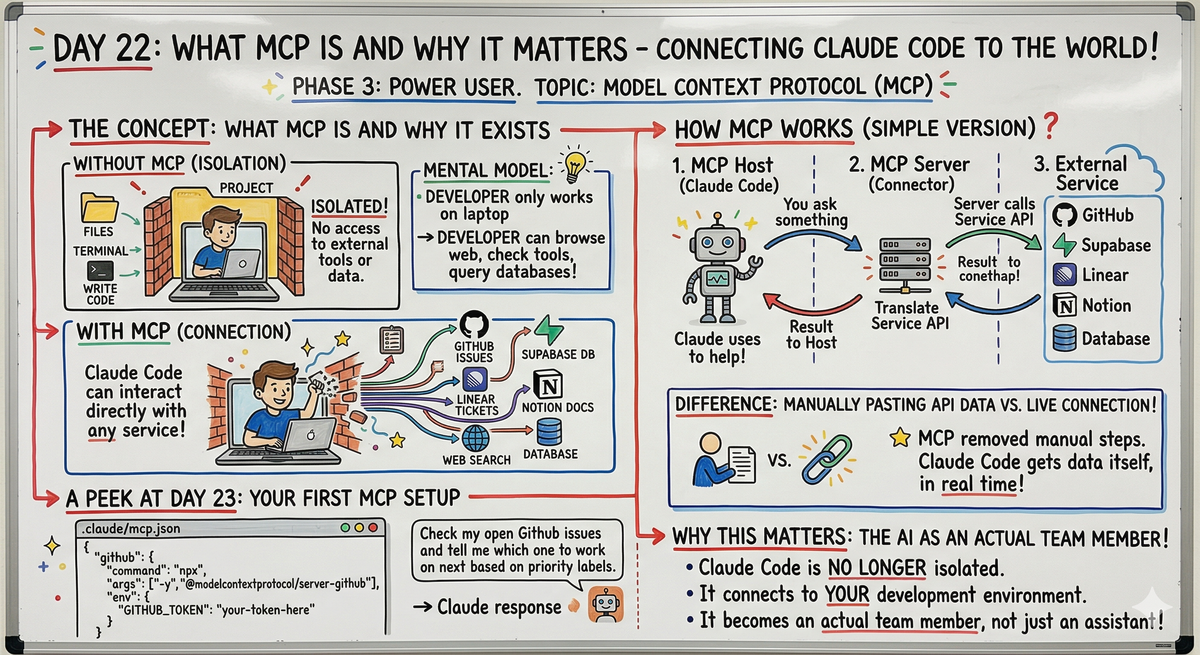
Here's what Claude Code can do without MCP:
- Read your files
- Write code
- Run terminal commands
- Create new files
- Refactor existing code
- Write tests
- Debug errors
Here's what Claude Code can't do:
- Check your GitHub issues
- Query your database directly
- Read your Linear tickets
- Search your Notion docs
- Browse the web for current info
- Access your project management tools
- Connect to external APIs you use daily
Without MCP, Claude Code lives inside your project folder.
That's powerful — but it's isolated.
The symptom:
You find yourself being the middleware between Claude Code and your tools.
Copying GitHub issue descriptions into the chat.
Pasting database records for Claude to analyze.
Describing what's in your Linear backlog.
Manually fetching data from external services and feeding it to Claude.
You're the human bridge between Claude Code and the rest of your development environment.
The Concept (MCP Breaks Down the Wall)
MCP stands for Model Context Protocol.
It's an open standard created by Anthropic that lets Claude connect to external tools, services, and data sources.
The mental model:
Without MCP: Claude Code is a developer who can only work on files on their laptop.
With MCP: Claude Code is a developer who can also browse the web, check project management tools, query databases, and interact with any service you give them access to.
With MCP, Claude Code can:
- Create and read GitHub issues directly
- Query your Supabase database in real time
- Check your Linear tickets and update them
- Search your Notion workspace
- Browse the web for current information
- Interact with any service that has an MCP server
The same way it interacts with your files.
Just ask. Claude does it.
How MCP Works (The Simple Version)
MCP works through servers.
An MCP server is a small program that sits between Claude Code and an external service.
It translates Claude's requests into API calls that the service understands and sends the results back.
Three parts to understand:
1. MCP Host
That's Claude Code.
The AI that makes requests.
2. MCP Server
The connector for a specific service.
There's an MCP server for GitHub, one for Supabase, one for Linear, one for Notion, and hundreds more.
Some are built by Anthropic. Most are built by the community and the companies themselves.
3. External Service
GitHub, Supabase, Linear, Notion, your database — whatever you're connecting to.
The flow:
You ask Claude Code something
↓
Claude Code calls the MCP server
↓
MCP server calls the external service API
↓
Result comes back to Claude Code
↓
Claude Code uses it to help you
Example:
You ask Claude Code: "Check my open GitHub issues and tell me which one to work on next based on priority labels."
What happens:
- Claude Code recognizes this needs GitHub data
- Calls the GitHub MCP server
- MCP server calls GitHub's API with your credentials
- GitHub returns your open issues with labels
- MCP server sends that data back to Claude Code
- Claude Code analyzes the issues and recommends which to tackle first
All of that happens automatically.
You just asked the question.
The Difference Between MCP and Just Using an API
You could manually paste your GitHub issues into Claude Code.
You could copy your Supabase data into the chat.
You could describe what's in your Linear backlog.
MCP removes the manual step.
Claude Code gets the data itself, in real time, whenever it needs it.
It's the difference between:
Handing a developer a printout of your database
vs.
Giving them a live connection to it
Without MCP: You are the bridge. You fetch the data. You paste it. You update it manually.
With MCP: Claude is the bridge. It fetches. It reads. It updates. You just tell it what you need.
What MCP Setup Looks Like (A Preview)
Setting up MCP for the first time takes about 10 minutes.
It looks like this:
// .claude/mcp.json — your MCP configuration file
{
  "mcpServers": {
    "github": {
      "command": "npx",
      "args": ["-y", "@modelcontextprotocol/server-github"],
      "env": {
        "GITHUB_TOKEN": "your-token-here"
      }
    }
  }
}
Once that's in place, you can do things like:
claude
Check my open GitHub issues and tell me which one
to work on next based on priority labels
And Claude Code actually reads your real GitHub issues and responds with real data.
Not a summary you pasted.
Not a manual copy.
Real, live data from your actual GitHub account.
Day 23 covers the full setup step by step.
What Services Have MCP Servers
Hundreds of MCP servers already exist.
Some built by Anthropic:
- GitHub
- GitLab
- Supabase
- PostgreSQL
- SQLite
- File system operations
- Web search
Some built by the community:
- Linear
- Notion
- Slack
- Google Drive
- Airtable
- Jira
- Asana
- Stripe
- AWS
- And hundreds more
If a service has an API, someone has probably built an MCP server for it.
If not, you can build your own.
(That's coming in Phase 3 too.)
Real-World MCP Use Cases
Use Case 1: GitHub Integration
Before MCP:
You: "I need to see my open issues."
[You manually go to GitHub]
[You copy the issue titles]
[You paste them into Claude Code]
Claude: "Based on what you've pasted..."
With MCP:
claude
Check my open GitHub issues and tell me which one
to work on next based on priority labels
Claude responds:
Reading your GitHub issues...

You have 7 open issues. Based on priority labels:

High Priority (3):
1. "Fix billing page crash on mobile" - labeled P0, critical
2. "Add email verification flow" - labeled P0, security
3. "Implement rate limiting on API" - labeled P1, security

Recommendation: Start with #1 "Fix billing page crash"
- Most critical (P0)
- Affects paying users
- Mobile-specific issue could impact revenue

Want me to pull the full issue details and create a fix plan?
Claude read your actual GitHub issues.
Analyzed the labels.
Gave you a recommendation.
No manual copying. No pasting. Just ask.
Use Case 2: Database Queries
Before MCP:
You: "How many users signed up this month?"
[You open your database client]
[You write the SQL query]
[You run it]
[You copy the result]
[You paste it into Claude Code]
Claude: "Based on the data you provided..."
With MCP:
claude
How many users signed up this month?
Claude responds:
Querying your database...

This month (March 2026):
- 847 new user signups
- Up 23% from February (689 signups)
- Peak signup day: March 15 (94 signups)

Breakdown by plan:
- Free: 721 (85%)
- Pro: 126 (15%)

Want me to analyze signup trends or user retention?
Claude queried your actual database.
Calculated the metrics.
Gave you insights.
Use Case 3: Linear Integration
Before MCP:
You: "What's in my backlog?"
[You open Linear]
[You scroll through tickets]
[You manually describe them to Claude]
Claude: "Based on what you've told me..."
With MCP:
claude
What tickets are in my backlog that are ready to build?
Claude responds:
Reading your Linear backlog...

Ready to build (5 tickets):

1. "Add dark mode toggle" (EST-142)
   - Status: Ready for Dev
   - Points: 3
   - No blockers

2. "Export data to CSV" (EST-156)
   - Status: Ready for Dev
   - Points: 5
   - Design approved

3. "Add keyboard shortcuts" (EST-167)
   - Status: Ready for Dev
   - Points: 2
   - Quick win

Recommendation: Start with EST-167 "Add keyboard shortcuts"
- Smallest scope (2 points)
- High user request
- Quick win for momentum

Want me to plan the implementation?
Claude read your Linear backlog.
Filtered for ready tickets.
Recommended where to start.
Why This Matters
MCP is what turns Claude Code from a coding assistant into an agent that can operate across your entire development environment.
Instead of being the human middleware between Claude Code and your tools — copying data in, pasting results out — MCP makes Claude Code the middleware.
It connects to your tools directly.
You just tell it what you need.
This is the phase where Claude Code stops feeling like a powerful tool and starts feeling like an actual team member.
What Phase 3 Covers
Phase 3 is about making Claude Code more powerful by connecting it to everything else.
Days 22-30 cover:
- Day 22: What MCP is and why it matters (today)
- Day 23: Setting up your first MCP server
- Day 24: Using MCP servers in real workflows
- Day 25: Building custom MCP servers
- Day 26-30: Skills, subagents, and advanced multi-agent workflows
This is where it gets serious.
My Raw Notes (Unfiltered)
The moment MCP clicked for me was when I realized I was manually copying stuff into Claude Code all the time.
Pasting error logs.
Copying database records.
Describing what was in my GitHub issues.
MCP removes all of that.
The server concept sounds complicated but it's really just a connector.
Someone else already built the connector for most services you use — you just configure it and point Claude at it.
Day 23 is going to be the most immediately useful lesson in Phase 3 for most people in the community because setup is fast and the payoff is instant.
Tomorrow (Day 23 Preview)
Topic: Setting Up Your First MCP Server — step by step, from zero to Claude Code connected to a real external service.
What I'm covering: Complete setup walkthrough, GitHub MCP server example, testing the connection, first real MCP-powered workflow.
Time to setup: 10 minutes.
Payoff: Immediate.
Following This Series
Phase 1 (Days 1-7): Foundations ✅
Phase 2 (Days 8-21): Getting Productive ✅
Phase 3 (Days 22-30): Power User ⬅️ You are here
So far in Phase 3:
- Day 22: What MCP is and why it matters (today)
- Day 23: Setting up your first MCP server (tomorrow)
G
P.S. - MCP is the bridge between Claude Code and the rest of your development environment. Without it, you're the bridge. With it, Claude is.
P.P.S. - Hundreds of MCP servers already exist. GitHub, Supabase, Linear, Notion, Slack. If it has an API, it probably has an MCP server.
P.P.P.S. - Setup takes 10 minutes. Tomorrow I'll walk you through it step by step.