Day 26: What Claude Skills Are and How They Differ From CLAUDE.md
Learn Claude Skills vs CLAUDE.md differences. Skills are reusable capabilities across projects. CLAUDE.md is project context. Progressive disclosure loading.
Hey, it's G.
Day 26 of the Claude Code series.
Skills track starts now.
I'd been confusing Claude Skills with CLAUDE.md for weeks.
They sound similar — both give Claude instructions.
But they're fundamentally different tools that solve different problems.
Today I finally understood the distinction, and it changed how I think about customizing Claude Code.
CLAUDE.md is project-specific.
Skills are reusable, portable, and shareable across everything.
The Problem (Every Project Needs the Same Instructions)
Here's what happens without Skills:
You build a feature in Project A.
You teach Claude Code your code review process — what to check, how to format findings, when to flag issues.
Works great in Project A.
Now you switch to Project B.
You ask Claude to review code.
It has no idea about your process.
You explain it again. Same instructions. Different project.
Project C. Explain again.
Project D. Explain again.
Every project. Every conversation. Same instructions.
You're re-teaching Claude how to do the same work over and over.
The Concept (Skills Are Reusable Capabilities)
A Claude Skill is a folder containing a SKILL.md file — a set of instructions that teaches Claude how to handle a specific task or workflow.
You build it once and it works across Claude.ai, Claude Code, and the API without modification.
The cleanest way to understand the difference between Skills and CLAUDE.md:
CLAUDE.md
Tells Claude about your project.
Stack, conventions, folder structure, behavior rules.
It's specific to one codebase.
It lives in your project folder.
It only works when Claude Code is running inside that project.
A Skill
Teaches Claude how to do a type of work.
A skill for writing frontend components.
A skill for creating Word documents.
A skill for running code reviews.
It's reusable across any project, any conversation, any surface.
CLAUDE.md answers: "What is this project?"
A Skill answers: "How do I do this kind of task?"
Instead of re-explaining your preferences, processes, and domain expertise in every conversation, skills let you teach Claude once and benefit every time.
Skills work well for repeatable workflows:
- Generating frontend designs from specs
- Creating documents that follow your team's style guide
- Orchestrating multi-step processes
- Running code reviews with consistent criteria
- Building components that match design patterns
How Skills Work (Progressive Disclosure)
Skills use a three-level loading system that keeps things efficient.
Level 1: YAML Frontmatter (Always Loaded)
Always loaded in Claude's system prompt.
Provides just enough information for Claude to know when each skill should be used.
Level 2: SKILL.md Body (Loaded When Relevant)
Loaded when Claude thinks the skill is relevant to the current task.
Contains the full instructions.
Level 3: Linked Files (Loaded As Needed)
Additional files bundled within the skill directory.
Claude navigates these only when needed.
This means skills don't bloat every session with instructions.
Claude only loads the full skill when it's actually relevant.
The Anatomy of a Skill
A skill is a folder with a specific structure:
my-skill/
├── SKILL.md        ← required — the main instructions file
├── scripts/        ← optional — executable code
├── references/     ← optional — docs loaded as needed
└── assets/         ← optional — templates, fonts, etc.
Only SKILL.md is required.
Everything else is optional and loaded as needed.
The SKILL.md File Structure
Every SKILL.md follows this pattern:
---
name: my-skill-name
description: What it does and when to use it. Include
             specific trigger phrases users might say.
---

# Skill Name

## Instructions
[Your full workflow instructions here]
Two parts:
1. YAML Frontmatter (Required)
Contains metadata Claude uses to decide whether to load the skill.
---
name: my-skill-name
description: What it does and when to use it
---
2. Markdown Body (Your Instructions)
The full workflow Claude follows when the skill is loaded.
The description field is critical.
It must include:
- What the skill does
- When to use it
- Trigger conditions
- Specific tasks users might say
Should be under 1024 characters.
Include specific phrases users might say.
Where Skills Live
Three locations depending on how you want to use them:
For Claude Code — Personal Skills (Available Everywhere)
~/.claude/skills/
Use for: Skills you want in every project.
For Claude Code — Project Skills
.claude/skills/
Use for: Skills specific to one project.
For Claude.ai
Settings → Capabilities → Skills → Upload skill
Use for: Skills in the web interface.
How to Create Your First Skill
Step 1: Create the Skill Folder
mkdir -p ~/.claude/skills/code-review
Step 2: Create the SKILL.md File
touch ~/.claude/skills/code-review/SKILL.md
code ~/.claude/skills/code-review/SKILL.md
Step 3: Write Your SKILL.md
---
name: code-review
description: Performs thorough code reviews on files or
             functions. Use when user asks to "review my code",
             "check this file", "find issues in", or
             "give me feedback on this code".
---

# Code Review Skill

## Instructions

When reviewing code, always cover these areas in order:

### 1. Bugs and Logic Errors
- Unhandled edge cases
- Off-by-one errors
- Null/undefined access risks
- Async issues and race conditions

### 2. Security Issues
- Exposed secrets or API keys
- Unsanitized user inputs
- Insecure direct object references

### 3. Performance
- Unnecessary re-renders (React)
- N+1 query patterns
- Missing indexes on DB queries

### 4. Code Quality
- Violations of clean code principles
- Functions doing more than one job
- Unclear naming

## Output Format

For each issue found:
- **Severity:** Critical / Warning / Suggestion
- **Location:** file and line if known
- **Issue:** what's wrong
- **Fix:** what to do instead

End with a summary: total issues by severity.

**Do not make any changes — report only.**
Step 4: Verify Claude Code Can See It
claude
What skills do you have available?
It should list your code-review skill.
The Difference in Practice (Side by Side)
Here's how CLAUDE.md and Skills work together:
CLAUDE.md Says:
This project uses Next.js 14, TypeScript strict mode,
named exports only, Tailwind for styling.

All components go in /components.
All API routes go in /app/api.
Use Supabase for database queries.
Project-specific context.
A Skill Says:
When asked to review code:
1. Check for bugs
2. Check for security issues
3. Check for performance problems
4. Check for code quality

Output findings by severity.
Never make changes.
Reusable workflow.
CLAUDE.md = project context
Skill = reusable capability
Together:
Claude knows what your project is (from CLAUDE.md)
Claude knows how to review code (from the skill)
Result: Consistent, high-quality code reviews in any project.
Complete Real Example
Let me walk you through creating and using a skill from scratch.
Step 1: Create the Skill
mkdir -p ~/.claude/skills/code-review
Create ~/.claude/skills/code-review/SKILL.md:
---
name: code-review
description: Performs thorough code reviews on files or
             functions. Use when user asks to "review my code",
             "check this file", "find issues in", or
             "give me feedback on this code".
---

# Code Review Skill

## Instructions

When reviewing code, always cover these areas in order:

### 1. Bugs and Logic Errors
- Unhandled edge cases
- Off-by-one errors
- Null/undefined access risks
- Async issues and race conditions

### 2. Security Issues
- Exposed secrets or API keys
- Unsanitized user inputs
- Insecure direct object references

### 3. Performance
- Unnecessary re-renders (React)
- N+1 query patterns
- Missing indexes on DB queries

### 4. Code Quality
- Violations of clean code principles
- Functions doing more than one job
- Unclear naming

## Output Format

For each issue found:
- **Severity:** Critical / Warning / Suggestion
- **Location:** file and line if known
- **Issue:** what's wrong
- **Fix:** what to do instead

End with a summary: total issues by severity.

**Do not make any changes — report only.**
Step 2: Use It in Project A
cd ~/projects/resiboko
claude
Review /components/auth/LoginForm.tsx
Claude loads the code-review skill automatically because the request matches the trigger phrases.
Runs through the full review workflow.
Outputs findings by severity.
Never touches the file.
Claude responds:
Running code review on LoginForm.tsx...

CRITICAL ISSUES (1):
- Line 45: Password field not using type="password"
  Fix: Change input type to "password" to hide input

WARNINGS (2):
- Line 12: useState called conditionally inside if block
  Fix: Move useState to top of component

- Line 67: API key visible in client-side code
  Fix: Move to environment variable, access server-side only

SUGGESTIONS (1):
- Line 23: Function handleSubmit doing validation + API call
  Fix: Extract validation to separate function

SUMMARY:
- Critical: 1
- Warnings: 2
- Suggestions: 1

Total issues: 4
Step 3: Use It in Project B
Now switch to a completely different project:
cd ~/projects/1minthumb
claude
Can you check this file for issues?
/app/api/generate/route.ts
Same skill. Same output format. Different project.
No re-explaining needed.
Claude responds:
Running code review on generate route...

CRITICAL ISSUES (0):
None found

WARNINGS (1):
- Line 34: No rate limiting on API endpoint
  Fix: Add rate limiting middleware or check

SUGGESTIONS (2):
- Line 15: Error messages expose internal details
  Fix: Return generic errors to client, log details server-side

- Line 52: Duplicate code in error handlers
  Fix: Extract to shared error handling function

SUMMARY:
- Critical: 0
- Warnings: 1
- Suggestions: 2

Total issues: 3
One skill. Works everywhere. Same quality every time.
Trigger Phrases Are Everything
The description field in YAML frontmatter is what makes skills work.
That's what Claude uses to decide whether to load your skill.
❌ Vague Description (Skill Never Loads)
---
name: code-review
description: Reviews code
---
Problem: Claude doesn't know when to use it.
✓ Specific Description (Skill Loads When Needed)
---
name: code-review
description: Performs thorough code reviews on files or
             functions. Use when user asks to "review my code",
             "check this file", "find issues in", or
             "give me feedback on this code".
---
Better: Claude knows exactly when to load it.
Include:
- What the skill does
- When to use it
- Specific phrases users might say
- Keywords that should trigger it
Skills vs CLAUDE.md — Complete Comparison
| Aspect | CLAUDE.md | Skill |
|---|---|---|
| Scope | One project | Any project |
| Purpose | Project context | Reusable capability |
| Location | Project folder | ~/.claude/skills/ |
| Portability | Not portable | Works everywhere |
| Answers | "What is this?" | "How do I do this?" |
| Example | "Uses Next.js 14" | "How to review code" |
| Loading | Always loaded in project | Loaded when relevant |
| Sharing | Copy per project | Share one file |
Use both together:
CLAUDE.md gives project context.
Skills give capabilities.
Combined: Claude that understands your codebase AND applies consistent workflows.
Why This Matters
Skills are the upgrade from "Claude that knows my project" to "Claude that knows how to work."
CLAUDE.md makes Claude Code project-aware.
Skills make it workflow-aware.
Combined, you get an AI agent that understands your specific codebase AND applies consistent, high-quality processes to every task it runs.
That combination is what separates casual Claude Code users from power users.
My Raw Notes (Unfiltered)
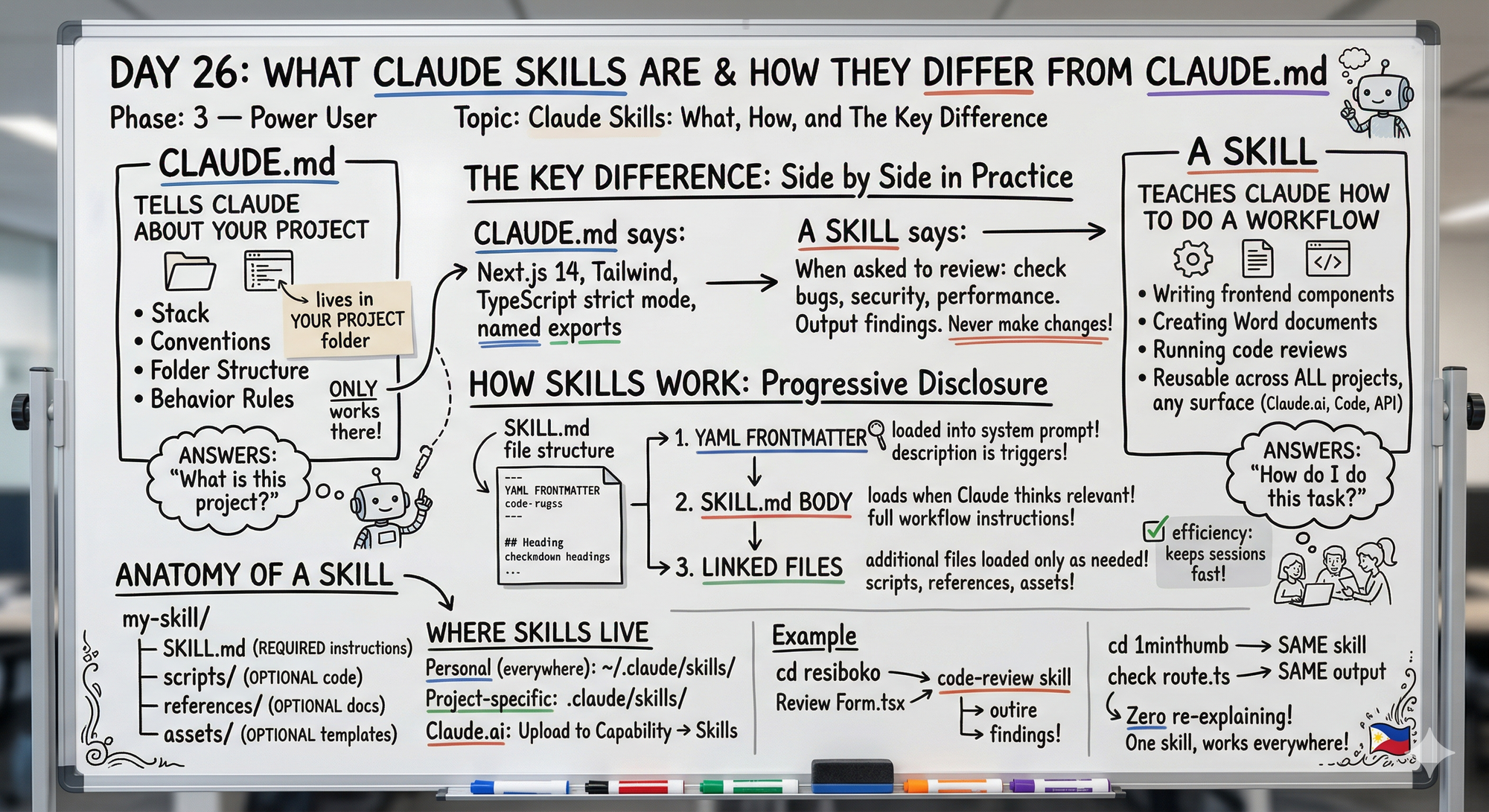
The progressive disclosure thing is what makes skills efficient — it doesn't load the whole skill into context unless it's relevant.
That's why you can have lots of skills without making sessions slow.
The key distinction I keep coming back to: CLAUDE.md is about what, skills are about how.
The description field in the frontmatter is everything — that's what triggers the skill.
Vague description = skill never loads.
Specific trigger phrases = skill loads exactly when you need it.
Day 27 covers installing existing skills which is the fastest way to get value before you build your own.
Tomorrow (Day 27 Preview)
Topic: Installing and Using Existing Skills — the skill library and how to get immediate value from skills other people already built.
What I'm covering:
- Where to find pre-built skills
- Installing skills for Claude Code
- Installing skills for Claude.ai
- Testing skills before committing
- Most useful skills to start with
Fastest path to value: use what exists before building custom.
Following This Series
Phase 1 (Days 1-7): Foundations ✅
Phase 2 (Days 8-21): Getting Productive ✅
Phase 3 (Days 22-30): Power User ⬅️ You are here
MCP Track (Days 22-25): ✅ Complete
Skills Track (Days 26-28): ⬅️ You are here
- Day 26: What Skills are and how they differ from CLAUDE.md (today)
- Day 27: Installing and using existing skills (tomorrow)
G
P.S. - CLAUDE.md is project context. Skills are reusable capabilities. Use both together for Claude that understands your codebase AND your workflows.
P.P.S. - The description field in YAML frontmatter is everything. That's what triggers the skill. Be specific: include what it does, when to use it, and phrases users might say.
P.P.P.S. - Skills use progressive disclosure — only load fully when relevant. Your sessions stay fast even with multiple skills.