Day 28: Writing Your First Custom Skill
Build custom Claude Skills for repeatable workflows. Content repurposing example. Sharp frontmatter, clear instructions, output format, rules. Use everywhere.
Hey, it's G.
Day 28 of the Claude Code series.
Day 27 was about installing skills others built.
Day 28 is building your own.
I took a workflow I already do manually every time — turning a blog post into platform-specific social posts — and packaged it as a skill.
The process was simpler than I expected.
The result is a skill I now use across every project and every Claude session without typing a single instruction.
The Problem (Re-Explaining the Same Workflow Every Session)
Here's what used to happen every time I published a blog post:
Session 1
claude
Turn this blog post into LinkedIn, Reddit, X,
YouTube Community, and YouTube Script content.

Use my voice: personal, direct, story-driven.
No em dashes.
LinkedIn hook never starts with "I".
Reddit leads with value.
YouTube Script includes stage directions.
CTA to giangallegos.com.

[paste blog post]
Claude creates the content. It works.
Session 2 (Next Blog Post)
claude
Turn this blog post into LinkedIn, Reddit, X,
YouTube Community, and YouTube Script content.

Use my voice: personal, direct, story-driven.
No em dashes.
LinkedIn hook never starts with "I".
Reddit leads with value.
YouTube Script includes stage directions.
CTA to giangallegos.com.

[paste blog post]
Same instructions. Word for word.
Session 3, 4, 5, 10, 20...
Same instructions. Every. Single. Time.
If you've typed the same prompt more than three times — it belongs in a skill.
The Concept (Package Your Repeatable Workflow)
The best candidate for a custom skill is a workflow you already run repeatedly.
One where you find yourself re-explaining the same instructions every session.
If you've typed the same prompt more than three times, it belongs in a skill.
Content repurposing is a perfect example.
Every time I publish a blog post I turn it into:
- LinkedIn post
- Reddit post
- X (Twitter) thread
- YouTube Community post
- YouTube Script
Same process. Same voice. Same rules.
Different post every time.
That's exactly what a skill is built for.
The Four Parts of a Well-Built Custom Skill
1. Sharp Frontmatter
The YAML block that tells Claude when to load the skill.
The description is the trigger.
Get this wrong and the skill never loads.
2. Clear Instructions
The step-by-step workflow Claude follows every time.
Specific enough to be consistent.
Flexible enough to handle different inputs.
3. Output Format
Exactly how the results should be structured.
Removes all ambiguity about what done looks like.
4. Rules and Constraints
Your non-negotiables.
Voice, style, platform-specific requirements, things to never do.
The official skills guide puts it well:
Skills are powerful when you have repeatable workflows.
They work best when the process is consistent but the content changes.
Which is exactly what content repurposing is.
How to Build a Custom Skill (Step by Step)
Step 1: Define Your Use Case Before Writing Anything
Answer these questions:
Workflow: What repeatable process are you packaging?
Trigger: What phrases should load this skill?
Input: What does the user provide?
Output: What does Claude produce?
Domain knowledge: What expertise needs to be embedded?
My example:
Workflow: Content repurposing
Trigger: User pastes a blog post URL or asks to repurpose content
Input: Blog post URL or text
Output: 5 platform-specific posts — LinkedIn, Reddit, X,
        YouTube Community, YouTube Script
Domain knowledge: G's voice, platform rules, content conventions
Step 2: Create the Skill Folder
mkdir -p ~/.claude/skills/content-repurpose
touch ~/.claude/skills/content-repurpose/SKILL.md
code ~/.claude/skills/content-repurpose/SKILL.md
Step 3: Write the SKILL.md
Full example of my content-repurpose skill:
---
name: content-repurpose
description: Repurposes blog posts into platform-specific
             social media content. Use when user shares a
             blog URL, says "repurpose this post", "turn this
             into social posts", "create posts from this blog",
             or "write content for LinkedIn/Reddit/X from this".
---

# Content Repurpose Skill

## What This Does
Takes a blog post and produces five platform-specific
outputs in G's voice: LinkedIn, Reddit, X (Twitter),
YouTube Community post, and YouTube Script.

## Voice and Style
- Personal, direct, conversational, story-driven
- Short paragraphs, simple language
- Teaches through real experience
- Occasional self-deprecating humor
- No em dashes — ever
- No emojis unless the platform specifically calls for them

## Step 1 — Read the Content
If a URL is provided, fetch and read the full blog post.
If text is pasted, read it carefully.

Identify:
- The main lesson
- The key story
- The practical takeaway
- Any specific commands or examples

## Step 2 — Generate All Five Outputs

### LinkedIn
- Professional audience
- Hook NEVER starts with "I" or a question
- Lead with a counterintuitive insight or bold statement
- Short paragraphs — one to two sentences max
- Build to the practical lesson
- End with a soft CTA pointing to giangallegos.com
- No em dashes
- Include one "learn one thing before the CTA" section
- 150-250 words

### Reddit
- Global audience, no-fluff
- Lead immediately with value — no preamble
- Neutral, helpful tone — not promotional
- Mention the blog link naturally at the end, not as a pitch
- Use plain text formatting — no excessive bold or headers
- 150-250 words

### X (Twitter/Thread)
- Build-in-public crowd
- Hook tweet grabs attention immediately
- Can be a single tweet or a short thread (3-5 tweets)
- Practical and punchy — no filler
- End with a CTA to giangallegos.com
- Include relevant hashtags: #ClaudeCode #AIForPinoys
  #BuildInPublic
- No em dashes

### YouTube Community Post
- Casual, conversational
- Feels like a personal update to subscribers
- Short — 3 to 5 sentences
- Ends with a question to drive comments
- Points to the blog or video

### YouTube Script
- Target audience: beginners
- Length: 1,500 to 2,000 words
- Structure:
  Hook (30 seconds) → Introduction → Tutorial Walkthrough
  → Learn One Thing → CTA
- Include stage directions: [PAUSE], [SCREEN: show X],
  [CUT TO: terminal]
- Conversational — write how G talks, not how he writes
- CTA points to giangallegos.com

## Step 3 — Output Format
Present all five outputs in this exact order:
1. LinkedIn
2. Reddit
3. X
4. YouTube Community
5. YouTube Script

Use clear headers for each platform.
Do not add commentary between outputs — just the content.

## Rules
- Never use em dashes in any output
- Always include a "learn one thing before the CTA" section
  in LinkedIn and YouTube Script
- CTAs always point to giangallegos.com
- Maintain G's voice throughout — personal, direct,
  story-driven
- If the blog post has specific commands or code snippets,
  include them in the relevant outputs
- YouTube Script must include stage directions
Step 4: Verify the Skill Loads
claude
What skills do you have available?
Should list content-repurpose.
Test trigger understanding:
When would you use the content-repurpose skill?
Claude should describe it accurately.
If vague — rewrite the description field.
Step 5: Test It With a Real Post
claude
Repurpose this blog post:
https://giangallegos.com/your-latest-post
Or paste the text directly:
Turn this into social posts:
[paste blog content]
Iterate based on output:
- If LinkedIn post starts with "I" → Add the rule more explicitly
- If YouTube Script is too short → Specify minimum word count
- If the voice sounds off → Add more voice examples
Use skill-creator to review:
Use the skill-creator skill to review my
content-repurpose skill and suggest improvements
Complete Real Session Example
Let me walk you through using the skill I built.
The Request
claude
Repurpose this post into all five platforms:
https://giangallegos.com/day-15-feature-first-workflow
What Happens (Behind the Scenes)
Skill triggers automatically.
Claude:
- Fetches and reads the full blog post
- Identifies:
- Main lesson: Feature briefs
- Key story: Winging it vs structured sessions
- Practical takeaway: The 5-component brief template
- Generates all five outputs in order
LinkedIn Output
Most developers fire off prompts as they think of them.

That's why features feel half-finished.

I used to do the same — start coding, realize midway
I'm building the wrong thing, restart from scratch.

The fix: feature briefs.

Five components before touching code:
- What it does
- Where it lives
- What exists
- What done looks like
- What to avoid

Turns 2-hour sessions into 30-minute feature builds.

Learn one thing: the "what to avoid" section is the
most important. It's where you catch the gotchas
before Claude codes them in.

Read the full breakdown → giangallegos.com
Reddit Output
If your Claude Code sessions feel half-finished,
try feature briefs.

Five components before touching code:

1. What it does (in plain English)
2. Where it lives (file paths)
3. What exists (existing patterns to match)
4. What done looks like (acceptance criteria)
5. What to avoid (gotchas and edge cases)

I use this for every feature now. Turns 2-hour
meandering sessions into 30-minute focused builds.

Full guide here: giangallegos.com/day-15-feature-first-workflow
X Output
Most devs fire off prompts as they think of them.

That's why features feel half-finished.

The fix: feature briefs.

5 components before touching code:
- What it does
- Where it lives
- What exists
- What done looks like
- What to avoid

Turns 2hr sessions into 30min builds.

Full breakdown 👇
giangallegos.com/day-15-feature-first-workflow

#ClaudeCode #AIForPinoys #BuildInPublic
YouTube Community Output
I used to fire off Claude Code prompts as I thought
of them — which is why features felt half-finished.

Now I write feature briefs first. Five components.
30 seconds of planning. Turns 2-hour sessions into
30-minute builds.

What's your biggest Claude Code time sink?
Planning? Debugging? Re-explaining?
YouTube Script Output
[SCREEN: Terminal with Claude Code open]

Hey, it's G.

Quick question — do your Claude Code sessions feel
half-finished? Like you're building something but it's
never quite done?

[PAUSE]

I used to have the same problem. I'd fire off prompts
as I thought of them. No plan. Just vibes.

And it showed. Features felt incomplete. I'd realize
midway I was building the wrong thing. Restart from scratch.

[CUT TO: Text editor]

The fix: feature briefs.

Five components I write before touching code...

[continues for 1,500-2,000 words with stage directions]

Learn one thing: the "what to avoid" section is the
most important...

[CTA]
Full guide at giangallegos.com. Link in description.
All five. One prompt. Consistent voice. Every time.
Why This Matters
Every repeatable workflow you haven't packaged as a skill is friction you're paying every single session.
Content repurposing is one example.
But the pattern applies to any workflow you run more than a few times:
- Code reviews with consistent criteria
- Deployment checklists
- Documentation generation
- Bug report formatting
- Feature planning templates
- API integration patterns
Build the skill once, and every future session starts with that workflow already embedded.
No re-explaining your voice.
No reminding Claude about platform rules.
No checking if the CTA points to the right place.
It just works.
Common Custom Skill Use Cases
Code Review Workflow
Package your review criteria:
- What to check (bugs, security, performance, style)
- How to format findings
- When to flag vs suggest vs ignore
Deployment Checklist
Package your pre-deploy steps:
- Run tests
- Check environment variables
- Verify database migrations
- Update changelog
- Tag release
Documentation Generator
Package your doc standards:
- API endpoint format
- Code example structure
- Installation instructions format
- Troubleshooting sections
Bug Report Template
Package your reporting format:
- Steps to reproduce
- Expected vs actual behavior
- Environment details
- Error messages and logs
My Raw Notes (Unfiltered)
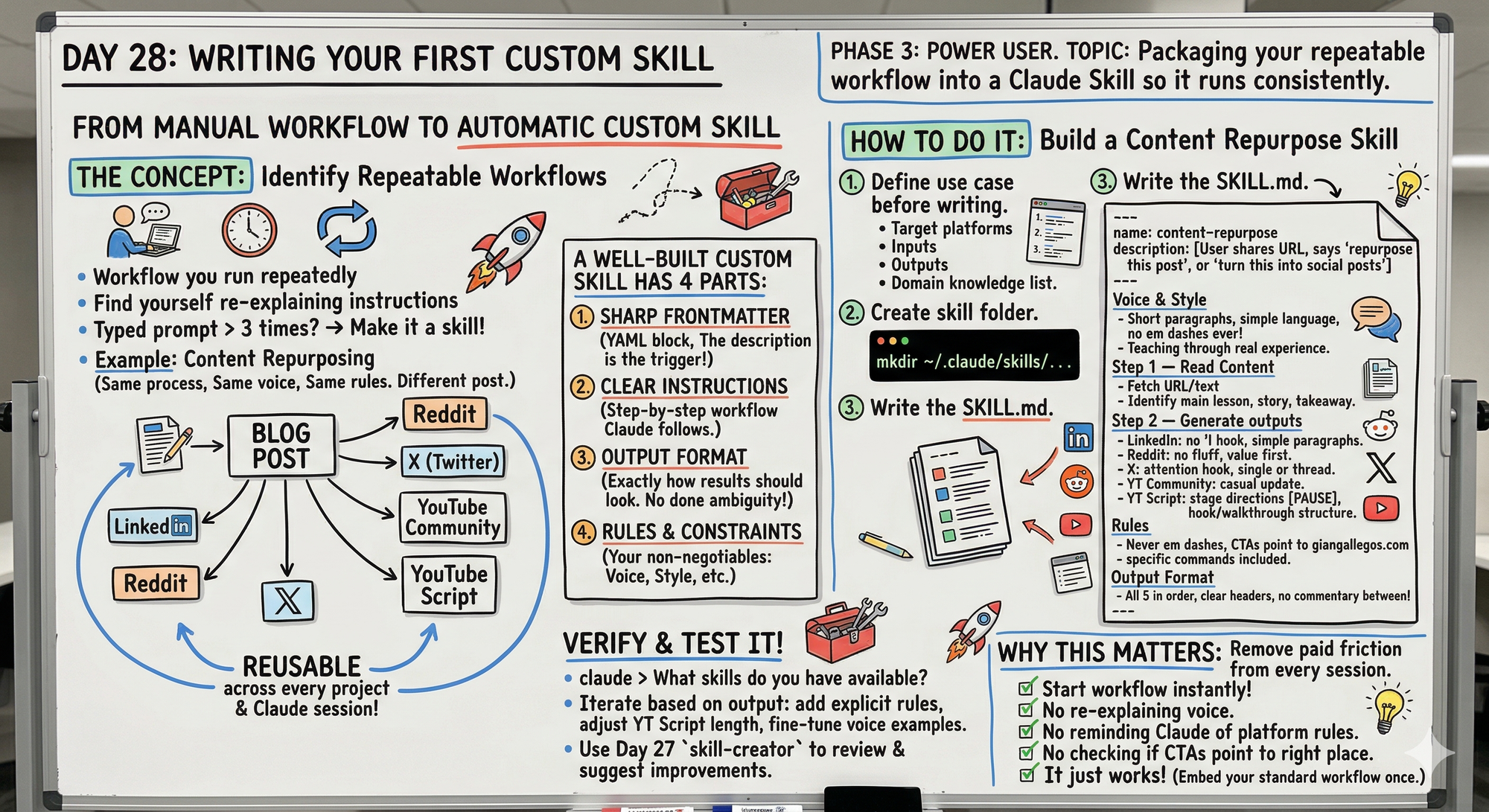
This is the workflow I actually use for every blog post and it was the first custom skill I built properly.
The voice section in the skill is what made the biggest difference — before I added it the outputs sounded like generic AI content.
The platform-specific rules are where the real value lives — LinkedIn hook rules, Reddit no-fluff, YouTube Script stage directions.
The skill-creator review step caught two things I missed: I forgot to specify the CTA destination and the YouTube Script length was too vague.
Always test with a real post before finalizing the skill.
Iterate on the description field if the skill doesn't trigger reliably.
Skills Track Complete
Days 26-28 covered:
Day 26: What Claude Skills are and how they differ from CLAUDE.md
Day 27: Installing and using existing skills
Day 28: Writing your first custom skill (today)
The complete Skills workflow:
- Understand what Skills are (Day 26)
- Install what already exists (Day 27)
- Build custom skills for gaps (Day 28)
Tomorrow (Day 29 Preview)
Topic: What Subagents Are — Claude Code delegating work to other agents.
What I'm covering:
- Concept of subagents
- When to use vs single agent
- Setting up subagent workflows
- Real multi-agent examples
- Coordination patterns
Phase 3 final track starts: Subagents and advanced workflows.
Following This Series
Phase 1 (Days 1-7): Foundations ✅
Phase 2 (Days 8-21): Getting Productive ✅
Phase 3 (Days 22-30): Power User ⬅️ You are here
MCP Track (Days 22-25): ✅ Complete
Skills Track (Days 26-28): ✅ Complete
- Day 26: What Skills are
- Day 27: Installing existing skills
- Day 28: Writing custom skills (today)
Subagents Track (Days 29-30): ⬅️ Starting tomorrow
G
P.S. - If you've typed the same prompt more than three times, it belongs in a skill. Package it once, use it forever.
P.P.S. - The four parts: sharp frontmatter (triggers), clear instructions (workflow), output format (what done looks like), rules (non-negotiables).
P.P.P.S. - Use skill-creator to review your custom skills. It catches things you miss like vague descriptions and missing constraints.