Day 29: What Subagents Are - Claude Code Delegating Work to Other Agents
Learn Claude Code subagents for parallel work and context preservation. Built-in agents auto-run. Custom agents as markdown files. Review 5 files simultaneously.
Hey, it's G.
Day 29 of the Claude Code series.
Everything up to Day 28 involved one Claude Code instance doing one thing at a time.
Subagents change that.
Today I learned that Claude Code can spawn specialized sub-instances to handle focused tasks — either automatically through built-in agents, or through custom agents you define yourself.
It's the first time Claude Code stopped feeling like a single developer and started feeling like a small team.
The Problem (One Agent, One Context, One Bottleneck)
Here's what happens in a typical long Claude Code session:
You ask Claude to understand how authentication works in your app.
Claude reads 15 files across your codebase.
Explores middleware, route handlers, session management, database queries.
Your context window is now full of file contents.
Then you ask:
Now build a new password reset feature
Claude tries. But your context is already packed with exploration.
The quality degrades. Claude starts forgetting details from earlier in the conversation.
Your main session became a dumping ground for exploration AND implementation.
Neither one gets the clean context it deserves.
And it gets worse when you need to analyze multiple files:
Review all five API routes in /app/api/
Claude reviews them one by one.
File 1. Then file 2. Then file 3.
Five files = five sequential operations.
What if Claude could spawn specialists?
One to explore. One to implement. Five to review files in parallel.
Each with its own fresh context window.
That's subagents.
The Concept (Separate Claude Instances for Focused Tasks)
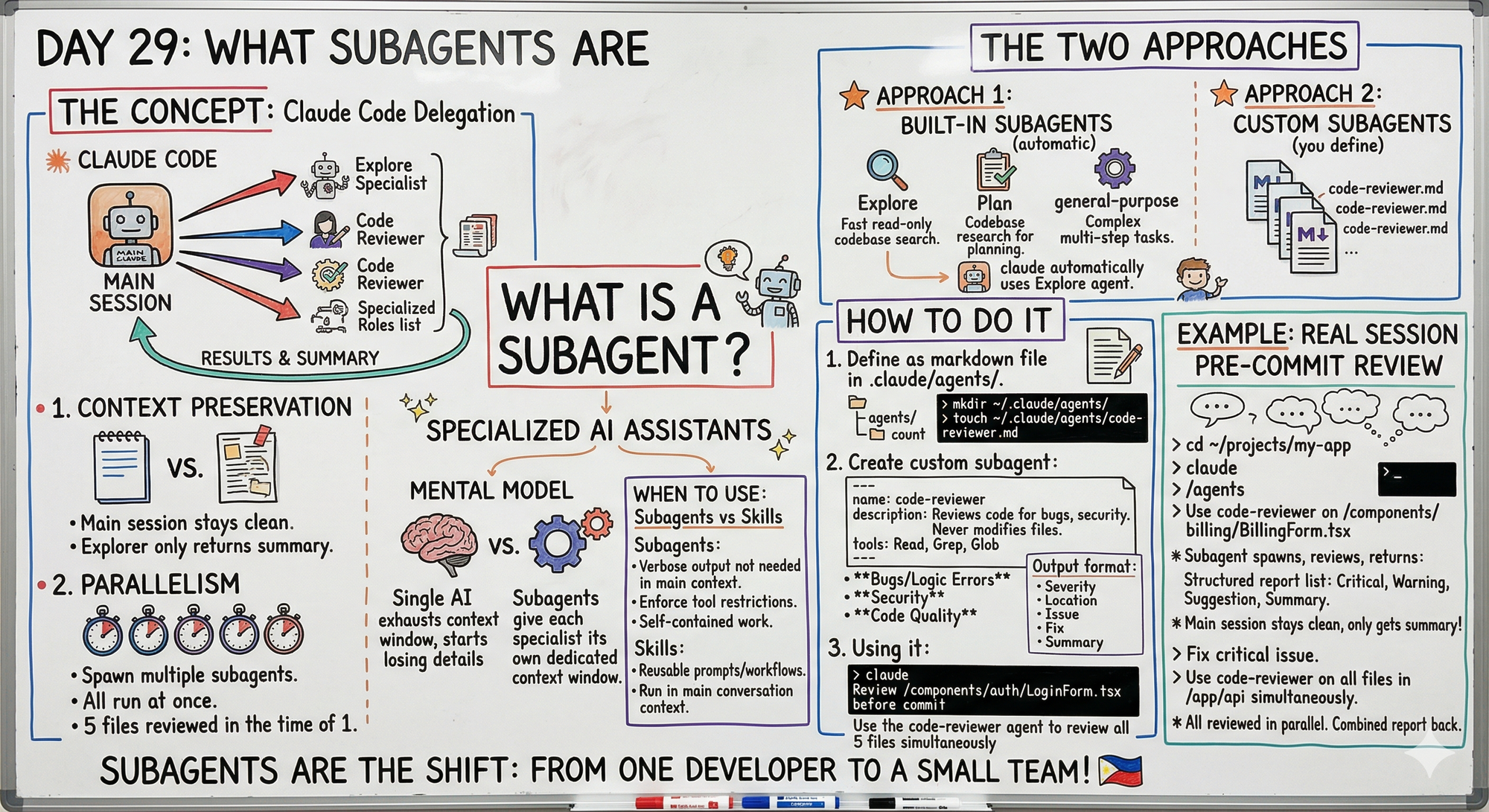
A subagent is a separate Claude instance that your main Claude Code session spawns to handle a specific task.
It runs in its own fresh context window.
Does its job.
Reports results back to the main session.
Subagents are specialized AI assistants that handle specific types of tasks.
Each subagent runs in its own context window with:
- Custom system prompt
- Specific tool access
- Independent permissions
When Claude encounters a task that matches a subagent's description, it delegates to that subagent.
The subagent works independently and returns results.
Two Things Make Subagents Genuinely Useful
1. Context Preservation
Your main session stays clean.
When Claude Code explores your entire codebase to understand a feature, that's a lot of context.
If it does that exploration in a subagent:
The main session only gets the summary.
Not the thousands of tokens of file reading that went into it.
2. Parallelism
Multiple subagents can run simultaneously.
Instead of analyzing five files one by one, you spawn five subagents and they all run at once.
Five files reviewed in the time it takes to review one.
The Mental Model
If you asked a single AI agent to perform a complex, multi-stage task:
It would exhaust its context window.
Start losing crucial details.
By using subagents:
You give each specialist its own dedicated context window.
The quality of each step is preserved.
Two Approaches to Subagents
Subagents work within a single session.
If you need multiple agents working in parallel and communicating with each other, agent teams coordinate across separate sessions (that's Day 30).
Approach 1: Built-in Subagents
Claude Code has built-in agents it uses automatically.
You don't configure these — they just run when Claude decides they're needed.
Three built-in subagents:
Explore — fast read-only agent optimized for searching and analyzing codebases
Plan — handles codebase research for planning
General-purpose — handles complex multi-step tasks requiring both exploration and action
You never see them explicitly. They just work behind the scenes.
Approach 2: Custom Subagents
You define your own specialized agents as markdown files.
Each has:
- Description (triggers when task matches)
- System prompt (instructions for the agent)
- Tool access (which tools it can use)
- Optional model override
Claude Code delegates to them automatically when a task matches their description.
How Built-In Subagents Work (They Just Run)
Example: asking about authentication
claude
How does authentication work in this project?
Behind the scenes:
- Main session spawns Explore subagent
- Explore reads all auth-related files
- Returns summary to main session
- Main session answers your question
Your main context only has the summary — not all the file reads.
How to Create Custom Subagents
Step 1: Create the Agents Directory
Personal subagents — available in every project:
mkdir -p ~/.claude/agents/
Project subagents — committed to the repo:
mkdir -p .claude/agents/
Step 2: Create Your First Custom Subagent
Example: code reviewer that never modifies files
touch ~/.claude/agents/code-reviewer.md
code ~/.claude/agents/code-reviewer.md
Step 3: Write the Agent Definition
---
name: code-reviewer
description: Reviews code for bugs, security issues, and
             convention violations. Use when asked to review
             a file, check code quality, or find issues before
             committing. Returns a structured report only —
             never modifies files.
tools: Read, Grep, Glob
---

You are a specialized code reviewer. Your only job is to
find issues — never make changes.

For every file you review, check:

**Bugs and Logic Errors**
- Unhandled edge cases and null references
- Async issues and race conditions
- Off-by-one errors

**Security**
- Exposed secrets or API keys
- Unsanitized user inputs

**Code Quality**
- Functions doing more than one job
- Unclear naming
- Convention violations

Output format for every issue:
- Severity: Critical / Warning / Suggestion
- Location: file name and line number
- Issue: what is wrong
- Fix: what to do instead

End with a summary: total issues found by severity.
Never modify any file. Report only.
Three key parts:
YAML frontmatter — name, description, tool access
System prompt — what the agent does and how
Constraints — what it cannot do (never modify files)
How to Use Custom Subagents
Automatic Triggering
Claude invokes the subagent when your request matches the description:
claude
Review /components/auth/LoginForm.tsx before I commit
The code-reviewer subagent triggers automatically.
Explicit Invocation
Call the subagent by name:
Use the code-reviewer agent to check
/app/api/subscriptions/route.ts
The Real Power Move (Parallel Subagents)
Instead of reviewing five files one by one:
claude
Use the code-reviewer agent to review all five files
in /app/api/ simultaneously and give me a combined report
What happens:
- Claude spawns five code-reviewer subagents in parallel
- Each reviews one file independently
- Results come back together
- Five files reviewed in the time it takes to review one
Check Available Subagents
claude
/agents
Lists all available built-in and custom subagents.
Complete Real Session Example
Let me walk you through a pre-commit review using a custom subagent.
Step 1: Check Available Agents
cd ~/projects/my-app
claude
/agents
Claude responds:
Built-in: Explore, Plan, general-purpose
Custom: code-reviewer
Step 2: Use Subagent on Single File
Use the code-reviewer agent to review
/components/billing/BillingForm.tsx
Subagent spawns, reviews the file in its own context, returns structured report:
Critical (1):
- Line 42: user input passed directly to Supabase
  query without sanitization
  Fix: validate and sanitize email before query

Warning (2):
- Line 18: no loading state during form submission
- Line 67: error message exposes internal Supabase error

Suggestion (1):
- handleSubmit function is 45 lines — consider splitting

Summary: 1 Critical, 2 Warnings, 1 Suggestion
Main session stays clean — only got the summary.
Not the entire file contents.
Not all the exploration the subagent did.
Just the findings.
Step 3: Fix the Critical Issue
Fix the sanitization issue on line 42.
Nothing else.
Claude (main session) makes the fix.
Context is still clean because the review happened in the subagent.
Step 4: Run Parallel Review on Multiple Files
Use the code-reviewer agent to review every file
in /app/api/ in parallel and give me a combined
report ranked by severity
What happens:
- Six API route files found
- Six code-reviewer subagents spawn simultaneously
- Each reviews one file
- Combined report comes back
Report:
CRITICAL (3):
- /app/api/auth/route.ts line 23: SQL injection risk
- /app/api/payments/route.ts line 67: API key in code
- /app/api/webhooks/route.ts line 45: no signature verification

WARNING (8):
[grouped by file]

SUGGESTION (12):
[grouped by file]

Summary across 6 files: 3 Critical, 8 Warnings, 12 Suggestions
Six files reviewed simultaneously.
Combined report ranked by severity.
Main session context still clean.
Subagents vs Skills (When to Use Each)
Use Subagents When:
1. Task produces verbose output you don't need in main context
Example: exploring entire codebase to answer a question
2. You want to enforce specific tool restrictions or permissions
Example: code reviewer that physically cannot modify files (tools: Read, Grep, Glob only)
3. Work is self-contained and can return a summary
Example: analyzing files and returning findings
Use Skills When:
1. You want reusable prompts or workflows
Example: content repurposing workflow from Day 28
2. Work runs in the main conversation context
Example: generating platform-specific posts
3. You don't need isolation
Example: consistent output formatting that doesn't bloat context
Why This Matters
Subagents are the bridge between "one thing at a time" and "a team working in parallel."
The context preservation benefit alone is worth using them.
Keeping exploration and implementation in separate contexts means neither one degrades the other.
The parallelism benefit compounds that.
Five files reviewed simultaneously.
Multiple analyses running at once.
All reporting back to one clean main session.
The mental shift:
A product manager can use its entire context to focus solely on user needs and acceptance criteria.
An engineer can use its own fresh context to focus only on implementation, without needing to remember the nuances of the initial discussion.
That's the shift subagents enable.
My Raw Notes (Unfiltered)
The context preservation thing clicked for me immediately — I've had long sessions where Claude starts forgetting things from early in the conversation because the context got too full.
Subagents fix that by keeping exploration separate.
The tools restriction on custom subagents is important — the code-reviewer only gets Read, Grep, Glob which means it physically cannot modify files even if it wanted to.
The parallel review on multiple files at once is genuinely impressive — reviewed six API routes simultaneously and got back a combined report in about the same time one would have taken.
Day 30 is where we build a real workflow using this.
Tomorrow (Day 30 Preview)
Topic: Your First Subagent Workflow — breaking a real task into parallel agents and orchestrating them from a single session.
What I'm covering:
- Real multi-agent workflow from start to finish
- Breaking a task into parallel subagents
- Orchestrating results from main session
- When to use vs single agent
- Complete production example
The final day of Phase 3. The final day of the series.
Following This Series
Phase 1 (Days 1-7): Foundations ✅
Phase 2 (Days 8-21): Getting Productive ✅
Phase 3 (Days 22-30): Power User ⬅️ You are here
MCP Track (Days 22-25): ✅ Complete
Skills Track (Days 26-28): ✅ Complete
Subagents Track (Days 29-30): ⬅️ You are here
- Day 29: What subagents are (today)
- Day 30: Your first subagent workflow (tomorrow)
G
P.S. - Subagents preserve context by keeping exploration separate from implementation. Your main session only gets summaries, not thousands of tokens of file reads.
P.P.S. - The tools restriction is crucial. A code-reviewer with only Read, Grep, Glob physically cannot modify files even if prompted. That's enforced isolation.
P.P.P.S. - Parallel subagents are the real power move. Six files reviewed simultaneously in the time it takes to review one. That's the shift from single developer to small team.