Day 30: Your First Subagent Workflow - Breaking a Task Into Parallel Agents
Build real subagent workflows with Claude Code. Map independent vs dependent tasks. Pre-release check example: 3 agents in parallel, 10 min vs 30. Series finale.
Hey, it's G.
Day 30 of the Claude Code series.
The final day.
Day 29 explained what subagents are.
Day 30 is building an actual workflow with them.
The concept clicks fast — the hard part is knowing how to break a task into pieces that benefit from parallelism.
Today I built my first real subagent workflow: a pre-release quality check that runs security, performance, and convention reviews all at once instead of one after another.
The Problem (Doing Everything Sequentially)
Here's what pre-release quality checks used to look like:
Step 1: Security Review
claude
Review all API routes in /app/api/ for security issues
Claude reviews them one by one.
Takes 10 minutes.
Step 2: Performance Review
Now review all page components for performance issues
Another sequential review.
Takes 10 minutes.
Step 3: Convention Check
Check /lib/ and /utils/ for convention violations
Another 10 minutes.
Total time: 30 minutes.
Three independent reviews that could have run simultaneously.
Each waiting for the previous one to finish.
The Concept (Independent vs Dependent Tasks)
Designing a subagent workflow comes down to one question:
Which parts of this task are independent of each other?
Independent tasks are parallelism candidates.
Security review doesn't need performance review's output to start.
Performance review doesn't need convention check's results.
They can all run at the same time.
Tasks that depend on each other have to run in sequence.
Subagent B needs subagent A's output before it can start.
Think of it like a kitchen.
A chef cooking a three-course meal doesn't finish the entrée before starting the soup.
The courses that can be prepped independently get prepped at the same time.
The ones with dependencies — like a sauce that needs the stock from the previous step — wait.
Two Workflow Patterns
Pattern 1: Parallel
Multiple subagents run the same type of task on different inputs simultaneously.
Same job, different files.
Same analysis, different components.
Results come back together and get synthesized.
Example:
Three reviewers analyzing three different aspects of your codebase.
Security reviewer on API routes.
Performance reviewer on pages.
Convention checker on utilities.
All running at once.
Pattern 2: Sequential
Subagents run one after another where each one needs the previous one's output.
Research → Plan → Implement → Review.
Each stage feeds the next.
Example:
Explore subagent maps all API routes without rate limiting.
Main session creates implementation plan based on findings.
Implementation happens file by file.
Review subagent verifies each change.
Most real workflows combine both.
A parallel phase for gathering information.
Followed by a sequential phase for acting on it.
Real-World Use Cases
Large-Scale Automated Refactoring
Parallel pattern:
Primary agent finds all instances.
Spin up dedicated subagent for each file.
Each performs replacement in small, safe context.
Incident Response
Parallel pattern:
Three subagents analyze each service's logs simultaneously.
Each extracts timeline of critical events.
Main agent synthesizes three pre-processed timelines into single report.
Much simpler than trying to process all three services in one context.
How to Build Your First Subagent Workflow
Step 1: Map Your Task Into Independent and Dependent Parts
Example task: Pre-release quality check
Independent (can run in parallel):
- Security review of all API routes
- Performance review of all pages
- Convention check against CLAUDE.md
- Dependency audit (outdated or vulnerable packages)
Dependent (runs after parallel phase):
- Synthesize all findings into prioritized fix list
- Fix critical issues found in parallel phase
Step 2: Define Your Subagents
Create security reviewer:
touch ~/.claude/agents/security-reviewer.md
code ~/.claude/agents/security-reviewer.md
---
name: security-reviewer
description: Reviews code specifically for security
             vulnerabilities. Use when checking API routes,
             auth flows, or any code handling user data
             or external inputs. Returns findings only —
             never modifies files.
tools: Read, Grep, Glob
---

You are a security specialist. Review only for security issues:
- Unsanitized user inputs
- Exposed API keys or secrets in code
- Missing authentication checks on routes
- Insecure direct object references
- SQL injection or similar injection risks
- Sensitive data logged or exposed in error messages

Output per issue:
- Severity: Critical / High / Medium
- File and line number
- What the vulnerability is
- How to fix it

Never modify files. Report only.
Create performance reviewer:
touch ~/.claude/agents/performance-reviewer.md
---
name: performance-reviewer
description: Reviews code for performance issues. Use when
             checking pages, components, or API routes for
             slow operations, unnecessary renders, or
             inefficient queries. Returns findings only.
tools: Read, Grep, Glob
---

You are a performance specialist. Review only for performance:
- Missing loading states that block rendering
- N+1 database query patterns
- Large components that should be code-split
- Missing React.memo or useMemo where expensive
- Unoptimized images or assets
- Missing pagination on large data fetches

Output per issue:
- Impact: High / Medium / Low
- File and line number
- What the problem is
- How to fix it

Never modify files. Report only.
You already have code-reviewer from Day 29.
Three specialized agents. Each focused on one domain.
Step 3: Design the Orchestration Prompt
This is where you tell Claude how to coordinate the subagents:
claude
Run a pre-release quality check on this project.

Phase 1 — run these in parallel:
1. Use the security-reviewer agent to check all files
   in /app/api/
2. Use the performance-reviewer agent to check all files
   in /app/ that are page components
3. Use the code-reviewer agent to check /utils/ and
   /lib/ for convention violations

Phase 2 — after all three complete:
Combine all findings into one prioritized list.
Group by: Critical fixes (block release),
          Warnings (fix soon),
          Suggestions (nice to have)

Phase 3 — fix all Critical items before we commit.
Three phases.
Clear dependencies between them.
Claude knows what to run in parallel and what to wait for.
Step 4: Review and Act on Results
After Phase 1 and 2 complete:
Show me only the Critical items
Fix them one by one with confirmation:
Fix the first critical issue. Show me what you changed
before moving to the next one.
After all criticals fixed — final verification:
Run the security-reviewer agent on the files we just
changed to verify the fixes are clean
This closes the loop.
Security reviewer confirms no issues remain.
The Sequential Pattern (Research Then Implement)
For tasks where later steps depend on earlier findings:
claude
I need to add rate limiting to all API routes.

Step 1: Use the Explore subagent to map every API route
in /app/api/ and identify which ones have no rate limiting.

Step 2: Based on those findings, create a plan for adding
consistent rate limiting across all routes.

Step 3: Implement the plan file by file.
After each file — pause and show me what changed.
Why sequential here?
Step 2 needs Step 1's findings.
Step 3 needs Step 2's plan.
Can't parallelize dependencies.
Complete Real Session Example
Let me walk you through the full pre-release workflow.
The Setup
cd ~/projects/my-app
claude
The Orchestration Prompt
Run a pre-release quality check.

Phase 1 — parallel:
- security-reviewer on /app/api/
- performance-reviewer on /app/ pages
- code-reviewer on /lib/ and /utils/

Phase 2 — synthesize findings ranked by priority

Phase 3 — fix all Criticals
Phase 1: Parallel Review (All Running Simultaneously)
Three subagents spawn.
Each works independently.
Each in its own context.
Security reviewer working on API routes:
Reading /app/api/users/route.ts...
Reading /app/api/auth/route.ts...
Reading /app/api/payments/route.ts...
Performance reviewer working on pages:
Reading /app/dashboard/page.tsx...
Reading /app/profile/page.tsx...
Reading /app/settings/page.tsx...
Code reviewer working on utilities:
Reading /lib/stripe.ts...
Reading /lib/supabase.ts...
Reading /utils/validation.ts...
All three complete around the same time.
Results come back.
Phase 1: Results
Security found:
CRITICAL: /app/api/users/route.ts line 34
User ID from params used directly in DB query
Fix: validate and sanitize before query
Performance found:
HIGH: /app/dashboard/page.tsx
Fetches all users without pagination — will break at scale
Fix: add pagination with limit/offset
Code review found:
WARNING: /lib/stripe.ts
Two functions exceed 50 lines — split them
Phase 2: Synthesized Priority List
Claude (main session) combines all findings:
CRITICAL (block release):
1. Security issue in /app/api/users/route.ts line 34

HIGH (fix this week):
1. Performance issue in /app/dashboard/page.tsx

WARNING (fix soon):
1. Code quality issue in /lib/stripe.ts
Clean. Ranked. Actionable.
Phase 3: Fix the Critical
Fix the critical security issue in
/app/api/users/route.ts line 34.
Show me what you changed.
Claude fixes it. Shows the diff:
- const user = await db.users.findUnique({
-   where: { id: params.userId }
- })

+ const userId = validateUUID(params.userId)
+ if (!userId) {
+   return new Response('Invalid user ID', { status: 400 })
+ }
+ const user = await db.users.findUnique({
+   where: { id: userId }
+ })
Verify the Fix
Run the security-reviewer agent on
/app/api/users/route.ts to verify the fix is clean
Security reviewer spawns again.
Reviews only the changed file.
Returns:
No security issues found.
Loop closed. Critical fixed. Verified.
Ship It
/ship
Three agents. Parallel review. One prioritized fix list. Critical fixed and verified.
All in one session.
Time comparison:
Sequential (old way): 30 minutes
Parallel (with subagents): 10 minutes
Why This Matters
The pre-release quality check is one example.
But the pattern applies to any task with independent components.
Other workflows this pattern fits:
- Reviewing multiple services
- Auditing multiple modules
- Analyzing different layers of your stack simultaneously
- Multi-file refactoring
- Incident response across services
The time savings compound with every additional parallel agent.
One review agent: 10 minutes.
Three review agents in parallel: still 10 minutes.
3x the work in the same time.
And the context isolation means each reviewer brings full focus to its domain.
Security reviewer only thinks about security.
Performance reviewer only thinks about performance.
Neither distracted by what the others found.
That's the real value of subagent workflows.
Not just speed.
Quality through specialization.
My Raw Notes (Unfiltered)
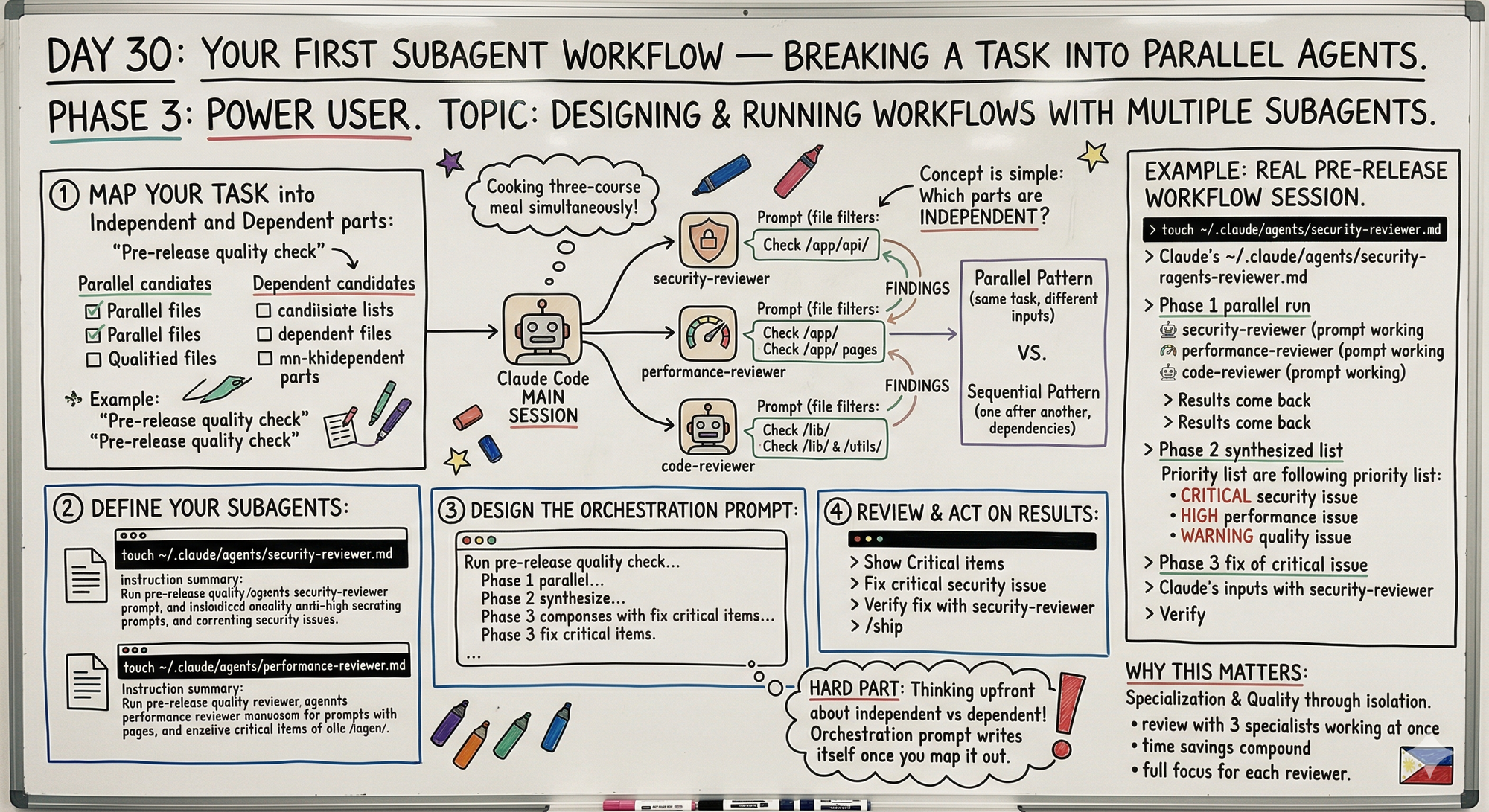
The hardest part of building a subagent workflow is the upfront thinking about what's independent vs dependent.
Once you map that out the orchestration prompt writes itself.
The pre-release check workflow is something I now run before every deploy — found a real security issue on the first run that I'd missed in manual review.
The verify the fix with the same subagent step is underrated — it closes the loop cleanly.
The sequential research then implement pattern is what I use for any feature that touches multiple files — explore first so the implementation phase has clean context to work from.
Series Complete
30 days. 30 posts. Complete.
Phase 1 (Days 1-7): Foundations ✅
Phase 2 (Days 8-21): Getting Productive ✅
Phase 3 (Days 22-30): Power User ✅
MCP Track (Days 22-25): ✅ Complete
Skills Track (Days 26-28): ✅ Complete
Subagents Track (Days 29-30): ✅ Complete
What We Covered
Foundations:
- First session basics
- /fix command
- /add command
- File editing workflows
- Multi-file changes
- Testing and debugging
- Real feature builds
Getting Productive:
- CLAUDE.md mastery
- Feature-first workflow
- Before/during/after systems
- Multi-file workflows
- Complete productive workflow
Power User:
- MCP servers (GitHub integration)
- Custom MCP servers
- Claude Skills (install and build)
- Subagents (parallel processing)
What This Series Was About
Not a highlight reel.
Not "10 tips to 10x your productivity."
Real learning. Real struggles. Real builds.
From someone figuring this out on:
A laggy laptop.
Between 3PM and 5PM.
In Manila.
With shaky faith and a squeaky chair.
Build-in-public means showing the messy process.
Not the polished success.
What's Next
This series is done.
But the building continues.
AI For Pinoys — still growing, still teaching, still learning together.
Resiboko, Fit Check, Truelytics — still shipping, still iterating.
The blog — still writing, still documenting.
And you?
If you made it this far — if you read even one of these 30 posts and learned something — salamat.
That's why I wrote this.
Following This Series
All 30 days available at:
giangallegos.com/claude-code-series
Phase 1 (Days 1-7): Foundations
Phase 2 (Days 8-21): Getting Productive
Phase 3 (Days 22-30): Power User
G
P.S. - The key to subagent workflows: map independent vs dependent tasks first. Independent runs in parallel. Dependent runs in sequence.
P.P.S. - The verify the fix step closes the loop. Same subagent that found the issue confirms the fix is clean.
P.P.P.S. - This was Day 30. The series is complete. Thank you for reading. See you in the next build 🇵🇭