Day 31 (Bonus): Subagent Patterns - When To Use Them and When Not To
Learn when subagents are worth it vs overkill. 3-question decision framework. 4 reliable patterns. 3 failure modes to avoid. Bonus content beyond Day 30.
Hey, it's G.
Day 31 of the Claude Code series.
Wait — didn't this end at Day 30?
It did. The core 30-day series is complete.
But here's the thing: 30 days wasn't enough to cover everything worth knowing.
So I'm extending with bonus days.
Because who doesn't want to learn more, right?
Days 29 and 30 were about what subagents are and how to build a workflow with them.
Day 31 is the honest lesson — when they're worth it and when they're overkill.
I've run enough subagent sessions now to know that reaching for them on the wrong task costs more than it saves.
Today I mapped out the patterns that work, the ones that don't, and the decision framework I now use before every session.
The Problem (Reaching for Subagents Too Quickly)
Here's what happens when you discover subagents:
You learn they exist. They're powerful. They run in parallel.
So you start using them for everything.
Single file to review?
Spawn a subagent.
Simple TypeScript error to check?
Spawn a subagent.
Sequential task where Step 2 needs Step 1's output?
Spawn two subagents anyway.
Then you notice:
Your sessions are slower.
Your context is full of subagent output.
Your token costs are higher.
And the output quality isn't better.
The realization:
Subagents are powerful.
But they're not free.
The Concept (Subagents Have a Cost)
Subagents are powerful but not free.
Each one consumes tokens.
Adds latency on startup.
Returns results that the main session has to synthesize.
For the right task that's a great trade.
For the wrong task it's unnecessary overhead on something a single session would have handled cleaner.
The developers getting the most out of subagents aren't the ones using them the most.
They're the ones using them at the right times.
Three Questions Before Every Subagent Session
These three questions decide whether subagents are worth it:
1. Is the Work Genuinely Parallelizable?
Can the subtasks run independently without needing each other's output?
If yes — subagents help.
If each step depends on the previous one — a single sequential session is cleaner.
Example (parallelizable):
Reviewing five API routes for security issues.
Each review is independent.
Perfect for parallel subagents.
Example (not parallelizable):
- Read the error log
- Figure out the cause
- Fix it
Step 2 needs Step 1's output. Step 3 needs Step 2's findings.
These steps depend on each other. Single session is cleaner.
2. Is the Output Verbose Enough to Pollute the Main Context?
Exploring a large codebase, reviewing many files, analyzing logs — these produce a lot of output you don't need in your main session.
Subagents keep that noise out.
For small focused tasks, the overhead isn't worth it.
Reviewing a 30-line file?
Checking for TypeScript errors?
The output is tiny. Just do it inline.
3. Does the Task Benefit from Specialization?
A subagent with restricted tools and a focused system prompt does its job better than a general agent trying to do everything.
Security review with only Read access.
Performance review with no write permissions.
Specialization improves quality.
The decision rule:
If the answer to all three is yes — subagents are the right tool.
If the answer to any one is no — a single session is probably better.
The Four Patterns That Work Reliably
Pattern 1: Parallel Analysis
Same job on multiple independent inputs at the same time.
Review five files.
Audit three modules.
Analyze four log files.
Each subagent gets one input and returns one focused result.
Example:
claude
Use the code-reviewer agent to review these five files
simultaneously:
- /app/api/users/route.ts
- /app/api/subscriptions/route.ts
- /app/api/webhooks/stripe/route.ts
- /app/api/auth/route.ts
- /app/api/billing/route.ts

Each review should return a summary under 200 words.
Combine findings ranked by severity when all five complete.
Five independent files. Five parallel reviews. One combined report.
This is the most reliable pattern.
Pattern 2: Specialized Reviewers
Different agents with different expertise reviewing the same thing from different angles.
Security reviewer plus performance reviewer plus convention checker.
Each focused on its domain, running in parallel.
Example:
claude
Run these three reviews simultaneously on /app/api/:

1. Use security-reviewer — focus only on security issues
2. Use performance-reviewer — focus only on performance
3. Use code-reviewer — focus only on convention violations

Each agent returns a brief summary.
Combine into one prioritized list when all three finish.
Three specialists. One codebase. Parallel work.
Pattern 3: Research Then Act
An Explore or research subagent gathers context first, keeping that exploration out of the main session.
Then the main session acts on the clean summary.
Example:
claude
Step 1: Use the Explore subagent to map how authentication
works across the entire codebase. Return a concise summary
of the auth flow, key files, and any inconsistencies found.

Step 2: Based on that summary, plan how to add
refresh token support without breaking existing auth.

Step 3: Implement the plan.
Exploration happens in subagent context.
Implementation happens in clean main context.
Main session never sees the thousands of tokens of file reading.
Pattern 4: Isolated Experiments
When you want to try something risky or exploratory without polluting your main context.
Let a subagent try the approach, report back, and you decide whether to apply it.
Example:
claude
I want to try refactoring /utils/payments.ts to use
a class-based approach instead of exported functions.
I'm not sure if it's a good idea yet.

Use a general-purpose subagent to try the refactor
in isolation and report back:
- What the refactored version would look like
- Whether it's actually cleaner
- Any downsides to the approach

Don't apply any changes to the actual file yet.
Just return the analysis and a code sample.
Try the risky thing in a sandbox.
Get the analysis without committing.
Main context stays clean until you decide.
The Three Failure Modes to Avoid
Failure Mode 1: Too Many Subagents Returning Too Much Detail
The problem:
You spawn ten subagents and each returns a detailed 500-word report.
Now your main session context is full of subagent output.
You've traded one context problem for another.
The fix:
Instruct subagents to return summaries, not full reports.
Example:
Each subagent should return a summary under 150 words.
List only actionable findings — no explanations of
things that are fine.
Or scope what you want back:
Return only Critical and High severity issues.
Skip Suggestions entirely.
Failure Mode 2: Subagents on Dependent Tasks
The problem:
You spawn two subagents where the second one needs the first one's output.
The second one starts without that context and produces wrong results.
Example of what NOT to do:
Subagent 1: Analyze the error log
Subagent 2: Fix the bug based on the error analysis
Subagent 2 runs in parallel without Subagent 1's findings.
It can't fix what it doesn't know about.
The fix:
Run dependent tasks sequentially, not in parallel.
Use a single session or explicit sequential steps.
Failure Mode 3: Subagents on Simple Tasks
The problem:
You spawn a subagent to review a 30-line file.
The overhead of starting the subagent, running it, and synthesizing the result costs more than just reviewing it inline.
The fix:
Use subagents for tasks that justify the overhead.
Multiple files. Large outputs. Genuinely independent work.
Don't do this:
Use a subagent to review /components/Button.tsx
Just do this:
/review /components/Button.tsx
The Decision Framework (Run Before Every Subagent Session)
Simple checklist:
Is the task genuinely parallelizable?
→ No → Use a single session

Is the output large enough to pollute main context?
→ No → Use a single session

Does the work benefit from tool restriction or specialization?
→ No → Use a single session

All three yes → Use subagents
This framework saves you from the three failure modes.
Run it mentally before spawning subagents.
When a Single Session is Better
Don't use subagents for these:
Single File, Simple Task
# Don't use subagents:
> Review /components/Button.tsx

# Just do:
> /review /components/Button.tsx
No subagent needed.
Dependent Steps
# Don't use subagents:
> Read the error log, figure out the cause, then fix it

# These steps depend on each other
# Single session is cleaner
Small Output
# Don't use subagents:
> Check if there are any TypeScript errors in this file

# Output is tiny
# Subagent overhead not worth it
Complete Real Session Example
Let me walk you through the decision framework in action.
The Task
Pre-deploy security sweep on four API routes.
The Decision Check
Is it parallelizable?
Yes — four independent API routes.
Is output verbose?
Yes — full security analysis per route.
Benefits from specialization?
Yes — security-only focus with tool restrictions.
All three yes → use subagents.
The Session
cd ~/projects/my-app
claude
Pre-deploy security sweep.

Use the security-reviewer agent to review these four
files simultaneously:
/app/api/users/route.ts
/app/api/subscriptions/route.ts
/app/api/payments/route.ts
/app/api/auth/route.ts

Each review: return only Critical and High findings.
Keep each summary under 100 words.
Combine all findings when complete — ranked Critical first.
What Happens
Four subagents run in parallel.
Each returns a tight focused summary.
Main context only gets the combined ranked list — not the full analysis from each.
Results
Critical (2):
- auth route missing rate limiting
- payments route logs full card object

High (1):
- users route no pagination

Total context used: small — just the summaries
Total time: same as reviewing one file
Fix the Criticals
Fix the two critical issues.
Show me each change before moving to the next.
Done.
Four routes reviewed.
Two criticals fixed.
Main context stayed clean throughout.
Why This Matters
Knowing when NOT to use subagents is as important as knowing when to use them.
Overusing them:
Inflates costs.
Fills your context with subagent output.
Adds latency to tasks that didn't need it.
The developers who get this right:
Think of subagents as a specialized tool with a specific use case.
Not a default approach to every task.
Use the decision framework.
Run subagents on tasks that earn them.
Keep single sessions for everything else.
My Raw Notes (Unfiltered)
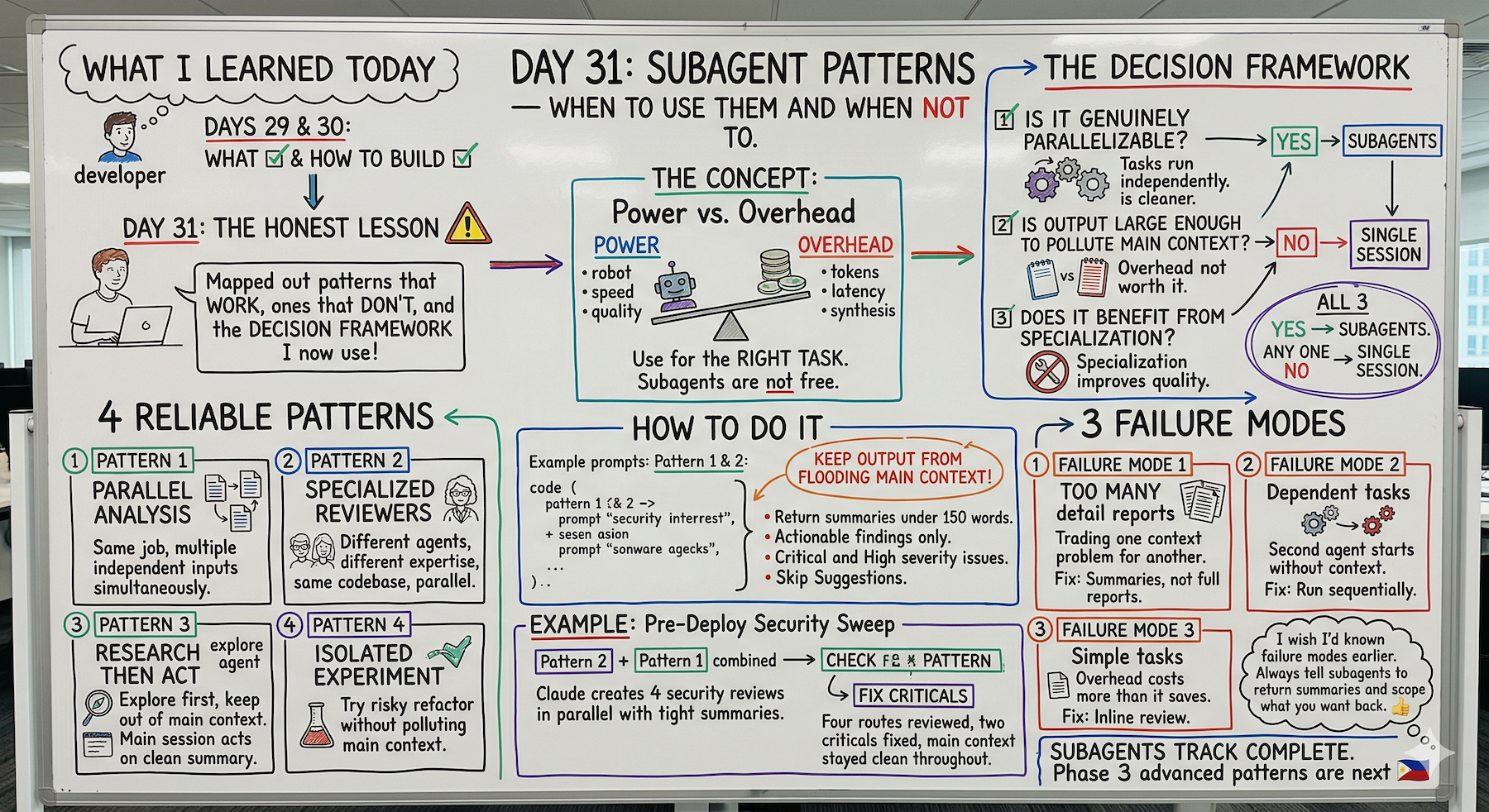
The failure modes section is what I wish someone had told me earlier.
My first few subagent sessions generated so much output that my main context got full faster than if I'd just done it inline.
The fix is simple — always tell subagents to return summaries and scope what you want back.
The decision framework is the thing I now run mentally before every session — parallelizable, verbose output, benefits from specialization.
If all three yes then subagents. Otherwise single session.
The isolated experiment pattern is underused — it's great for trying a risky refactor without committing to it.
Subagents Track Complete
Days 29-31 covered:
Day 29: What subagents are and the two approaches
Day 30: Your first subagent workflow
Day 31 (Bonus): Subagent patterns — when to use them and when not to
The complete subagent workflow:
- Understand what subagents are (Day 29)
- Build your first workflow (Day 30)
- Learn when to use vs not use (Day 31)
What's Next
Bonus days continue.
30 days wasn't enough to cover everything worth knowing.
Next up: Advanced Patterns — combining MCP + Skills + Subagents together.
The full power stack working as one system.
G
P.S. - The three-question framework: parallelizable, verbose output, specialization. All three yes = subagents. Any one no = single session.
P.P.S. - Always scope subagent output: "Each returns summary under 150 words. Critical and High only — skip Suggestions."
P.P.P.S. - The isolated experiment pattern is underused. Try risky refactors in subagent sandbox before committing.