Day 32 (Bonus): Combining MCP + Skills + Subagents - The Full Power Stack
Learn to combine MCP, Skills, and Subagents. 3 layers: data, workflow, execution. Release prep example: fetch issues, review, create content, close. One session.

Hey, it's G.
Day 32 of the Claude Code series.
Bonus days continue.
Days 22 through 31 covered MCP, Skills, and Subagents as separate tracks.
Today I combined all three in one session and felt the difference immediately.
Each system is useful alone.
Together they compound.
MCP brings live external data.
Skills bring consistent workflows.
Subagents bring parallelism and context isolation.
When all three are active, Claude Code stops feeling like a tool and starts feeling like infrastructure.
The Problem (Using Each System in Isolation)
Here's what happens when you only use one at a time:
Using Only MCP
You connect to GitHub.
Fetch issue data.
But you still have to manually format it, process it, turn it into something useful.
The data is live. The workflow is manual.
Using Only Skills
You have a content-repurpose skill that formats output perfectly.
But you still have to copy-paste data into Claude.
The workflow is consistent. The data fetching is manual.
Using Only Subagents
You can run parallel reviews.
But each review uses the same generic approach.
The execution is fast. The workflow isn't specialized.
Each one solves one problem.
None of them solve the full workflow.
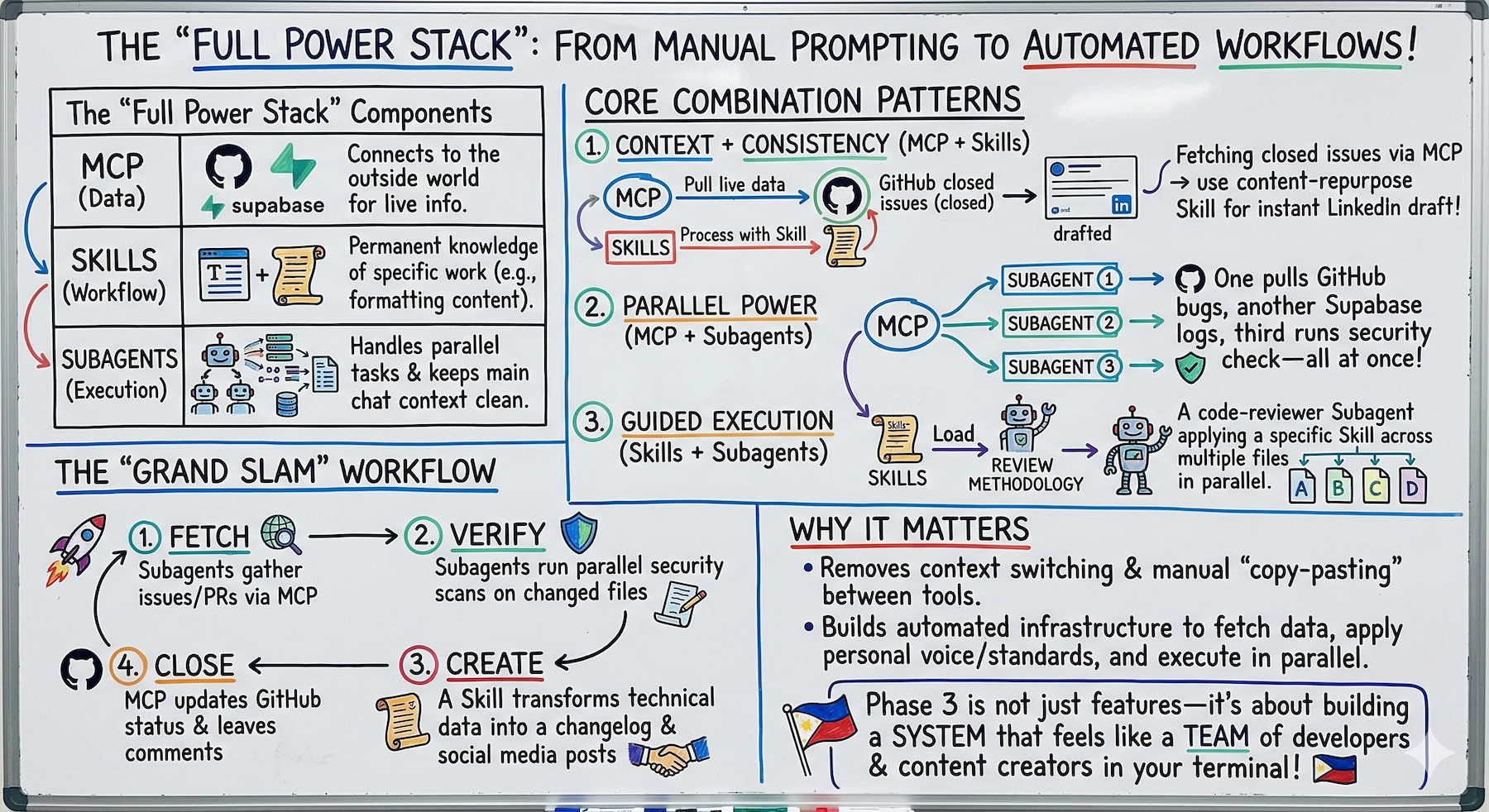
The Concept (Three Layers Working Together)
Each system solves a different problem:
MCP — The Data Layer
Connects Claude Code to the outside world.
Live data from GitHub, Supabase, Linear, or any service.
Without MCP, Claude Code only knows what's in your local files.
Skills — The Workflow Layer
Give Claude Code consistent workflows.
Instead of re-explaining how to do a type of work, the skill carries that knowledge permanently.
Without skills, you're re-prompting the same instructions every session.
Subagents — The Execution Layer
Handle parallel work and context isolation.
Multiple independent tasks run simultaneously.
Verbose work stays out of the main context.
Without subagents, everything runs sequentially in one context.
Alone each one is an upgrade.
Combined they enable workflows that aren't possible any other way.
The Mental Model
MCP is the data layer.
Skills are the workflow layer.
Subagents are the execution layer.
Stack all three and you have a system that:
Fetches its own data.
Applies consistent workflows.
Runs in parallel.
That's not a coding assistant anymore.
That's infrastructure.
Three Combination Patterns
Pattern 1: MCP + Skills
MCP provides context, Skills provide workflow.
Claude Code pulls live data via MCP.
Then a skill determines how to process and present it.
Examples:
GitHub issues come in via MCP → content-repurpose skill formats them into LinkedIn posts.
Supabase data comes in via MCP → reporting skill formats it into a document.
The workflow:
claude
Read the three most recently closed GitHub issues
in this repo.

For each one, use the content-repurpose skill to
generate a LinkedIn post announcing what shipped.

Keep each post under 200 words.
What happens:
Claude Code fetches real GitHub data via MCP.
Applies your content workflow via the skill.
Produces ready-to-post content.
All from one prompt.
Pattern 2: MCP + Subagents
Subagents handle MCP calls in parallel.
Instead of fetching data from multiple MCP-connected services sequentially, subagents fetch from each simultaneously.
Examples:
One subagent pulls GitHub issues.
Another pulls Supabase metrics.
Another pulls recent error logs.
All at once. All keeping their verbose output out of main context.
The workflow:
claude
Fetch these simultaneously using subagents:

1. Use a subagent to fetch all open GitHub issues
   labeled "bug" — return count and titles only

2. Use a subagent to fetch the last 10 error logs
   from Supabase — return error types and frequency

3. Use a subagent to run the security-reviewer agent
   on /app/api/

After all three complete — synthesize into a
weekly health report for this project.
Three data sources. Parallel fetch. Clean synthesis in main context.
Pattern 3: Skills + Subagents
Skills guide subagents.
A subagent with a skill loaded applies that skill's workflow independently.
Examples:
A security-reviewer subagent that also has the code-review skill applies structured review methodology.
Not just ad-hoc analysis.
The skill makes the subagent more consistent.
The workflow:
claude
Use the code-reviewer subagent to review all five
files in /app/api/ simultaneously.

Each subagent should apply the full code-review
skill methodology.

Return findings under 100 words per file.

Combine when all five complete.
Five files. Parallel review. Consistent methodology. One combined report.
The Full Stack (All Three Together)
MCP + Skills + Subagents in one workflow:
claude
Weekly release prep workflow:

Phase 1 — parallel data gathering (subagents):
- Fetch all GitHub issues closed this week via MCP
- Fetch all GitHub PRs merged this week via MCP
- Run security-reviewer on any files changed this week

Phase 2 — synthesis:
Combine into a release summary covering:
- What shipped (from closed issues + merged PRs)
- Any security findings to address before release
- Suggested version bump based on change type

Phase 3 — content:
Use the content-repurpose skill to turn the
release summary into:
- A LinkedIn announcement post
- A changelog entry for the repo
What's happening:
- MCP fetches live GitHub data
- Subagents process it in parallel
- Skills apply consistent workflow to output
Live GitHub data + parallel review + content workflow. One session.
Complete Real Session Example
Let me walk you through the full stack: issue to shipped to announced.
Step 1: Read What's Ready to Ship (MCP + Subagent)
cd ~/projects/my-app
claude
Use a subagent to fetch all GitHub issues labeled
"ready-to-ship" in this repo.

Return: issue numbers, titles, and descriptions.
Keep output under 300 words total.
Subagent fetches via GitHub MCP. Returns clean summary:
Issue #44: Add empty state to subscriptions page
Issue #47: Fix null user state on dashboard
Issue #51: Add rate limiting to API routes
Main context stays clean. Only got the summary.
Step 2: Parallel Security Check Before Releasing (Subagents)
Use the security-reviewer subagent to review the
files changed in issues #44, #47, and #51 simultaneously.

Each review: Critical findings only, under 100 words.
Three subagents run in parallel.
All clean. No criticals found.
Step 3: Create Release Content (Skill)
Use the content-repurpose skill to turn this
release into content:

What shipped:
- Empty state for subscriptions page (#44)
- Fixed null user crash on dashboard (#47)
- Rate limiting added to all API routes (#51)

Generate:
1. LinkedIn post announcing the release
2. X post for build-in-public audience
3. Changelog entry for the repo
Skill applies G's voice, platform rules, CTA.
Produces all three outputs ready to post.
Step 4: Close the Issues (MCP)
Close GitHub issues #44, #47, and #51.
Add a comment to each: "Shipped in v1.4.0"
GitHub MCP closes the issues. Adds comments.
Done.
What Just Happened
Five steps in one session:
- Issues fetched (MCP + Subagent)
- Code reviewed (Subagents in parallel)
- Content created (Skill)
- Issues closed (MCP)
- Ready to announce
All without leaving the terminal.
No context switching. No copy-pasting. No manual formatting.
Breaking Down the Layers
Data Layer (MCP)
What it handled:
- Fetching GitHub issues labeled "ready-to-ship"
- Closing issues and adding comments
Without MCP:
- You'd manually browse GitHub
- Copy issue details
- Paste into Claude
- Go back to GitHub to close issues
Workflow Layer (Skills)
What it handled:
- Applying G's voice to content
- Following platform-specific rules (LinkedIn vs X)
- Adding CTAs consistently
- Formatting changelog entries
Without Skills:
- You'd re-explain voice every time
- Manually format for each platform
- Inconsistent output quality
Execution Layer (Subagents)
What it handled:
- Fetching issues without polluting main context
- Running three security reviews in parallel
- Keeping verbose output isolated
Without Subagents:
- Sequential execution (3x slower)
- Main context full of file contents
- No parallel processing
Why This Matters
Each system alone moves the needle.
All three together changes the category of work Claude Code can do.
You're no longer running an AI coding assistant.
You're running an automated development workflow that:
Fetches its own data.
Applies consistent processes.
Works in parallel.
Produces output ready to ship.
That's the difference between a power user and someone who's built infrastructure.
Day 32 is where Phase 3 starts to feel less like learning features and more like building a system.
Other Combination Examples
Example 1: Weekly Health Report
claude
Fetch these in parallel using subagents:
- Open bugs from GitHub (MCP)
- Error logs from Supabase (MCP)
- Failed API requests from monitoring

Synthesize into weekly health report.
Use the reporting skill to format as document.
Three sources. Parallel fetch. Professional report. One prompt.
Example 2: Feature Documentation
claude
Use a subagent to fetch the PR for feature #123 via GitHub MCP.
Read the code changes.

Use the documentation skill to generate:
- API reference entries
- User-facing changelog
- Developer onboarding notes

Keep technical accuracy high, user-facing language simple.
Live PR data. Consistent documentation format. Multiple outputs.
Example 3: Pre-Deploy Checklist
claude
Phase 1 — Parallel checks (subagents):
- Security review on changed files
- Fetch open bugs labeled "blocker" via GitHub MCP
- Run test coverage check

Phase 2 — Synthesis:
Combine into go/no-go decision for deploy.

Phase 3 — If go:
Use content-repurpose skill to generate release announcement.
Close "ready-to-ship" issues via GitHub MCP.
Automated pre-deploy workflow. Decision support. Content generation. Issue management.
My Raw Notes (Unfiltered)
The moment all three clicked together was the release prep workflow.
Fetching GitHub data, running security in parallel, producing LinkedIn content in my voice — that's three separate manual workflows collapsed into one session.
The key insight is that each layer handles a different concern: MCP is data, Skills are workflow, Subagents are execution.
When you think about a task in those three layers it becomes obvious where each tool fits.
The GitHub MCP plus content-repurpose skill combination is the one I use most week to week — pull what shipped, turn it into content, done.
What's Next
Bonus Day 33 preview:
Claude Code for Non-Coding Tasks — using the full stack for docs, research, and content workflows beyond just writing code.
Because the power stack isn't just for developers.
Following This Series
Core 30 Days: ✅ Complete
Bonus Days: In progress
Phase 3 Tracks:
- MCP (Days 22-25): ✅ Complete
- Skills (Days 26-28): ✅ Complete
- Subagents (Days 29-31): ✅ Complete
- Advanced Patterns (Day 32+): ⬅️ You are here
G
P.S. - MCP is the data layer. Skills are the workflow layer. Subagents are the execution layer. Stack all three for infrastructure.
P.P.S. - The release prep workflow (fetch issues → review → create content → close issues) is now one session instead of four separate manual steps.
P.P.P.S. - Pattern 2 (MCP + Subagents) for parallel data fetching is underused. Fetch from three services simultaneously instead of sequentially.