Day 33 (Bonus): Claude Code for Non-Coding Tasks - Docs, Research, and Content
Use Claude Code for non-coding tasks. Documentation from real code. Research with MCP + subagents. Content workflows. docs-writer skill example. Context advantage.
Hey, it's G.
Day 33 of the Claude Code series.
Bonus days continue.
I'd been using Claude Code exclusively for coding tasks.
Today I realized that was leaving most of its power on the table.
The same system — MCP for live data, skills for consistent workflows, subagents for parallel execution — works just as well for writing documentation, doing research, and producing content.
The terminal is just the interface. The workflows are the same.
The Problem (Treating Claude Code as Code-Only)
Here's how most developers use Claude Code:
Write code.
Fix bugs.
Refactor components.
Then switch to a different tool for everything else.
Documentation?
ChatGPT in the browser.
Copy code. Paste into chat. Ask for docs.
No project context. Generic output.
Research?
Web browser. Multiple tabs. Copy-paste into notes.
Manual synthesis. No automation.
Content?
Different AI tool. Re-explain your voice every time.
No connection to what actually shipped.
The split:
Claude Code for code.
Everything else for everything else.
Unnecessary.
The Concept (Claude Code is General Purpose)
Claude Code is a general-purpose agent that happens to be used by developers.
The tools it has:
- File reading
- Terminal commands
- MCP connections
- Skills
- Subagents
Apply to any repeatable workflow, not just coding.
Three Non-Coding Use Cases
1. Documentation
Reading your actual codebase and generating accurate docs from it.
Not generic docs.
Docs that reflect what your code actually does.
Using your real function names.
Your real folder structure.
Your real conventions.
2. Research
Using MCP-connected tools and subagents to gather information from multiple sources in parallel, synthesize it, and produce a structured output.
Market research.
Competitive analysis.
Technical investigation.
All automated. All from real sources.
3. Content Workflows
The content-repurpose skill from Day 28 is one example.
But Claude Code can handle the entire content pipeline:
- Read a GitHub issue
- Understand what shipped
- Write the announcement
- Generate the changelog
- Update the README
- Post to social
All in one session.
The Key Insight
Claude Code has full context of your project.
When it writes documentation:
It reads the actual code first.
Not generic templates.
Real function signatures. Real file paths.
When it writes a changelog:
It reads the actual git history.
Or actual GitHub issues via MCP.
Real changes. Real issue numbers.
When it writes a tutorial:
It reads your actual folder structure.
Your actual setup process.
Real commands that actually work.
That context is what makes Claude Code's non-coding output better than a generic AI writing tool.
How to Do It (Documentation Workflows)
Generate a README from Scratch
claude
Read the entire project structure, CLAUDE.md,
and the main entry points in /app.

Write a comprehensive README.md covering:
- What this project does
- Tech stack
- Local setup instructions
- Folder structure overview
- Environment variables needed (read from .env.example)
- How to deploy

Base everything on what you actually find in the code —
not generic assumptions.
Claude reads:
- Your actual folder structure
- Your actual package.json
- Your actual .env.example
- Your actual entry points
Then writes accurate setup instructions.
Not "install dependencies" generic.
"Run npm install, set these 5 specific env vars, run this seed script" specific.
Generate API Documentation
claude
Read all files in /app/api/ and generate
API documentation covering:
- Every endpoint (method, path, description)
- Request body schema for each
- Response schema for each
- Auth requirements
- Error responses

Format as markdown. Save to /docs/api.md
Claude reads every route file.
Extracts the actual schemas.
Documents what the API actually does.
Not what you think it does.
Update Docs After a Feature Ships
claude
We just added subscription billing.

Read the new files in /app/api/billing/ and
/components/billing/.

Update /docs/api.md and README.md to reflect
the new billing functionality.

Show me what changed before saving.
Reads the new code.
Updates the relevant docs.
Shows you the diff.
Documentation stays current with code.
How to Do It (Research Workflows)
Competitive Research Using Web Fetch
claude
Research how three popular SaaS tools handle
subscription billing UX:

1. Read https://stripe.com/docs/billing
2. Read how Linear handles their pricing page
3. Read how Vercel handles plan upgrades

Compare their approaches and summarize:
- How each handles the upgrade flow
- What friction points they've solved
- What we should steal for our billing page
Fetches real docs.
Compares real implementations.
Structured competitive analysis.
Technical Investigation Using Subagents
claude
I need to understand how our codebase handles
authentication before I refactor it.

Use three subagents in parallel:

1. Map all auth-related files and their relationships
2. Find every place in the codebase that checks
   user permissions
3. Find every place that reads or writes to the
   user session

Synthesize into an auth architecture overview
I can reference during the refactor.
Three subagents exploring different aspects simultaneously.
Main context only gets the synthesized overview.
Clean. Fast. Comprehensive.
GitHub Issue Research Using MCP
claude
Read all GitHub issues labeled "user-feedback"
in this repo.

Group them by theme — what problems keep coming up?

Prioritize by frequency and severity.

Output a structured brief I can use for sprint planning.
Real user feedback from GitHub.
Automatically grouped.
Automatically prioritized.
30 minutes of backlog grooming becomes 30 seconds.
How to Do It (Content Workflows)
Full Release Announcement Workflow
claude
Today we shipped v1.5.0. Here's what changed:
[paste changelog or point to git log]

Produce all of these:
1. README badge update — new version number
2. CHANGELOG.md entry for v1.5.0
3. GitHub release notes
4. LinkedIn announcement post
5. X post for build-in-public audience

Save the README and CHANGELOG updates to their files.
Show me the social posts for approval before anything
gets posted.
Five outputs from one changelog.
README updated.
CHANGELOG formatted.
Social content ready.
One session. No context switching.
Documentation from a Feature Brief
claude
Read issue #52 — it describes a new onboarding flow
we just shipped.

Write a user-facing help article explaining how the
new onboarding works.

Audience: non-technical users.

Save to /docs/help/onboarding.md
Reads the actual issue.
Understands what was built.
Writes help docs in user-friendly language.
Sprint Planning from GitHub Data
claude
Read all open GitHub issues in this repo.

I have capacity for 5 issues this sprint.

Suggest the best 5 based on:
- Impact (based on labels and descriptions)
- Dependencies (flag any that block others)
- Effort (estimate based on scope described)

Output a sprint plan I can paste into Linear.
Real backlog.
Intelligent prioritization.
Ready-to-use sprint plan.
Building a Documentation Skill
For consistent documentation across all projects:
touch ~/.claude/skills/docs-writer.md
code ~/.claude/skills/docs-writer.md
---
name: docs-writer
description: Writes technical documentation from actual
             code. Use when asked to document a file,
             generate API docs, write a README, create
             a help article, or update existing docs.
             Always reads source code before writing.
---

# Documentation Writer Skill

## Core Rule
Never write documentation from assumptions.
Always read the actual code, files, and comments first.
Documentation must reflect what the code actually does.

## For API Documentation
Read the route file completely.
Document:
- HTTP method and path
- Description of what it does
- Request body with field types and whether required
- Response schema with field types
- Authentication requirements
- Possible error responses with status codes

## For README Files
Read: project structure, package.json, .env.example,
main entry points.

Cover: what it does, tech stack, setup, folder structure,
environment variables, deployment.

Keep setup instructions copy-pasteable — test every command.

## For Help Articles
Audience is non-technical unless specified otherwise.
No jargon. No code blocks unless essential.
Lead with what the user can do, not how it works internally.
Include screenshots suggestions where visuals would help.

## Output Rules
- Save to the specified path when given one
- Show a diff of changes when updating existing docs
- Flag anything that looks outdated in existing docs
- Never invent behavior — if unsure, say so
One skill. Consistent docs. Every project.
Complete Real Session Example
Full non-coding session: post-sprint documentation update.
Step 1: Understand What Shipped (GitHub MCP)
cd ~/projects/my-app
claude
Read all GitHub issues closed this week.
Summarize what was built — one sentence per issue.
MCP fetches real issues:
#44: Empty state for subscriptions page
#47: Fixed null user crash on dashboard
#51: Rate limiting on all API routes
Step 2: Update API Docs (docs-writer Skill)
Use the docs-writer skill to update /docs/api.md.

Three new things were added this sprint:
- Empty state in /app/subscriptions/page.tsx
- Rate limiting in /app/api/ (read the middleware)
- Dashboard fix in /app/dashboard/page.tsx

Read each file before documenting.
Show me the diff before saving.
Docs-writer skill:
Reads actual code.
Generates accurate docs.
Shows diff for approval.
Saves to file.
Step 3: Generate Changelog Entry
Write a CHANGELOG.md entry for this sprint.

Use the issues we just reviewed as the source.

Format: ## [v1.5.0] - [today's date]
Group by: Added / Fixed / Changed
Claude generates:
## [v1.5.0] - 2026-03-22

### Added
- Empty state for subscriptions page (#44)
- Rate limiting on all API routes (#51)

### Fixed
- Null user crash on dashboard (#47)
Step 4: Update README Version
Update the version badge in README.md to v1.5.0
Badge updated.
Step 5: Generate Social Content (content-repurpose Skill)
Use the content-repurpose skill to turn this sprint
summary into a LinkedIn post and an X post.
Skill applies:
- G's voice
- Platform-specific rules
- CTAs
Social content ready to post.
What Just Happened
Sprint documented. Content ready. All from what actually shipped.
Five steps:
- Issues fetched (GitHub MCP)
- API docs updated (docs-writer skill reading real code)
- Changelog written (from real issues)
- README bumped (version badge)
- Social content generated (content-repurpose skill)
No context switching. No copy-pasting. No assumptions.
Why This Matters
Most developers treat Claude Code as a coding tool and use a different AI for everything else.
That's an unnecessary split.
Claude Code has one advantage no general writing tool has:
It knows your actual project.
When it writes docs:
It reads your real code.
When it writes a changelog:
It reads your real git history.
When it writes a release post:
It reads your real GitHub issues.
That context makes the output more accurate than anything produced without it.
The full stack works for any repeatable workflow.
Not just the ones that produce .ts files.
My Raw Notes (Unfiltered)
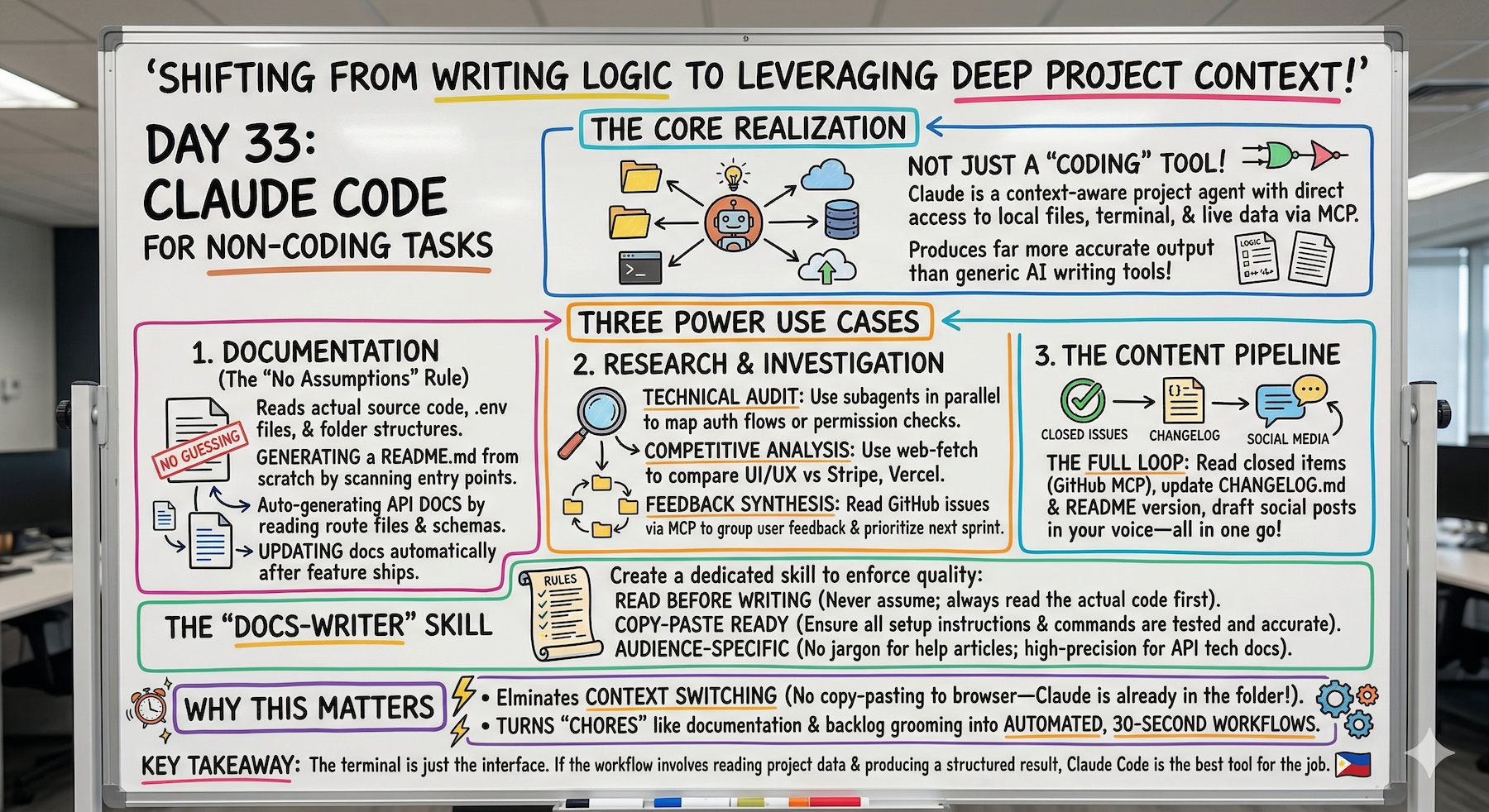
The docs-writer skill changed how I handle documentation.
Used to be the last thing I did and always felt like a chore.
Now it runs at the end of every session automatically — reads what changed, updates the relevant docs, shows me the diff.
The sprint planning from GitHub issues workflow is underused — asking Claude to read all issues and suggest the best five for the sprint saves me 30 minutes of backlog grooming every week.
The key rule for docs is always read the code first — never write from assumptions.
That rule in the skill is what makes the output actually accurate.
What's Next
Bonus Day 34 preview:
Debugging Complex Multi-Agent Workflows — what to do when subagents go wrong, context drifts, or MCP connections break mid-session.
Because the more complex your workflows get, the more ways they can break.
Following This Series
Core 30 Days: ✅ Complete
Bonus Days: In progress
Phase 3 Tracks:
- MCP (Days 22-25): ✅ Complete
- Skills (Days 26-28): ✅ Complete
- Subagents (Days 29-31): ✅ Complete
- Advanced Patterns (Days 32+): ⬅️ You are here
G
P.S. - Claude Code isn't just for code. The same stack (MCP, skills, subagents) works for docs, research, and content. The terminal is just the interface.
P.P.S. - The docs-writer skill's core rule: never write from assumptions, always read the code first. That's what makes output accurate.
P.P.P.S. - Sprint planning from GitHub MCP (read all issues, suggest best 5 based on impact/dependencies/effort) saves 30 minutes every week.