Day 34 (Bonus): Debugging Complex Multi-Agent Workflows - When Things Go Wrong
Debug multi-agent workflows that fail quietly. 5 failure modes: silent subagent failures, MCP drops, context drift, scope creep, synthesis errors. Verification checklist.
Hey, it's G.
Day 34 of the Claude Code series.
Bonus days continue.
Complex workflows break in ways simple sessions don't.
A single Claude Code session fails obviously — wrong output, error message, bad diff.
Multi-agent workflows fail quietly.
A subagent returns empty results.
An MCP connection drops mid-session.
Context drifts between phases.
And you don't notice until three steps later when everything looks slightly wrong.
Today I learned how to diagnose and fix these failures before they compound.
The Problem (Silent Failures That Compound)
Here's what happens in a complex workflow:
You Run a Security Review
Three subagents reviewing six API routes in parallel.
Results come back clean. Three findings total.
You feel good. Deploy.
Two Days Later
Production bug. Security vulnerability in one of those routes.
You go back to the session logs.
The subagent that was supposed to review that route returned empty results.
No error. No warning.
Just silently didn't run.
You trusted the synthesis.
The main session said "review complete."
But one subagent failed silently and you never verified.
That's the difference between simple and complex workflows.
Simple session: fails obviously.
Complex workflow: fails quietly and you find out later.
The Concept (More Moving Parts, More Failure Modes)
Multi-agent workflows have more moving parts than single sessions.
More moving parts means more failure modes.
And the failures are harder to spot because they often don't produce obvious errors.
They just produce subtly wrong results.
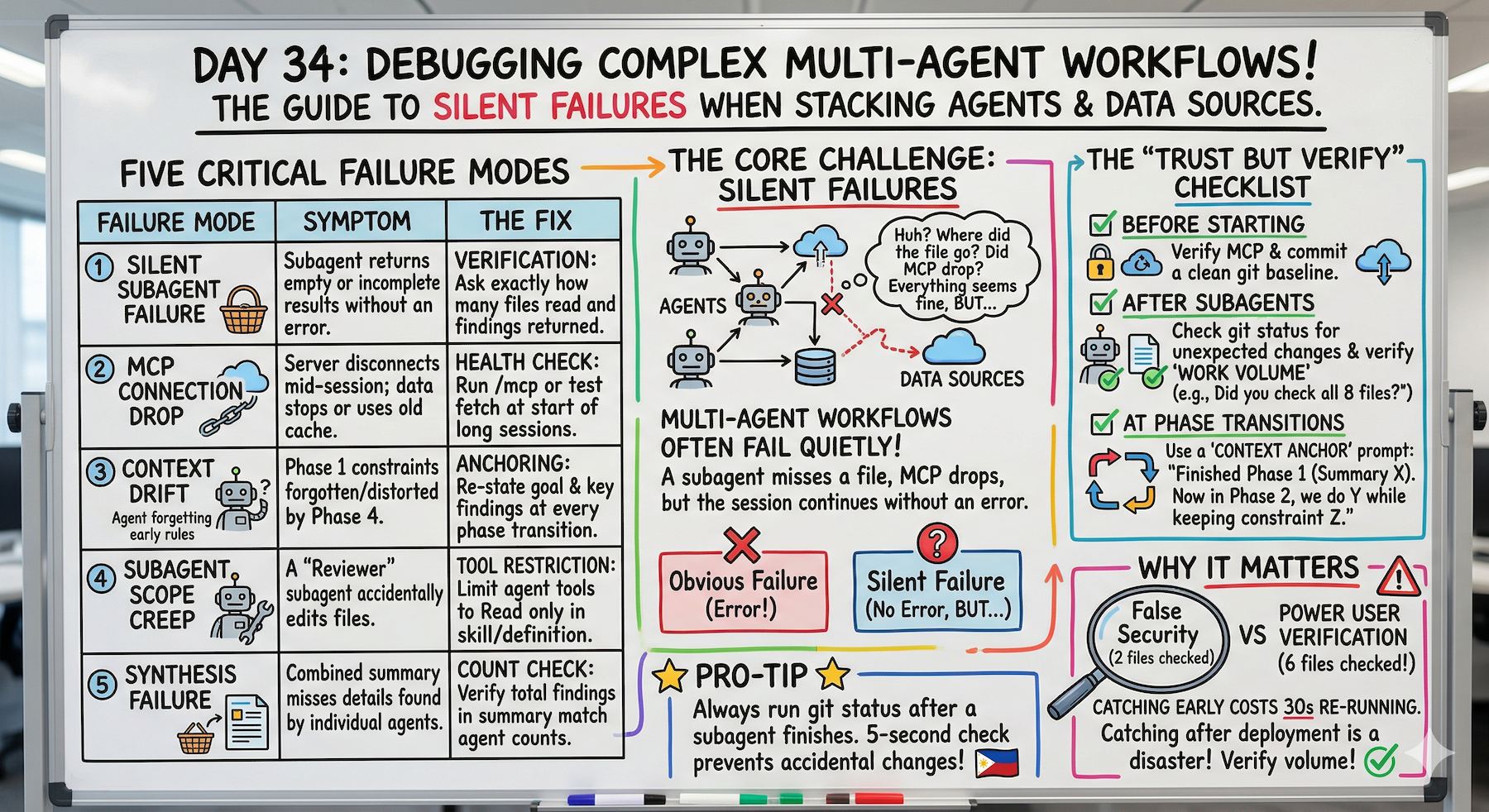
Five Failure Modes to Know
Failure Mode 1: Silent Subagent Failure
The problem:
A subagent returns an empty result or a vague non-answer without throwing an error.
The main session treats it as a valid response and moves forward.
You only notice when the final output is missing something important.
Example:
Security-reviewer subagent on 6 API routes
Returns: "No critical findings"
Looks good.
But you didn't verify it actually reviewed all 6 files.
It only reviewed 2. The prompt was ambiguous and it stopped early.
Failure Mode 2: MCP Connection Drop
The problem:
The MCP server disconnects mid-session.
Claude Code either fails silently or returns stale cached data.
Common in longer sessions or after system sleep.
Example:
Fetch GitHub issues labeled "ready-to-ship"
Returns: 3 issues.
But 5 were actually labeled that way.
MCP connection dropped. Returned cached data from 2 days ago.
Failure Mode 3: Context Drift Between Phases
The problem:
In a multi-phase workflow, context from phase 1 gets lost or misinterpreted by phase 3.
Each phase makes slightly different assumptions.
By the end the output doesn't match what you set up at the start.
Example:
Phase 1: "Fix critical security issues only. Leave warnings for later."
Phase 2: Fixes the criticals.
Phase 3: Also fixes the warnings even though you said not to.
Context from phase 1 faded by phase 3.
Failure Mode 4: Subagent Scope Creep
The problem:
A subagent was told to review files and report findings.
But it also made changes.
Tool restrictions weren't set properly and the subagent acted beyond its intended scope.
Example:
security-reviewer subagent
Should only read and report
But tools: field wasn't set.
Defaults to full tool access.
Modified files during "review."
Failure Mode 5: Synthesis Failure
The problem:
Each subagent returned good results individually.
But the main session synthesized them incorrectly.
Missed a finding. Duplicated something. Contradicted results from different agents.
Example:
Security-reviewer: 2 criticals
Performance-reviewer: 1 high
Code-reviewer: 3 warnings
Synthesis: 1 critical, 1 high, 2 warnings
Counts don't match. One critical got dropped.
The Debugging Principle
Treat multi-agent workflows like distributed systems.
Each component can fail independently.
Verify each component before trusting the whole.
How to Debug (Failure Mode by Failure Mode)
Debugging Silent Subagent Failure
Always verify subagent output before moving to the next phase:
claude
Before we continue to phase 2, confirm:
- How many files did the security-reviewer subagent review?
- How many findings did it return?
- If it reviewed zero files or returned no findings on a
  large codebase, something went wrong — re-run it.
If a subagent returns suspiciously little:
The security-reviewer returned no findings on 8 API routes.
That seems unlikely.

Re-run it on /app/api/users/route.ts only and tell me
exactly what it checked and found.
Add an explicit verification step to every workflow:
After each subagent completes, confirm:
- What files it actually read
- How many findings it returned
- Whether the output looks complete
Debugging MCP Connection Drop
Check MCP status before a long session:
claude
/mcp
Shows connected servers — verify GitHub shows ✓
If MCP stops working mid-session:
/mcp
Check if the server still shows as connected.
Reconnect if needed:
# Exit Claude Code
Ctrl+C

# Verify config still exists
claude mcp list

# Restart session
claude
Add MCP verification to the start of any workflow that depends on it:
Before we start — confirm you can reach GitHub MCP.

Fetch the repo name and open issue count as a test.

If that fails, tell me before we proceed.
Debugging Context Drift
Anchor the context at the start of every phase:
claude
We just completed phase 1. Here's what we found:
[paste the phase 1 summary]

Now in phase 2 we are going to: [restate phase 2 goal]

The constraints from phase 1 that still apply are:
[list them explicitly]

Proceed.
If output seems inconsistent with earlier phases:
The phase 3 output seems inconsistent with what
the security-reviewer found in phase 1.

Phase 1 found a critical issue in /app/api/users/route.ts.
Your phase 3 summary doesn't mention it.

Reconcile these before we move forward.
Build a session state summary prompt:
Before we start phase 3, summarize in one paragraph:
- What we set out to do
- What we found in phases 1 and 2
- What phase 3 needs to accomplish

This is your context anchor for the rest of the session.
Debugging Subagent Scope Creep
Prevention — always specify tools explicitly:
In your subagent definition:
---
name: security-reviewer
tools: Read, Grep, Glob
# No Write, Edit, or Bash — physically cannot modify files
---
Verification after subagent runs:
After the security-reviewer subagent completed —
confirm: did it modify any files?

Run git status to check for unexpected changes.
If scope creep happened — revert immediately:
git status shows unexpected changes.

Run git diff to see what changed.

Revert any changes the subagent made — it was only
supposed to review, not modify.
Debugging Synthesis Failure
Always verify synthesis against individual outputs:
claude
Here are the individual subagent reports:
[security found 2 criticals]
[performance found 1 high]
[code-review found 3 warnings]

Your combined summary shows 1 critical, 1 high, 2 warnings.
That doesn't match.

Re-synthesize — make sure every finding from every
subagent appears in the combined output.

Count: 2 criticals, 1 high, 3 warnings expected.
Add a count verification step to every synthesis:
After combining all subagent results, confirm:
- Total findings from each subagent individually
- Total findings in the combined output

These numbers must match before we proceed.
The Multi-Agent Debugging Checklist
Before Starting a Complex Workflow
☐ Verify MCP connections with a test call
☐ Confirm all required subagents are available (/agents)
☐ Commit a clean git baseline
After Each Subagent Completes
☐ Verify it reviewed the expected number of files
☐ Verify the finding count looks reasonable
☐ Run git status to check for unexpected changes
At Each Phase Transition
☐ Re-anchor context with a phase summary
☐ Explicitly state what carries forward from previous phase
After Synthesis
☐ Verify finding counts match individual reports
☐ Check for any critical findings that got dropped
Complete Real Session Example (Debugging in Action)
Let me walk you through debugging a workflow that went wrong.
Phase 1: Results Look Thin
cd ~/projects/my-app
claude
Security review just completed:
The security-reviewer returned only 1 finding across
6 API routes.

That seems low.

Before we continue — confirm:
- Which files did it actually read?
- Did it complete all 6 files or stop early?
Claude checks — reveals the problem:
The subagent only read 2 files.
The prompt was ambiguous — it stopped after two.
Silent failure caught.
Fix and Re-Run
Re-run the security-reviewer on these specific files:
/app/api/users/route.ts
/app/api/subscriptions/route.ts
/app/api/payments/route.ts
/app/api/auth/route.ts
/app/api/billing/route.ts
/app/api/webhooks/stripe/route.ts

Confirm it reads all six before returning findings.
Re-runs correctly. Returns 4 findings this time.
That's more like it.
Phase Transition: Re-Anchor Context
Before phase 2, let me confirm what we have:

Security review found 4 issues across 6 files:
- 1 critical: unsanitized input in payments route
- 2 high: missing rate limiting in auth and billing
- 1 warning: error message exposes internals in users route

Phase 2 goal: fix the critical issue only.
Leave highs and warning for a separate session.

Proceed.
Context explicitly re-anchored.
Phase 2: Fix the Critical
Critical fixed.
Verify No Scope Creep
Run git status and git diff.

Confirm only /app/api/payments/route.ts was modified.
git diff shows only the expected file.
Clean. No scope creep.
Final Verification
Confirm the fix addresses the critical finding completely.

Re-run the security-reviewer on /app/api/payments/route.ts
to verify the vulnerability is gone.
Subagent re-runs. Confirms clean.
/ship
What Just Happened
Caught a silent failure early.
Fixed it.
Verified the fix.
Clean session.
Without verification:
Would have deployed thinking 6 routes were reviewed.
Only 2 actually were.
Would have found out in production.
Why This Matters
Complex workflows fail in ways that are easy to miss and expensive to fix late.
A subagent that silently reviewed two files instead of six gives you a false sense of security.
You think you've done a full security audit when you haven't.
Catching that early costs one re-run.
Catching it after you've deployed costs much more.
The debugging habits in this lesson are what separate developers who use multi-agent workflows confidently from ones who don't trust them.
Trust comes from verification.
Not from hoping it worked.
My Raw Notes (Unfiltered)
The silent subagent failure is the one that bit me hardest.
Ran a security review, got back three findings, felt good about it, deployed.
Later found a fourth issue that the subagent apparently skipped.
Now I always verify the file count after every subagent run.
The context drift between phases is subtle and cumulative — by phase 4 of a long workflow the original constraints from phase 1 have faded.
The phase transition re-anchor prompt fixed this completely for me.
The git status check after every subagent is non-negotiable — takes 5 seconds and has caught scope creep twice.
What's Next
Bonus Day 35 preview:
Phase 3 Wrap-Up — the complete power user toolkit from MCP to Skills to Subagents, all in one system.
The finale of Phase 3. Everything we've built, synthesized.
Following This Series
Core 30 Days: ✅ Complete
Bonus Days: In progress
Phase 3 Tracks:
- MCP (Days 22-25): ✅ Complete
- Skills (Days 26-28): ✅ Complete
- Subagents (Days 29-31): ✅ Complete
- Advanced Patterns (Days 32-34): ⬅️ You are here
G
P.S. - The debugging habit that saves the most: "Before we move to phase 2: how many files did the subagent actually read? How many findings? Run git status." 30 seconds of verification catches 90% of silent failures.
P.P.S. - Context drift is cumulative. Phase 1 constraints fade by phase 4. Re-anchor context at every phase transition: "Here's what we found in phase 1. Here's what phase 2 needs to do. Here are the constraints that still apply."
P.P.P.S. - Always set tools explicitly in subagent definitions. tools: Read, Grep, Glob means physically cannot modify files even if prompted. Prevents scope creep.