Day 35 (Bonus): The Complete Power User Toolkit - Everything From Phase 3 in One System
Phase 3 complete. 4 layers working together: MCP (data), Skills (workflows), Subagents (execution), Verification (debugging). Complete system, not features.
Hey, it's G.
Day 35 of the Claude Code series.
Bonus days continue.
Phase 3 complete.
Phase 3 covered a lot of ground.
MCP. Skills. Subagents. Debugging. Non-coding workflows.
Today I tied it all together.
Not a list of features.
A system.
The same way Phase 2 ended with a complete productive workflow, Phase 3 ends with a complete power user setup.
The difference between Phase 2 and Phase 3?
The difference between working efficiently inside your project and operating across your entire development environment.
The Problem (Using Features, Not Building a System)
Here's what happens when you treat Phase 3 as a feature list:
You learn MCP. Use it sometimes.
You learn Skills. Use them when you remember.
You learn Subagents. Use them on big tasks.
Each tool lives in isolation.
You're using features.
Not running a system.
The Concept (Four Layers That Work Together)
Phase 2 gave you a single-session workflow.
Phase 3 gives you a multi-layer system.
Layer 1: Data Layer (MCP)
Claude Code is connected to your external services.
GitHub for issues and PRs.
Supabase for your database.
Any service you've connected.
Live data flows in automatically.
You never manually paste context again.
Layer 2: Workflow Layer (Skills)
Your repeatable workflows are packaged as skills.
Code review.
Content repurposing.
Documentation writing.
Each runs consistently without re-explaining.
Skills you've installed from the official library plus the custom ones you've built for your specific workflows.
Layer 3: Execution Layer (Subagents)
Parallel work runs through subagents.
Security reviewer.
Performance reviewer.
Code reviewer.
Each specialized, each with restricted tools, each keeping verbose output out of your main context.
Complex tasks get broken into independent pieces and run simultaneously.
Layer 4: Verification Layer (Debugging Habits)
Every complex workflow gets verified at each phase.
Subagent file counts confirmed.
MCP connections tested at session start.
Context re-anchored at phase transitions.
Git status checked after every subagent run.
These four layers on top of the Phase 2 foundation — CLAUDE.md, slash commands, vibe coding — is your complete Claude Code system.
The Complete Power User Setup
Your MCP Configuration
# Verify your connected servers:
claude mcp list
Minimum recommended stack:
github    → issues, PRs, repos
supabase  → database queries (if you use Supabase)
Plus any internal tools you built in Day 25.
Test connections at the start of important sessions:
claude
/mcp

Verify all MCP servers are connected with a test call each.
Your Skills Library
ls ~/.claude/skills/
Minimum recommended library:
skill-creator/       ← build and iterate skills
frontend-design/     ← production-grade UI components
docx/                ← Word document creation
code-review/         ← custom — your review workflow
content-repurpose/   ← custom — your content workflow
docs-writer/         ← custom — documentation from code
Check Claude sees them all:
claude
What skills do you have available?
Your Subagent Library
ls ~/.claude/agents/
Minimum recommended agents:
security-reviewer.md     ← security only, Read/Grep/Glob
performance-reviewer.md  ← performance only, Read/Grep/Glob
code-reviewer.md         ← conventions, Read/Grep/Glob
Verify they're available:
claude
/agents
Your Slash Command Library
ls ~/.claude/commands/
Full library from Phase 2 — still in use:
review.md        plan.md       debug.md
refactor.md      test.md       ship.md
explain.md       commit.md     standup.md
document.md      review-focus.md
Your CLAUDE.md — Updated for Phase 3
# [Project Name]

## Project Overview
[What it does]

## Tech Stack
[Stack with exact versions]

## Folder Structure
[Key folders]

## Coding Conventions
[Non-negotiable rules]

## Behavior Rules
⚠️ NEVER install dependencies without asking
⚠️ NEVER run migrations without asking
⚠️ NEVER push to git without instruction
- Run freely: npm run dev, build, lint, typecheck

## Commands
[Exact commands]

## Current Focus
[What we're actively building right now]

## MCP Connections
- GitHub: connected — use for issues, PRs, and releases
- Supabase: connected — use for DB queries and debugging

## Active Skills
- code-review: use before every commit
- content-repurpose: use after every release
- docs-writer: use after every sprint
Two new sections:
MCP Connections — which services are connected and what they're for.
Active Skills — which skills should be used and when.
The Complete Power User Workflow
Session Startup (Every Session)
git add . && git commit -m "before session: [topic]"
claude
/mcp

Verify all MCP connections are live.

What skills and agents do you have available?

What's in my CLAUDE.md — summarize the rules.
30 seconds of verification.
Every session starts from a known good state.
During the Session (Pick the Right Tool)
Decision tree:
Single feature        → Phase 2 feature-first workflow
Bug to fix            → /debug → fix → write test
Code cleanup          → /refactor → git diff → build
Need docs             → docs-writer skill
Multi-file change     → map → anchor → checkpoint
Security check        → security-reviewer subagent
Pre-release review    → parallel subagents → synthesize
GitHub data needed    → MCP directly
Content needed        → content-repurpose skill
Unfamiliar code       → Explore subagent → /explain
Each tool has its place.
You pick the right one for the task.
Complex Workflow Structure (Every Time)
10-step pattern:
1. Test MCP connections
2. State the full goal
3. Map independent vs dependent tasks
4. Run parallel subagents on independent tasks
5. Verify each subagent output before continuing
6. Re-anchor context at every phase transition
7. Synthesize — verify counts match
8. Fix findings
9. Run git status — check for scope creep
10. /ship
Same structure. Every complex workflow.
Reliability through repetition.
Session Close (Every Session)
> /review
> Run npm run build and npm run typecheck
> /ship
> Update CLAUDE.md if anything changed today

git add . && git commit -m "[what was built]"
Every session ends clean.
CLAUDE.md stays current.
Git history stays clear.
Complete Real Session Example
Full power user session: build and release a feature.
Session Startup
cd ~/projects/my-app
claude
/mcp
GitHub ✓ Supabase ✓
What skills and agents are available?
Skills: code-review, content-repurpose, docs-writer, frontend-design, skill-creator
Agents: security-reviewer, performance-reviewer, code-reviewer
Known good state. Ready to work.
Phase 1: Understand the Task (GitHub MCP)
Read issue #58 — "Add user avatar upload to profile page"

Summarize what's needed before we plan.
MCP fetches real GitHub issue.
Claude summarizes requirements.
Phase 2: Plan
/plan
Feature brief generated.
What it does. Where it lives. What exists. What done looks like. What to avoid.
Phase 3: Build
Looks good. Go ahead.
Feature built.
Avatar upload component. API route. Storage integration.
Phase 4: Pre-Release Review (Parallel Subagents)
Run security-reviewer and performance-reviewer
simultaneously on the new files.

Each returns findings under 100 words.

Confirm file count before synthesizing.
Subagents run in parallel.
Security: clean.
Performance: clean.
Verify:
How many files did each agent review?
Counts confirmed. Synthesis accurate.
Phase 5: Documentation (docs-writer Skill)
Use the docs-writer skill to update /docs/api.md
with the new avatar upload endpoint.

Read /app/api/avatar/route.ts first.

Show me the diff before saving.
docs-writer skill:
Reads the actual route file.
Generates accurate API documentation.
Shows diff.
Approved. Saved.
Phase 6: Content (content-repurpose Skill)
Use the content-repurpose skill to turn this
feature into a LinkedIn post and X post.

Reference issue #58 for what shipped.
content-repurpose skill:
Applies G's voice.
Follows platform-specific rules.
Adds CTAs.
Social content ready.
Phase 7: Close the Loop (GitHub MCP)
Close issue #58.

Add a comment: "Shipped — avatar upload live"
Issue closed via MCP.
No leaving the terminal.
Phase 8: Ship
/ship
git add . && git commit -m "add user avatar upload"
What Just Happened
Issue read. Feature built. Security reviewed. Docs updated. Content created. Issue closed.
One session. No context switching.
Every layer working together:
Layer 1 (MCP): Read issue, close issue
Layer 2 (Skills): docs-writer, content-repurpose
Layer 3 (Subagents): security-reviewer, performance-reviewer
Layer 4 (Verification): File counts confirmed, synthesis verified
The Four Layers in Practice
When Layer 1 (MCP) Gets Used
- Reading GitHub issues at session start
- Fetching PR data for reviews
- Querying Supabase for debugging
- Closing issues after shipping
- Creating GitHub releases
When Layer 2 (Skills) Gets Used
- Before every commit (code-review skill)
- After every release (content-repurpose skill)
- After every sprint (docs-writer skill)
- When building UI (frontend-design skill)
- When building new skills (skill-creator skill)
When Layer 3 (Subagents) Gets Used
- Pre-release security checks (security-reviewer)
- Performance audits (performance-reviewer)
- Convention enforcement (code-reviewer)
- Exploring unfamiliar code (Explore subagent)
- Any multi-file parallel work
When Layer 4 (Verification) Gets Used
- Every session start (MCP connection check)
- After every subagent (file count, finding count)
- Every phase transition (context re-anchor)
- After every subagent (git status check)
- After synthesis (count verification)
Why This Matters
Phase 3 didn't add features to Claude Code.
It built a system on top of Claude Code.
MCP, Skills, and Subagents aren't three separate things you use occasionally.
They're layers of infrastructure that run underneath every session.
The more you use them the more natural they become and the less you think about them.
That's the goal.
A setup so complete that Claude Code just works the way you need it to, automatically, every time.
The Jump From Phase 2 to Phase 3
Phase 2:
Working efficiently inside your project.
One session at a time.
One feature at a time.
Clean workflows. Good habits.
Phase 3:
Operating across your entire development environment.
Multiple services connected.
Workflows packaged and reusable.
Parallel execution.
Infrastructure, not just efficiency.
The jump from Phase 2 to Phase 3 is bigger than the jump from Phase 1 to Phase 2.
In terms of what becomes possible.
My Raw Notes (Unfiltered)
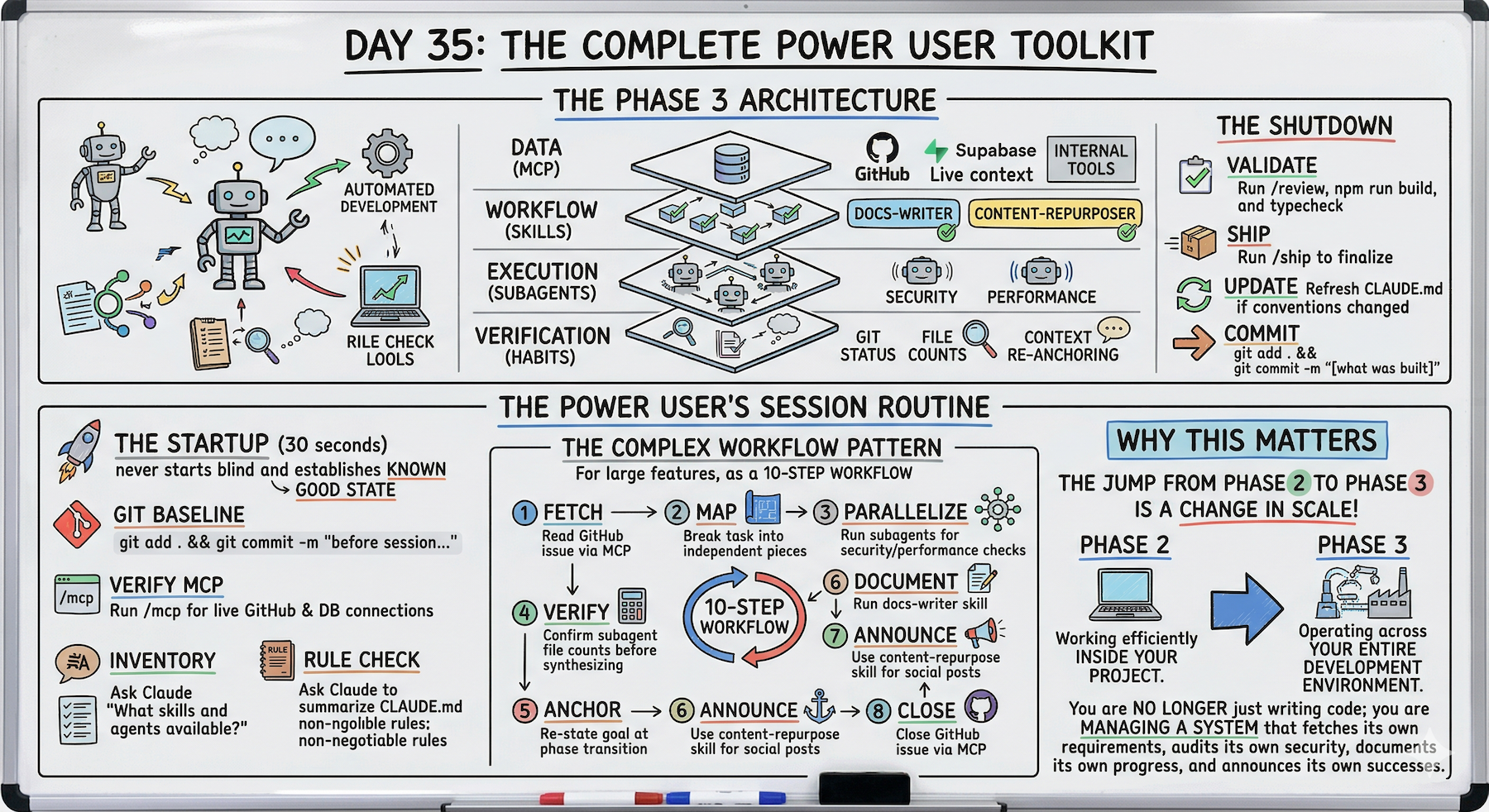
Writing this wrap-up made me realize how far day 35 is from day 1.
Day 1 was installing the thing and running it for the first time.
Day 35 is a multi-layer system with live data connections, packaged workflows, parallel agents, and debugging habits.
The jump from phase 2 to phase 3 is bigger than the jump from phase 1 to phase 2 in terms of what becomes possible.
The session startup verification habit is the one that ties it all together — checking MCP, skills, and agents at the start of every session takes 30 seconds and means every session starts from a known good state.
Phase 4 is going to be about showing all of this in public while actually shipping.
Phase 3 Complete
14 days. 4 tracks. One complete power user system.
Days 22-25: MCP Integrations ✅
Connecting Claude Code to external services.
GitHub, Supabase, custom servers.
Live data flows in automatically.
Days 26-28: Claude Skills ✅
Packaging workflows for consistency.
Official skills plus custom ones.
Reusable across all projects.
Days 29-31: Subagents ✅
Parallel execution and context isolation.
Specialized agents with tool restrictions.
Multiple tasks running simultaneously.
Days 32-35: Advanced Patterns ✅
Combining all three systems.
Non-coding workflows.
Debugging complex sessions.
Complete power user toolkit.
What's Next
Phase 4 starts with Day 36:
What Building In Public With Claude Code Actually Looks Like
The full loop from building to documenting to sharing.
Taking this whole system live while actually shipping.
Following This Series
Core 30 Days: ✅ Complete
Bonus Days: In progress
Phase 1 (Days 1-7): Foundations ✅ Complete
Phase 2 (Days 8-21): Getting Productive ✅ Complete
Phase 3 (Days 22-35): Power User ✅ Complete
Phase 4 (Days 36+): Build In Public ⬅️ Starting next
G
P.S. - The session startup verification: /mcp to check connections, list skills and agents, summarize CLAUDE.md rules. 30 seconds. Every session starts from known good state.
P.P.S. - Your CLAUDE.md should now have two new sections: MCP Connections (which services + what they're for) and Active Skills (which skills + when to use them).
P.P.P.S. - Phase 3 isn't features you use occasionally. It's infrastructure that runs underneath every session. The more you use it, the less you think about it. That's the goal.