Day 40 (Bonus): Designing a Multi-Agent System From Scratch
Multiple Claude instances, distributed ownership. Divide by ownership not step. Design interfaces first. Keep agents focused. Plan failure modes. Phase 5 starts.
Hey, it's G.
Day 40 of the Claude Code series.
Phase 5: Multi-Agent Systems starts now.
Subagents in Phase 3 were about parallel tasks inside one session.
Multi-agent systems are the next level.
Multiple Claude Code instances working on different parts of a project simultaneously.
Each with its own context.
Its own tools.
Its own scope.
Today I learned how to design one from scratch.
Not just run it.
Think through the architecture before writing a single prompt.
The Problem (One Session Gets Crowded)
You're building a complete feature.
API routes. Frontend components. Tests. Documentation.
All in one session.
What Happens
The context gets crowded.
API code, frontend code, test code all in one conversation.
Claude tries to keep track of everything.
Context gets messy. Output gets confused.
The Conflicts
You ask Claude to fix the frontend.
It accidentally changes the API too.
You ask for tests.
It modifies source files it shouldn't touch.
One agent. One context. Too much scope.
Bottleneck.
The Concept (Coordinated Set of Specialists)
A multi-agent system is a coordinated set of AI agents where each one owns a specific piece of work.
One agent plans.
Others execute.
One reviews.
The work happens in parallel across independent contexts.
Not sequentially in one context that gets crowded and slow.
Think of It Like a Small Engineering Team
One lead — coordinates work, assigns tasks, synthesizes results
Multiple workers — each owns one piece, works independently
One reviewer — checks the work before it ships
That's the pattern most multi-agent systems follow.
The Key Difference From Subagents
Subagents run within a single session.
Report back to main agent.
Can't talk to each other.
Multi-agent systems have agents that can work independently.
Own tasks completely.
Work without a human in the loop for every step.
Subagents = parallel execution, one coordinator.
Multi-agents = distributed ownership, multiple coordinators.
Four Principles for Designing Multi-Agent Systems
Principle 1: Divide by Ownership, Not by Step
Don't split work by time sequence.
Split it by who owns what.
Bad division (by steps):
Agent 1: writes code first
Agent 2: writes tests second
Agent 3: writes docs third
Problem: Everyone touches the same files at different times. Conflicts everywhere.
Good division (by ownership):
api-agent: owns /app/api/
frontend-agent: owns /components/ and /app/pages/
test-agent: owns all .test.ts files
docs-agent: owns /docs/
Result: Ownership boundaries prevent conflicts. No two agents touch the same file at the same time.
The API layer agent owns all API work.
The frontend agent owns all UI work.
The test agent owns all test work.
Clear boundaries.
No conflicts.
Principle 2: Design the Interfaces First
Before any agent starts working, define:
- What each one produces
- What the next one needs
Example:
Agent A produces: TypeScript interfaces in /types/
Agent B needs: those TypeScript interfaces to build the frontend
Agent C needs: completed code from A and B to write tests
The interface between agents is more important than any individual agent's instructions.
Principle 3: Keep Agents Small and Focused
A focused agent with one clear job produces better results than a general agent trying to do everything.
The temptation: Make one powerful agent that does it all.
The reality: Five focused agents outperform one general one.
Why?
Focused agents stay in scope.
General agents drift.
Simple job = better execution.
Principle 4: Plan the Failure Modes Before You Start
What happens if the API agent finishes but the frontend agent hits a blocker?
What happens if the test agent finds a critical bug after the other agents have moved on?
Design the recovery path before you need it.
Example recovery paths:
API agent blocker → frontend agent waits, doesn't proceed with bad assumptions
Test agent finds bug → routes back to responsible agent (API or frontend), not forward to docs
Don't design only the happy path.
Design the failure path too.
How to Design a Multi-Agent System
Step 1: Map the Work Into Owned Pieces
Task: Build a complete feature end-to-end
Piece 1: API layer
- Owner:
api-agent - Scope:
/app/api/[feature]/ - Produces: working API routes with TypeScript types
Piece 2: Frontend
- Owner:
frontend-agent - Scope:
/app/[feature]/and/components/[feature]/ - Needs: TypeScript types from api-agent
- Produces: working UI components
Piece 3: Tests
- Owner:
test-agent - Scope: all new files
- Needs: completed code from api-agent + frontend-agent
- Produces: test suite with coverage
Piece 4: Documentation
- Owner:
docs-agent - Scope:
/docs/ - Needs: completed code from all agents
- Produces: updated API docs and README
Four agents. Four clear scopes. No overlap.
Step 2: Define the Interfaces Between Agents
What each agent produces that others depend on:
api-agent produces:
/types/[feature].ts → TypeScript interfaces
/app/api/[feature]/route.ts → API endpoints
frontend-agent needs from api-agent:
The TypeScript interfaces before building
test-agent needs from both:
All completed files before writing tests
docs-agent needs from all:
Everything done before documenting
Dependencies mapped.
No agent starts before it has what it needs.
Step 3: Write the Agent Definitions
Lead agent — coordinates everything:
touch .claude/agents/feature-lead.md
---
name: feature-lead
description: Coordinates multi-agent feature builds.
             Use when building a complete feature that
             spans API, frontend, tests, and docs.
             Assigns work to specialist agents and
             synthesizes results.
tools: Read, Write, Edit, Bash, Glob, Grep
---

You are the lead agent for feature builds.

Your job:
1. Read the feature spec or GitHub issue
2. Break the work into owned pieces
3. Assign each piece to the right specialist agent
4. Wait for each agent to complete before moving
   to dependent phases
5. Synthesize results and flag any conflicts
6. Report completion with a summary of what each
   agent did

Specialist agents available:
- api-agent: builds API routes and TypeScript types
- frontend-agent: builds UI components and pages
- test-agent: writes tests for completed code
- docs-agent: updates documentation

Never do the specialist work yourself — delegate it.
Your value is coordination and synthesis.
Lead only coordinates.
Never does specialist work.
API specialist:
touch .claude/agents/api-agent.md
---
name: api-agent
description: Builds API routes and TypeScript types.
             Use when implementing backend endpoints,
             database queries, or server-side logic.
tools: Read, Write, Edit, Bash, Glob, Grep
---

You are an API specialist. You build:
- Next.js API routes in /app/api/
- TypeScript interfaces in /types/
- Database queries using Supabase
- Input validation and error handling

Rules:
- Always create TypeScript interfaces first —
  other agents depend on them
- Full error handling on every route
- Input validation on every route that accepts data
- Never touch /components/ or /app/[page]/ —
  that belongs to frontend-agent
- Follow conventions in CLAUDE.md exactly

When done: report the files created and the
TypeScript interfaces exported.
Clear scope.
Clear boundaries.
Explicit "never touch" rules.
Frontend specialist:
touch .claude/agents/frontend-agent.md
---
name: frontend-agent
description: Builds UI components and pages.
             Use when implementing React components,
             pages, or any user-facing interface.
tools: Read, Write, Edit, Bash, Glob, Grep
---

You are a frontend specialist. You build:
- React components in /components/
- Pages in /app/
- Client-side state and interactions
- Loading, error, and empty states

Rules:
- Read TypeScript interfaces from /types/ before building
- Never build your own types — use what api-agent produced
- Use existing components from /components/ui/
  before creating new ones
- Every component needs loading, error, and empty states
- Never touch /app/api/ — that belongs to api-agent
- Follow conventions in CLAUDE.md exactly

When done: report the components and pages created.
Depends on api-agent's output.
Doesn't create own types.
Uses what was produced.
Test specialist:
touch .claude/agents/test-agent.md
---
name: test-agent
description: Writes tests for completed features.
             Use after API and frontend work is done.
             Never modifies source files.
tools: Read, Write, Glob, Grep
---

You are a test specialist. You write:
- API route tests using Vitest
- Component tests using Vitest + React Testing Library
- Utility function tests

Rules:
- Read all completed files before writing any tests
- Cover: happy path, edge cases, error states
- Mock all external dependencies — no real API calls
- Place test files next to source files
- Never modify source files — test only
- Run the tests after writing them and fix any failures

When done: report test files created and pass/fail status.
Notice the tool restrictions.
Read, Write, Glob, Grep — no Edit, no Bash.
Can't modify source files.
Tests only.
Step 4: Design the Orchestration Sequence
How the agents work together:
claude
We are running a multi-agent feature build for
issue #65: "Add team member invitation flow"

Phase 1 — parallel (no dependencies):
- Use api-agent to build the invitation API routes
  and TypeScript interfaces

Phase 2 — after api-agent completes:
- Use frontend-agent to build the invitation UI
  using the TypeScript interfaces from phase 1

Phase 3 — after both complete:
- Use test-agent to write tests for all new files
  from phases 1 and 2

Phase 4 — after tests pass:
- Use docs-agent to update API docs and README

feature-lead coordinates — confirm each phase
is complete before starting the next.
Report blockers immediately — don't proceed if
something is wrong.
Sequential phases.
Each waits for the previous.
No moving forward if something's blocked.
Complete Real Example (Team Invitation Feature)
Full multi-agent build from GitHub issue to shipped feature.
Setup Check
cd ~/projects/my-app
claude
/mcp
/agents
GitHub ✓
api-agent ✓
frontend-agent ✓
test-agent ✓
docs-agent ✓
All agents available. Ready.
Read the Spec
Read GitHub issue #65.

Summarize what needs to be built before
we assign to agents.
Claude reads via GitHub MCP and summarizes:
Team admins can invite members by email.
Invitee gets an email with a magic link.
On accept: added to team, redirected to dashboard.

New tables: team_invitations
New routes: POST /api/invitations, GET /api/invitations/[token]
New pages: /invite/[token]
Spec clear. Ready to assign.
Phase 1: API Agent
Use api-agent to build:

- POST /app/api/invitations/route.ts
  (create invitation, send email via Resend)

- GET /app/api/invitations/[token]/route.ts
  (validate token, add member to team)

- /types/invitation.ts
  (TypeScript interfaces for all new types)

Follow CLAUDE.md conventions.
Report files created when done.
api-agent builds and reports:
Created: /types/invitation.ts (3 interfaces exported)
Created: /app/api/invitations/route.ts
Created: /app/api/invitations/[token]/route.ts

All routes: validated, error-handled, typed ✓
Phase 1 complete.
TypeScript interfaces available for frontend.
Phase 2: Frontend Agent
Use frontend-agent to build:

- /app/invite/[token]/page.tsx
  (accept invitation page)

- /components/team/InviteForm.tsx
  (email input + send invitation button)

Read /types/invitation.ts before building.
Use existing Button and Input from /components/ui/
frontend-agent builds and reports:
Read: /types/invitation.ts ✓

Created: /app/invite/[token]/page.tsx
Created: /components/team/InviteForm.tsx

Loading, error, and empty states: all covered ✓
Phase 2 complete.
Used api-agent's types. No conflicts.
Phase 3: Test Agent
Use test-agent to write tests for all
files created in phases 1 and 2.

Run them and report pass/fail.
test-agent builds, runs, and reports:
12 tests written across 4 test files:
- /app/api/invitations/route.test.ts
- /app/api/invitations/[token]/route.test.ts
- /app/invite/[token]/page.test.tsx
- /components/team/InviteForm.test.tsx

All passing ✓
Phase 3 complete.
Full test coverage.
Phase 4: Documentation
Use docs-writer skill to update /docs/api.md
with the new invitation endpoints.
docs-writer generates:
## Team Invitations

### Create Invitation

POST /api/invitations

Send invitation email to new team member.

### Accept Invitation

GET /api/invitations/[token]

Validate token and add member to team.
Phase 4 complete.
Documentation updated.
Close the Loop
/capture
Close GitHub issue #65 via MCP.
/ship
Done.
Complete feature built across 4 agents.
Each owned their scope.
No conflicts. Clear ownership boundaries.
One session.
What I Learned (The Hard Way)
First Run: No Ownership Boundaries
I didn't define clear scopes.
Two agents edited the same file.
Conflicting code.
Merge hell.
Second Run: Clear Boundaries
Added ownership rules:
- api-agent owns
/app/api/ - frontend-agent owns
/components/and/app/pages/ - test-agent owns all
.test.tsfiles - docs-agent owns
/docs/
Never touch another agent's scope.
Result: Clean. No conflicts.
The ownership boundary principle prevents the most problems.
The Lead Agent Pattern
When the lead tries to do both coordination and specialist work, coordination suffers.
Better:
Lead agent only coordinates.
Never does specialist work.
Delegates everything.
Clearer separation.
Better results.
Designing Interfaces First
The step most people skip.
The one that matters most.
Before writing any agent definitions:
What does each agent produce?
What does the next agent need?
Define that first.
Then write the agents.
Why This Matters
Multi-agent systems are where Claude Code crosses from a personal productivity tool into something that can handle projects too large and complex for a single session to manage well.
The design principles:
- Divide by ownership
- Define interfaces
- Keep agents focused
- Plan failure modes
These are the same principles that make human engineering teams work.
Applying them to AI agents produces the same result:
Parallel progress.
Clear accountability.
Output that coheres because the boundaries were defined before anyone started building.
My Raw Notes (Unfiltered)
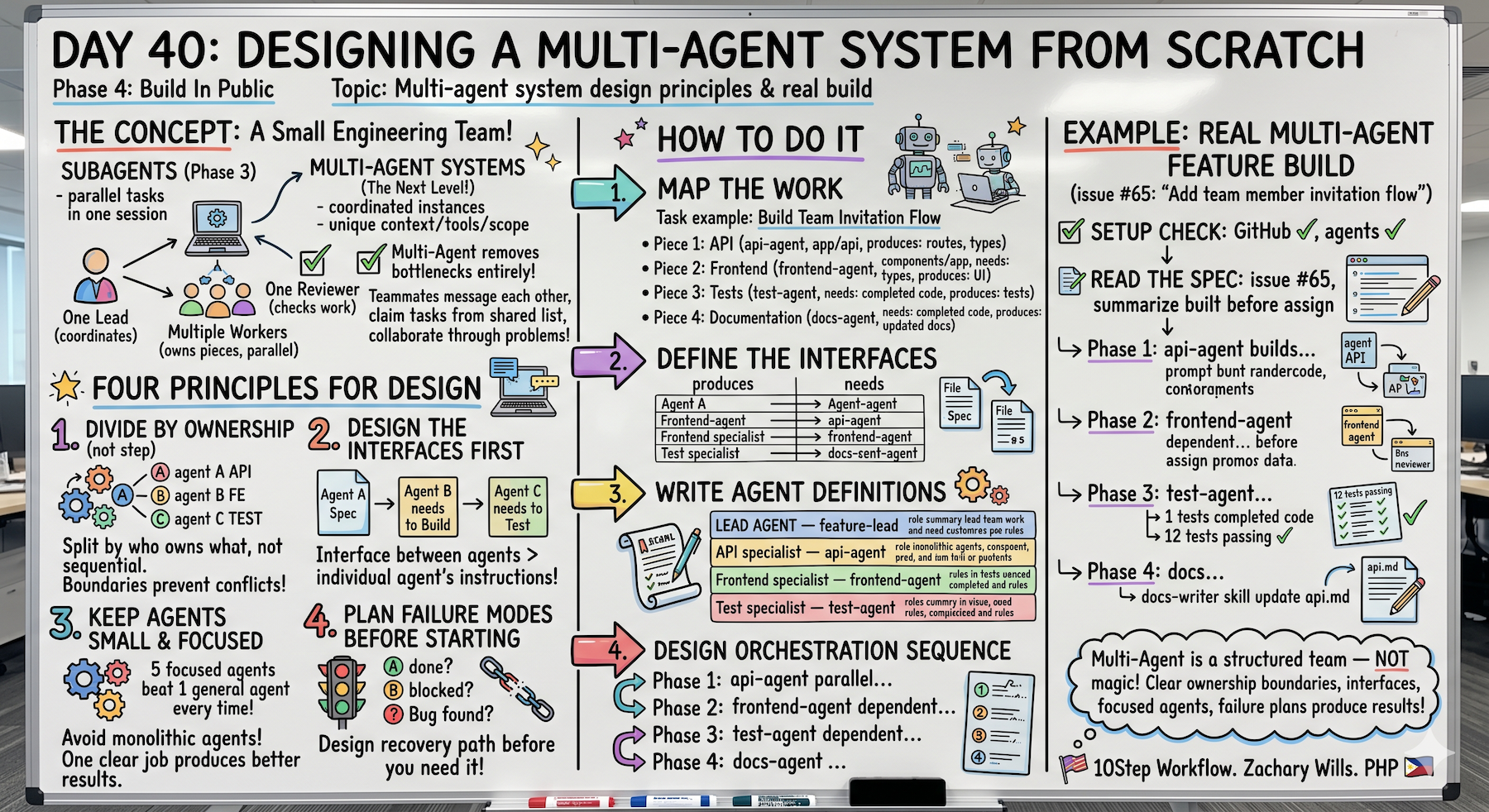
The ownership boundary principle is the one that prevents the most problems.
The first time I ran a multi-agent build without clear boundaries two agents edited the same file and produced conflicting code.
Clear ownership — api-agent owns /app/api/, frontend-agent owns /components/ and /app/pages/ — fixed it completely.
Designing the interfaces between agents before writing any agent definitions is the step most people skip and the one that matters most.
The lead agent that only coordinates and never does specialist work is a pattern worth sticking to.
When the lead tries to do both its own coordination suffers.
This feels less like using a tool and more like managing a team.
The same patterns apply.
Phase 5 Is Open
Multi-Agent Systems track starts.
Day 40: Designing from scratch ← You are here
Day 41 preview: The Orchestrator + Worker Pattern (one agent managing others, most reliable architecture for real projects)
From personal productivity to distributed systems.
The next level.
Following This Series
Core 30 Days: ✅ Complete
Bonus Days: In progress
Phase 1 (Days 1-7): Foundations ✅ Complete
Phase 2 (Days 8-21): Getting Productive ✅ Complete
Phase 3 (Days 22-35): Power User ✅ Complete
Phase 4 (Days 36-39): Build In Public ✅ Complete
Phase 5 (Days 40+): Multi-Agent Systems ⬅️ Starting now
G
P.S. - Divide by ownership not by step. api-agent owns /app/api/, frontend-agent owns /components/ and /app/pages/. No overlap. No conflicts. Ownership boundaries are everything.
P.P.S. - Design the interfaces first. What does each agent produce? What does the next one need? Define that before writing any agent definitions. Most skipped step. Most important step.
P.P.P.S. - Lead agent only coordinates, never does specialist work. When the lead tries to do both, coordination suffers. Delegate everything. That's the pattern that works.