Day 39 (Bonus): Building Your Personal Claude Code System
Portable, composable, maintainable system. Global CLAUDE.md. Version control. 5 minutes from fresh machine to full setup. Infrastructure, not files.
Hey, it's G.
Day 39 of the Claude Code series.
Phase 4: Build In Public continues.
Day 38 was about sharing your setup with others.
Day 39 is about owning it yourself.
After 39 days of building individual pieces — CLAUDE.md, slash commands, skills, subagents, MCP connections — today I assembled them into one coherent personal system.
Not a collection of files.
A system.
The Problem (Files vs System)
You've built a lot over 39 days.
Commands. Skills. Agents. Templates.
But where is it all?
Scattered Across Projects
Some commands in this project's .claude/commands/.
Some in that project's folder.
Which version is the current one?
Lost When You Switch Machines
New laptop?
Rebuild everything from scratch.
New job?
Start over.
No Clear Way to Improve It
You build a new command.
Where does it go?
How do you keep it updated?
How do you know what's working and what's not?
A collection accumulates.
A system is designed.
The Concept (Four Properties of a Personal System)
The difference between files and a system is intentionality.
A personal Claude Code system has four properties:
1. Portable
It lives in a structure that can be cloned to any machine in minutes.
New laptop. New job. New project.
Your full setup is available immediately.
2. Composable
The pieces work together.
Your CLAUDE.md references your conventions.
Your slash commands match those conventions.
Your skills reinforce them.
Everything points in the same direction.
3. Maintainable
It has a clear update routine.
New commands get added.
Stale skills get updated.
CLAUDE.md templates evolve.
The system improves with every project.
4. Discoverable
You can remember what's in it.
A system with 50 commands you never use isn't a system.
It's clutter.
Keep only what you actually reach for.
Think of it like your development environment.
Your VS Code setup. Your terminal config. Your dotfiles.
You've probably spent years refining those.
Your Claude Code system deserves the same care.
It's part of your environment now.
The Complete Personal System Structure
~/.claude/
├── CLAUDE.md               ← global rules for all projects
├── commands/               ← slash command library
│   ├── review.md
│   ├── plan.md
│   ├── debug.md
│   ├── refactor.md
│   ├── test.md
│   ├── test-component.md
│   ├── ship.md
│   ├── capture.md
│   ├── standup.md
│   ├── commit.md
│   ├── explain.md
│   └── review-focus.md
├── skills/                 ← personal skill library
│   ├── frontend-design/
│   ├── skill-creator/
│   ├── code-review/
│   ├── content-repurpose/
│   └── docs-writer/
└── agents/                 ← personal subagent library
    ├── security-reviewer.md
    ├── performance-reviewer.md
    └── code-reviewer.md
Everything in one place.
Clear structure.
Easy to find.
The Piece Most People Miss (Global CLAUDE.md)
Most CLAUDE.md files are project-specific.
Tech stack. Folder structure. Current focus.
Different for every project.
But you can also keep a global one.
~/.claude/CLAUDE.md
Applies to every project.
Your universal preferences that don't change regardless of what you're building.
Create Your Global CLAUDE.md
touch ~/.claude/CLAUDE.md
What goes in it:
# G's Global Claude Code Rules

## Universal Conventions
- TypeScript always — never plain JavaScript
- Named exports only — never default exports
- Async/await only — never .then() chains
- No console.log in committed code — use proper logging
- No commented-out code blocks — delete or keep, never comment

## Universal Behavior Rules
⚠️ NEVER push to git without my explicit instruction
⚠️ NEVER install dependencies without asking
- Always ask before running any destructive operation
- Always run the build and typecheck after making changes
- Always show me a diff before committing

## My Working Style
- I prefer outcome-focused prompts — describe what done
  looks like, not how to get there
- I review changes after each logical chunk — don't batch
  everything into one giant diff
- Plan before touching anything non-trivial

## Content Voice (for content-repurpose skill)
- Personal, direct, conversational, story-driven
- Short paragraphs — two sentences max per paragraph
- No em dashes — ever
- No generic AI tone
- CTA always points to giangallegos.com
Rules that apply everywhere.
Without re-stating them in every project.
This became the most important file in my system.
Universal conventions mean I don't repeat the same rules in every project CLAUDE.md.
Define once. Apply everywhere.
Making It Portable (One Command)
Your entire Claude Code system should be version controlled.
cd ~/.claude
git init
git add .
git commit -m "initial claude code system"
Push to a private repo:
git remote add origin [your private github repo]
git push -u origin main
Now your entire Claude Code system is:
- Version controlled
- Backed up
- Accessible from any machine
This is the setup that made me feel like I owned my system.
Not just files on one machine.
A real, portable, version-controlled system.
Setting Up a New Machine (5 Minutes)
New laptop. New job. New contract.
Full system in 5 minutes.
# Clone your system:
git clone [your private repo] ~/.claude
Verify everything is in place:
claude
What skills, commands, and agents do you have available?

What are your global rules?
Claude responds:
Global rules: TypeScript always, named exports,
              async/await, git rules, content voice

Commands (12): review, plan, debug, refactor, test,
               test-component, ship, capture, standup,
               commit, explain, review-focus

Skills (5): frontend-design, skill-creator,
            code-review, content-repurpose, docs-writer

Agents (3): security-reviewer, performance-reviewer,
            code-reviewer

Full system loaded. Ready.
Five minutes.
New machine.
Full system.
Ready to build.
The Maintenance Routine (Keep It Alive)
After Building a New Command
cp .claude/commands/new-command.md ~/.claude/commands/
cd ~/.claude
git add .
git commit -m "add [command]"
git push
After Building a New Skill
cp -r .claude/skills/new-skill/ ~/.claude/skills/
cd ~/.claude
git add .
git commit -m "add [skill] skill"
git push
Update as you learn.
The system gets better with every project.
Monthly System Audit
Run this on the first of every month:
claude
Audit my Claude Code system.

Read everything in ~/.claude/ and tell me:
- Commands I haven't used recently based on their content
- Skills that might be outdated or too narrow
- Anything missing based on the workflows we've run
- Anything that conflicts with each other

Suggest what to keep, update, or remove.
Claude analyzes your system.
Flags unused commands.
Catches outdated skills.
Suggests improvements.
I ran this recently.
Caught three commands I hadn't used in weeks.
Two skills that were slightly out of date.
The audit keeps the system healthy.
System Health Check
Run before starting important projects:
claude
Run a system health check:

1. List all available commands — are any broken or empty?
2. List all available skills — do their descriptions
   still match how I actually use them?
3. List all available agents — do their tool restrictions
   still make sense?
4. Check the global CLAUDE.md — anything outdated?

Flag anything that needs updating before we start
a new project.
Proactive maintenance.
Not reactive fixes.
Evolving the System Over Time
The system should get better with every project.
Three triggers for updates:
Trigger 1: You Typed the Same Prompt Three Times
Turn this repeated prompt into a slash command:
[paste the prompt]

Suggest a name and save it to ~/.claude/commands/
Repeated work becomes automated.
Trigger 2: A Skill Produced Wrong Output
The content-repurpose skill produced output that
doesn't match my voice in this section: [paste it]

Update the skill to prevent this in future.
Errors become improvements.
Trigger 3: You Discovered a Better Pattern
We just found a better approach to [workflow].

Update the relevant command/skill/agent to use
this approach going forward.
Learning becomes permanence.
Every project makes the system better.
Every session teaches the system something new.
Complete Real Example (New Machine Setup)
Full session: fresh machine to full Claude Code system.
Clone the System
# Terminal on new machine:
git clone git@github.com:[username]/claude-system ~/.claude
System cloned.
Verify Everything
claude
What's my full Claude Code system?

List: global rules, commands, skills, agents
Claude responds:
Global rules:
- TypeScript always, named exports only
- Async/await only, no .then() chains
- Never push to git without instruction
- Never install dependencies without asking
- Outcome-focused prompts preferred
- Review in chunks, plan before building
- Content voice: personal, direct, conversational,
  short paragraphs, no em dashes, CTA to giangallegos.com

Commands (12):
review, plan, debug, refactor, test, test-component,
ship, capture, standup, commit, explain, review-focus

Skills (5):
frontend-design, skill-creator, code-review,
content-repurpose, docs-writer

Agents (3):
security-reviewer, performance-reviewer, code-reviewer

Full system loaded. Ready.
Everything there.
Nothing missing.
Five minutes.
Start a New Project With Full System
cd ~/projects/new-project
touch CLAUDE.md
claude
I'm starting a new Next.js 14 project with Supabase.

Use my global rules as a base and help me write a
project-specific CLAUDE.md that adds the details
specific to this project.
Claude combines:
- Global rules from
~/.claude/CLAUDE.md - Project specifics for Next.js + Supabase
Into a complete project CLAUDE.md in under 2 minutes.
System running.
New project set up.
Full context loaded.
This is what a personal system enables.
Not rebuilding every time.
Building once. Using everywhere.
Why This Matters
Your Claude Code system is an asset that compounds.
Every command you add makes future sessions faster.
Every skill you refine makes future output better.
Every agent you tune makes future reviews more accurate.
The developers who get the most out of Claude Code over time aren't the ones who learned the most features.
They're the ones who built and maintained a personal system that gets better with every project.
Day 39 is about treating your Claude Code setup with the same care you'd give any other part of your development environment.
It's not a collection of files.
It's infrastructure.
My Raw Notes (Unfiltered)
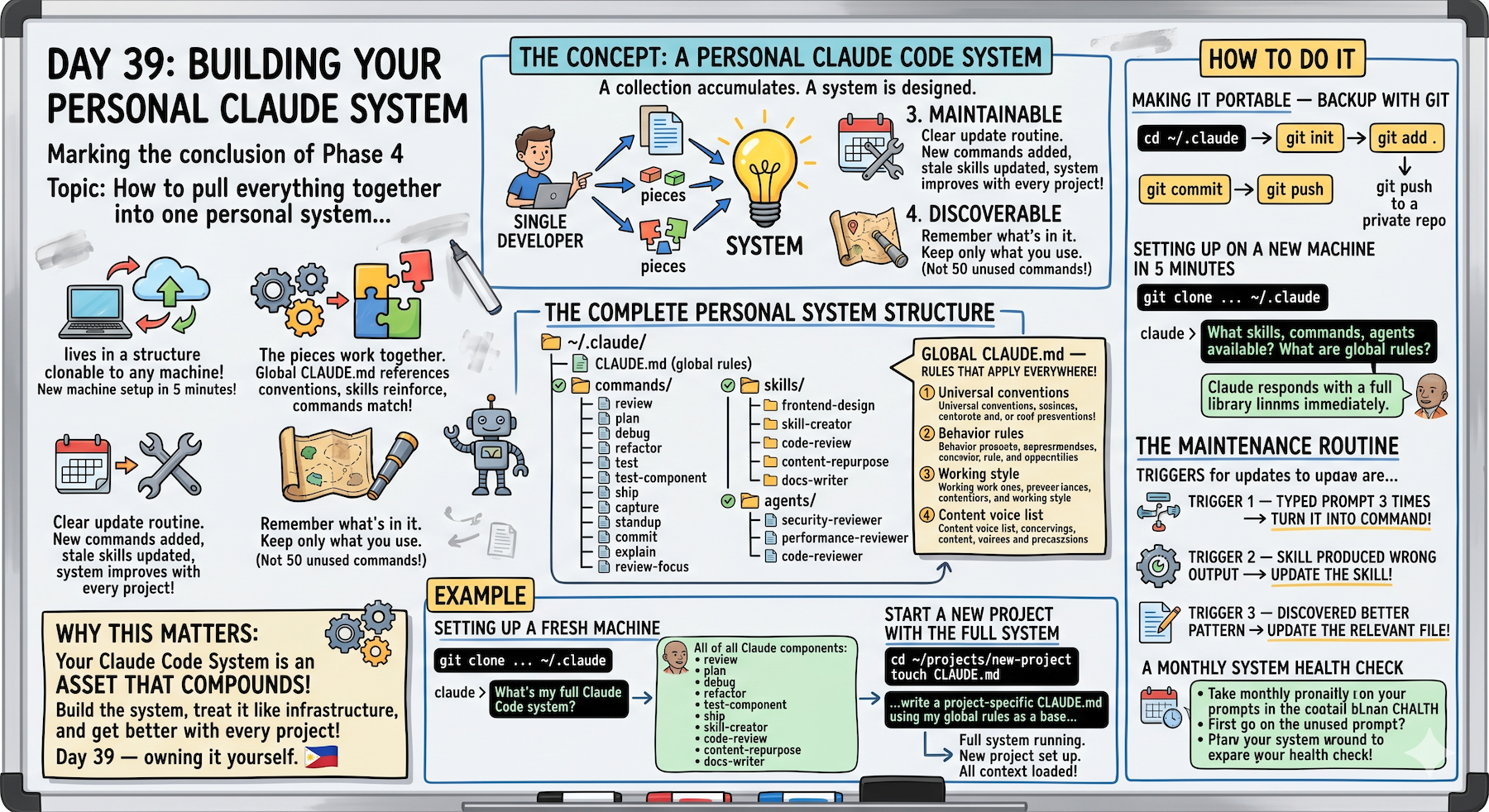
The global CLAUDE.md was something I didn't know about until recently and it immediately became the most important file in my system.
Universal conventions that apply everywhere means I don't have to put the same rules in every project CLAUDE.md.
The private git repo for the whole ~/.claude folder is the setup that finally made me feel like I owned my system — not just a bunch of files on one machine.
The monthly audit prompt caught three commands I hadn't used in weeks and two skills that were slightly out of date.
The new machine setup in 5 minutes test is how I know the system is actually working.
If I can't clone and be productive immediately, the system isn't portable enough.
That's the real test.
Build In Public Track Complete
Days 36-39 covered:
Day 36: What building in public with Claude Code looks like
Content as byproduct of building.
docs-writer + content-repurpose at session end.
10 minutes added. Story ships with code.
Day 37: Documenting your workflow as you ship
Real-time session documentation while Claude has context.
Memory fades. Details matter.
60-second prompt changes everything.
Day 38: Sharing your setup with your community
Open source CLAUDE.md templates, slash commands, custom skills.
Share the generic, protect the specific.
Process over outputs.
Day 39: Building your personal Claude Code system
Pull everything together into portable, composable, maintainable system.
Global CLAUDE.md. Version control. Monthly audits.
5 minutes to full setup on any machine.
Phase 4 Complete
Four days. Complete Build In Public system.
Build → Document → Share → Systematize
The loop is closed.
The system is portable.
The community is equipped.
What's Next
Day 40 preview:
Multi-Agent track starts.
Designing a Multi-Agent System From Scratch
How to architect complex workflows with multiple coordinated agents.
Beyond the basics. Into architecture.
Following This Series
Core 30 Days: ✅ Complete
Bonus Days: In progress
Phase 1 (Days 1-7): Foundations ✅ Complete
Phase 2 (Days 8-21): Getting Productive ✅ Complete
Phase 3 (Days 22-35): Power User ✅ Complete
Phase 4 (Days 36-39): Build In Public ✅ Complete
Phase 5 (Days 40+): Multi-Agent Systems ⬅️ Starting next
G
P.S. - The global CLAUDE.md at ~/.claude/CLAUDE.md applies to every project. Universal conventions you don't have to repeat. TypeScript always. Named exports. Content voice. Define once, apply everywhere.
P.P.S. - Version control your entire ~/.claude/ folder. Private repo. One command: git clone [repo] ~/.claude. Five minutes from fresh machine to full system. That's portability.
P.P.P.S. - Monthly audit prompt: "Read ~/.claude/ and tell me what to keep, update, or remove based on how I actually work." Catches unused commands, outdated skills. Keeps the system healthy. Run it on the first of every month.