Day 42 (Bonus): Multi-Agent for Real Projects — From Start to Shipped
Real GitHub issue to shipped feature. All systems working together. Blockers handled. Security bugs caught. Docs updated. Content posted. Full loop closed.
Hey, it's G.
Day 42 of the Claude Code series.
Phase 5: Multi-Agent Systems continues.
Days 40 and 41 were about designing and understanding multi-agent systems.
Day 42 is the real thing.
Running the full workflow on an actual feature.
Start to finish.
With everything from Phase 3 and Phase 4 working together.
No toy examples.
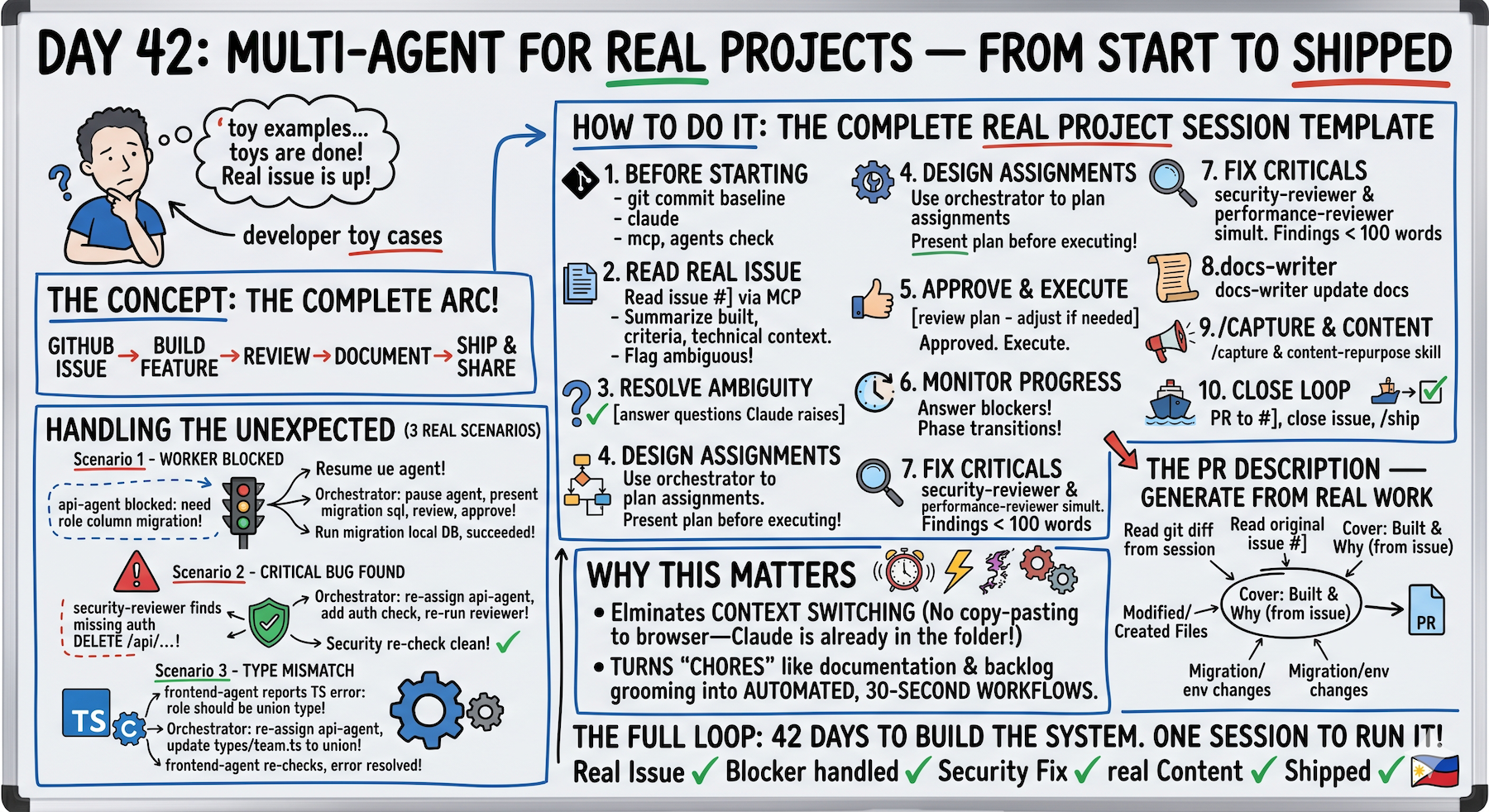
The complete arc:
Read the issue → coordinate the agents → build the feature → review it → document it → ship it.
The Problem (Tutorial Examples vs Real Projects)
You've learned the patterns.
Orchestrator + workers.
Clear ownership boundaries.
Looks good in examples.
What Happens With Real Projects
The spec isn't clean.
Ambiguity everywhere.
Workers hit blockers.
"The database table is missing a column."
Security reviewer finds critical issues.
"Missing auth check — anyone can delete anything."
Type mismatches between workers.
"api-agent returned string but frontend-agent needs union type."
Real sessions have friction.
The system needs to handle it gracefully.
Not pretend it doesn't exist.
The Concept (Everything Working Together)
A real multi-agent feature build combines every system:
From Phase 2:
- CLAUDE.md conventions
- Slash commands
- Vibe coding habits
From Phase 3:
- MCP for live GitHub data
- Skills for consistent workflows
- Subagents for parallel work
- Debugging habits
From Phase 4:
- Build in public loop
- Real-time documentation
- Orchestrator pattern
42 days of building systems.
One session to run them all.
Real Project Sessions Are Different
Three ways:
1. The Spec Comes From Real Data
Not a made-up feature brief.
An actual GitHub issue read via MCP.
Real acceptance criteria.
Real context about what already exists.
2. The Unexpected Happens
A worker hits a blocker.
A reviewer finds a critical issue.
A dependency was wrong.
Real sessions have friction.
The system needs to handle it gracefully.
3. The Output Goes Somewhere
Real commits.
Real PR.
Real docs update.
Real content posted.
The session closes a loop that started with a GitHub issue and ends with shipped code and an audience that knows about it.
The Mental Model
You are the product owner.
Claude Code is the engineering team.
You define what needs to be built.
The system figures out how.
The Complete Real Project Session Template
# Before starting:
git add . && git commit -m "before session: [issue number]"
claude
# Session startup:
/mcp — verify GitHub connected
/agents — verify all agents available
Summarize my CLAUDE.md rules
# Read the real issue:
Read GitHub issue #[number] via MCP.

Summarize: what needs to be built, acceptance criteria,
any technical context in the comments.

Flag anything ambiguous before we start.
# Resolve ambiguity before assigning:
[answer any questions Claude raises]
# Design the agent assignments:
Use the orchestrator to plan the agent assignments
for this feature.

Present the plan before executing anything.
# Review and approve:
[review plan — adjust if needed]
Approved. Execute.
# During execution — stay in the chair:
# Monitor progress
# Answer blockers immediately
# Approve phase transitions
# After all workers complete:
Run security-reviewer and performance-reviewer
on all new files simultaneously.

Report findings before we proceed.
# Fix any critical findings:
Fix the critical issue in [file]. Show me the change.
# Run full verification:
Run npm run build and npm run typecheck.
Report any errors.
# Documentation:
Use the docs-writer skill to update relevant docs.
# Capture and content:
/capture
Use the content-repurpose skill on the session log.
# Close the loop:
Create a GitHub PR linking to issue #[number].
Close the issue with a comment.
/ship
Full loop.
Nothing skipped.
Handling the Unexpected (Three Real Scenarios)
Scenario 1: Worker Hits a Blocker
api-agent reports:
Cannot complete — the team_members table doesn't have
a role column. Need migration first.
What you do:
Orchestrator: pause api-agent.

This requires a database migration before we can continue.

What migration is needed and what are the risks?

Present the migration SQL before I approve running it.
Review migration. Approve:
Run the migration on local DB only.
Confirm it succeeds before api-agent continues.
After migration succeeds:
Resume api-agent with the role column now available.
Blocker resolved. Work continues.
Scenario 2: Reviewer Finds Critical Issue
security-reviewer finds:
Missing auth check on DELETE /api/team/members/[id]

Any authenticated user can delete any team member
What you do:
Orchestrator: security-reviewer found a critical issue.

Re-assign to api-agent: add team admin auth check
to DELETE route before any user can call it.

After api-agent fixes it — re-run security-reviewer
on that file only to confirm clean.
api-agent fixes.
security-reviewer re-checks.
Clean.
Critical issue caught before ship.
Not after.
Scenario 3: Type Mismatch Between Workers
frontend-agent reports:
TypeScript error — api-agent's TeamMember interface
has role as string but the component needs it as a
union type: 'admin' | 'member' | 'viewer'
What you do:
Orchestrator: type mismatch between workers.

Re-assign to api-agent: update TeamMember.role in
/types/team.ts from string to
'admin' | 'member' | 'viewer' union type.

After api-agent updates types — frontend-agent
re-checks and confirms the error is resolved.
api-agent updates types.
frontend-agent re-checks.
Error resolved.
Interface mismatch fixed before tests.
Generating the PR Description (From Real Work)
After the session completes:
Read the git diff from this session.
Read the original GitHub issue #[number].

Write a PR description covering:
- What was built and why (from the issue)
- What files were created or modified
- How to test it
- Any migration or environment changes needed
- Screenshots or code examples where helpful
PR description from actual work done.
Not from memory.
Complete Real Example (Team Role Management)
Full session: GitHub issue to shipped feature.
Before Starting
cd ~/projects/my-app
git add . && git commit -m "before session: issue #67"
claude
Startup
/mcp
GitHub ✓
/agents
orchestrator ✓
api-agent ✓
frontend-agent ✓
test-agent ✓
security-reviewer ✓
All systems ready.
Read the Real Issue
Read GitHub issue #67 via MCP.
Claude reads and summarizes:
Feature: team members can be assigned roles

Roles: admin, member, viewer

Admins can change other members' roles
Non-admins see roles but can't change them

Acceptance criteria:
- Role badge on each member in team list
- Admin-only dropdown to change role
- API enforces role-based access
- Role change logged in activity feed
Ambiguity Flagged
Claude catches something:
One ambiguity: What happens when the last admin
tries to downgrade their own role?
Good catch.
Block it — always need at least one admin.

Add validation: cannot change own role if last admin.
That question prevented a data integrity bug.
Before any code was written.
Orchestrator Plans
Use orchestrator to plan agent assignments.
Present plan before executing.
Plan presented:
Worker 1: api-agent
- PATCH /app/api/team/members/[id]/role/route.ts
- /types/team.ts (add Role union type)
- Validation: last-admin guard
Runs: first

Worker 2: frontend-agent
- Update /components/team/MemberRow.tsx
  (add role badge + admin dropdown)
- Read /types/team.ts from api-agent first
Runs: after api-agent

Worker 3: test-agent
- Tests for PATCH route (including last-admin guard)
- Tests for MemberRow component (role badge + dropdown)
Runs: after both workers

Approved?
Review the plan.
Looks good.
Approved. Execute.
Worker 1: api-agent Runs
api-agent completes and reports:
Created: /types/team.ts — Role type added
Created: PATCH route with last-admin guard
Reporting: all validation handled, typed correctly
Orchestrator Verifies
Role union type: 'admin' | 'member' | 'viewer' ✓
Last-admin guard: tested manually ✓
Proceeding to frontend-agent
Verification passed. Next worker.
Worker 2: frontend-agent Runs
frontend-agent completes and reports:
Read /types/team.ts ✓

Updated: MemberRow.tsx
- Role badge: shows for all users
- Dropdown: renders only for admins
- Disabled state: own role for last admin
Orchestrator Verifies
Admin-only logic ✓
Disabled state for last admin ✓
Proceeding to test-agent
Verification passed. Next worker.
Worker 3: test-agent Runs
test-agent completes and reports:
14 tests written
All passing ✓
Last-admin guard test: confirms 403 response ✓
All workers complete.
Now the quality gate.
Security Review Gate
Run security-reviewer on all new files.
security-reviewer finds:
HIGH: PATCH route doesn't verify requester is
in the same team as the target member

Cross-team role change possible
Critical issue found.
Fix the Critical Issue
Orchestrator: re-assign to api-agent.

Add team membership check before role update.
Verify requester and target are in same team.
api-agent fixes.
security-reviewer re-runs.
Clean ✓
Security gate passed.
The lesson:
Being authenticated ≠ being authorized for every resource.
Obvious in retrospect.
Easy to miss in implementation.
Full Verification
Run npm run build and npm run typecheck.
Build: success ✓
Typecheck: no errors ✓
Build clean.
Documentation
Use docs-writer skill to update /docs/api.md
with the new PATCH role endpoint.
Docs updated.
Capture
/capture
Session log generated.
Key insight captured:
"Always check cross-team access, not just auth.
Being authenticated doesn't mean you have access
to every team's data."
Content
Use content-repurpose skill on the session log.

Lead the LinkedIn post with the cross-team access lesson —
not the role management feature.
LinkedIn post generated:
Being authenticated ≠ being authorized.

Shipped team role management today.
Security review caught a critical bug before deploy.

The bug: PATCH route checked if user was authenticated.
Didn't check if user was in the same team as target member.

Cross-team role changes were possible.

The fix: one extra check before the update.
Verify requester and target share a team.

Obvious in retrospect.
Easy to miss in implementation.

This is why we run security-reviewer on every feature.
Not optional. Standard.

[feature details]
[CTA to blog]
Story-driven.
Lesson-first.
Not just "shipped feature."
PR and Close
Create a GitHub PR for this session linking to issue #67.

Close issue #67 with a comment: "Shipped — role
management live with admin guard and cross-team check."
PR created via MCP.
Issue closed via MCP.
Ship
/ship
Done.
Real issue. Real blockers. Real fix. Real lesson. Real content. Shipped.
Why This Matters
Everything in this series was preparation for this session type.
The CLAUDE.md that makes Claude Code project-aware.
The slash commands that remove repeated friction.
The skills that keep output consistent.
The subagents that parallelize work.
The orchestrator that coordinates it all.
And the Build In Public habits that turn every session into content.
A real project session with all systems running is the most productive way to build software that exists right now.
Not because AI is magic.
Because a well-designed system with clear responsibilities and good debugging habits is hard to beat.
Regardless of what's doing the work.
My Raw Notes (Unfiltered)
The cross-team access bug the security reviewer caught is a real class of bug I've hit before.
Being authenticated is not the same as being authorized for every resource.
The last-admin guard edge case from the issue is exactly the kind of thing GitHub issues don't always capture but good clarification upfront handles.
Running the full session with every system active — MCP, orchestrator, workers, security reviewer, docs skill, content skill, capture command — is genuinely different from any other way of building.
The work moves fast and the output is complete by the time you close the session.
No loose ends.
What Makes It Real
Three things:
1. The Spec Comes From Real Data
Not a made-up example.
GitHub issue via MCP.
Real acceptance criteria.
Real context.
2. The Unexpected Happens
Blockers.
Security issues.
Type mismatches.
And the system handles it gracefully.
3. The Output Goes Somewhere
Real commits.
Real PR.
Real docs.
Real content posted to real audience.
Full loop closed.
Phase 5 Building
Day 40: Design from scratch (principles + architecture)
Day 41: Orchestrator + Worker (most reliable pattern)
Day 42: Real projects (start to shipped) ← You are here
Day 43 preview: Failure modes (when multi-agent breaks badly and how to recover)
From theory → implementation → production.
Next: what happens when it breaks.
Following This Series
Core 30 Days: ✅ Complete
Bonus Days: In progress
Phase 1 (Days 1-7): Foundations ✅ Complete
Phase 2 (Days 8-21): Getting Productive ✅ Complete
Phase 3 (Days 22-35): Power User ✅ Complete
Phase 4 (Days 36-39): Build In Public ✅ Complete
Phase 5 (Days 40+): Multi-Agent Systems ⬅️ Production use
G
P.S. - The cross-team access bug: being authenticated ≠ being authorized for every resource. Obvious in retrospect, easy to miss in implementation. This is why security-reviewer runs on every feature. Not optional. Standard.
P.P.S. - The last-admin guard edge case: good clarification upfront prevented data integrity bug. "What happens when last admin downgrades their own role?" One question before any code written saved hours of debugging later.
P.P.P.S. - Full session with all systems: MCP + orchestrator + workers + reviewers + docs skill + content skill + capture. Work moves fast, output complete by session close. No loose ends. This is the complete system in action.