Day 43 (Bonus): Multi-Agent Failure Modes — When Things Break Badly
Five failure modes: orchestrator loses thread, ownership violations, interface cascades, infinite loops, false completion. Prevention cheaper than recovery.
Hey, it's G.
Day 43 of the Claude Code series.
Phase 5: Multi-Agent Systems continues.
Day 34 covered debugging subagent workflows.
Day 43 is the harder version.
What happens when a full multi-agent system breaks?
Not a single subagent returning empty results.
The whole coordination falling apart.
Agents working on the wrong thing.
Conflicting changes in the same file.
An orchestrator that lost track of what was assigned.
These failures are more expensive and harder to recover from.
Today I learned how to recognize them early and what to do when they happen.
The Problem (Failures That Compound)
In a single session, a wrong decision affects one thing.
You catch it. You fix it.
Done.
In a Multi-Agent System
A wrong decision in the orchestrator gets executed by three workers simultaneously.
By the time you notice:
- Three files are wrong instead of one
- The workers' outputs don't cohere with each other
- Downstream workers built on a broken foundation
Failures compound.
That's what makes them expensive.
The Concept (Earlier = Cheaper)
The earlier you catch a failure, the cheaper it is to fix.
A wrong assumption caught in the planning phase?
Costs nothing. Just update the plan.
The same wrong assumption caught after three workers have built on it?
Costs an entire re-run.
Prevention is cheaper than recovery.
Every time.
Five Failure Modes Unique to Multi-Agent Systems
Failure Mode 1: Orchestrator Loses the Thread
The orchestrator starts strong.
But after several worker interactions it loses track of the original task.
It starts assigning work that contradicts earlier assignments.
Or approves worker output that doesn't meet the original acceptance criteria.
The thread is lost.
The session drifts off course.
Failure Mode 2: Ownership Boundary Violation
Two workers edit the same file.
One finishes.
The other overwrites its work.
You end up with:
- One worker's version and no trace of the other's contributions
- Or worse, a merged mess neither agent intended
Conflicting changes. No clear owner.
Failure Mode 3: Interface Mismatch Cascade
Worker 1 produces types or output that Worker 2 builds on.
Worker 1 makes a small change mid-execution.
Worker 2 built on the original version.
Now everything Worker 2 produced is type-incorrect or functionally broken.
The mismatch cascades through every downstream worker.
One small change. Multiple broken outputs.
Failure Mode 4: Infinite Re-Assignment Loop
A worker flags a blocker.
The orchestrator re-assigns to fix it.
The fix creates a new blocker.
The orchestrator re-assigns again.
This loops.
Until the context window is exhausted or the session times out.
No forward progress.
Just circular assignments.
Failure Mode 5: False Completion
A worker reports completion.
But the output is incomplete or wrong.
The orchestrator accepts it without verification and proceeds.
Downstream workers build on a broken foundation.
The failure only surfaces in the final review.
When everything is already built on bad output.
Too late.
Too expensive.
Prevention (Build These Into Every Workflow)
1. Git Checkpoint Before Every Worker
# Before assigning any workers:
> Before assigning any workers — run git status.
> We need a clean baseline.
git add . && git commit -m "before multi-agent: [task]"
Clean baseline. Clear recovery point.
2. Lock Ownership Boundaries Explicitly
api-agent owns ONLY these paths:
/app/api/[feature]/ and /types/[feature].ts

Do not touch any other directory.

If you need something outside these paths —
report it as a blocker, do not edit it yourself.
Explicit boundaries. No ambiguity.
3. Freeze Interfaces After Worker 1 Completes
api-agent has completed and produced /types/billing.ts.

This file is now LOCKED — no changes until all
workers complete.

frontend-agent: read /types/billing.ts now and
confirm you have what you need before building.
Interface frozen. No mid-execution changes.
Prevents cascade failures.
4. Set a Re-Assignment Limit
If any worker hits more than two blockers on the
same issue — stop and report to me.

Do not attempt a third re-assignment without
my explicit approval.
Breaks infinite loops.
Forces root cause diagnosis.
Debugging Failure Mode 1 (Orchestrator Loses Thread)
Signs
Orchestrator starts approving outputs that don't match the original acceptance criteria.
Fix: Re-Anchor the Orchestrator
Orchestrator: stop all assignments.

Re-read the original task: [paste it]
Re-read the acceptance criteria: [paste them]

List every acceptance criterion and whether
it has been met, partially met, or not started.

Resume from an accurate picture of where we are.
Explicit re-anchor.
Back on track.
Debugging Failure Mode 2 (Ownership Boundary Violation)
Signs
git diff shows a file edited by two workers.
Detect Early
Before frontend-agent starts — run git status.

List every file api-agent modified.

Confirm none of them overlap with
frontend-agent's assigned scope.
Catch before it happens.
If It Already Happened: Recover
git log --oneline -10
Identify which commit belongs to which worker.
git diff [api-agent-commit] [frontend-agent-commit] -- [file]
See what each worker changed.
Read both versions of [file] from the git history.

Merge the changes correctly — api-agent's backend
logic plus frontend-agent's rendering logic.

Show me the merged version before applying it.
Manual merge. Verify before apply.
Debugging Failure Mode 3 (Interface Mismatch Cascade)
Signs
TypeScript errors in frontend files that reference types from api-agent.
Detect Before It Cascades
After api-agent completes — before frontend-agent starts:

Run npm run typecheck on the new type files only.

Confirm zero errors before we proceed.
Catch at the source. Before it spreads.
If Cascade Already Happened
Run npm run typecheck and list every error.

Group errors by which worker's output is the root cause.

Fix the root cause first — not the symptoms.

If the root is in api-agent's types:
Re-assign to api-agent to fix /types/[file].ts

Then re-run frontend-agent only on files that
depend on the fixed types.

Do not re-run the entire workflow.
Fix the foundation first.
Re-run only what's affected.
Debugging Failure Mode 4 (Infinite Re-Assignment Loop)
Signs
Same blocker keeps appearing after each fix.
Break the Loop
Stop all assignments immediately.

This blocker has appeared [X] times.

Before any more re-assignments — diagnose the root cause.

Why does this blocker keep reappearing?
Is it a missing dependency?
A wrong assumption in the original plan?
A constraint we didn't account for?

Fix the root cause first.
Then resume with a corrected plan — not another re-assignment.
Common Root Causes of Loops
- Missing database column (need migration first)
- Missing environment variable (need to add to .env)
- Missing dependency (need to install package)
- Wrong assumption about existing API (need to read it first)
Infrastructure problem. Not code problem.
Fix the infrastructure. Loop breaks.
Debugging Failure Mode 5 (False Completion)
Prevention: Never Accept Self-Reported Completion
After every worker reports completion — verify independently:

1. List the files it created
2. Run typecheck on those files specifically
3. Check git diff to confirm the changes look right
4. Verify the output meets the acceptance criteria
   from the original issue — not just the worker's summary

Only proceed to the next worker after independent verification.
Trust but verify.
Actually: verify. Don't just trust.
If False Completion Already Cascaded
Run npm run build — report all errors
Run npm run typecheck — report all errors

Map each error back to which worker's output caused it.

Fix in reverse order — fix the foundation first.
Foundation broken. Everything else built on it.
Fix the foundation. Then rebuild on solid ground.
The Multi-Agent Recovery Playbook
When a multi-agent session goes badly wrong:
Step 1: Stop Everything
Halt all active worker assignments immediately.
No more damage. Assess first.
Step 2: Assess the Damage
Run git status and git diff.
Run npm run build and npm run typecheck.

List every broken file and every error.
Full damage report before deciding next move.
Step 3: Decide — Fix Forward or Revert?
Fix forward if:
- Only 1-2 files are wrong
- The fix is clear
Revert if:
- The foundation is broken
- Multiple workers built on it incorrectly
Fix Forward
Fix only [specific file] — leave everything else.
Show me the change before applying it.
Revert to Baseline
git checkout . # revert all uncommitted changes
Or:
git reset --hard [baseline-commit] # revert to last clean commit
Clean slate. Start from known good state.
Step 4: Fix the Plan Before Re-Running
Before we re-run — identify what caused the failure.

Update the agent assignments to prevent it happening again.

Then re-execute from the last clean checkpoint.
Don't just re-run. Fix the plan first.
Otherwise you'll hit the same failure again.
Complete Real Example (Interface Mismatch Cascade)
Caught early. Fixed at the root. Clean recovery.
The Session
cd ~/projects/my-app
claude
api-agent completes and reports done.
frontend-agent starts building.
Mid-build, frontend-agent reports TypeScript errors.
Failure Mode 3 In Progress
Catch it early:
Stop frontend-agent.

Run npm run typecheck on /types/subscription.ts only.

Report every error before we continue.
Typecheck reveals:
/types/subscription.ts: SubscriptionStatus is
exported as string but frontend-agent needs it
as a union type
Root cause found.
Fix the Foundation
Re-assign to api-agent only:

Update SubscriptionStatus in /types/subscription.ts
from string to: 'active' | 'cancelled' | 'past_due' | 'trialing'

Show me the change before applying it.
api-agent fixes the type:
/types/subscription.ts updated ✓
Freeze the Interface Now
/types/subscription.ts is now locked.

Run typecheck one more time to confirm zero errors.
Zero errors ✓
Interface frozen. Foundation solid.
Resume Frontend-Agent From Scratch
Resume frontend-agent.

Re-read /types/subscription.ts before building.

Start fresh — the previous partial build is stale.
Frontend-agent rebuilds correctly on fixed types.
No further cascades.
Lesson Captured
/capture
"Always freeze interfaces after Worker 1 completes.
A mid-execution type change cascades to every
downstream worker instantly."
Caught early. Fixed at the root. Re-run only the affected worker.
Clean.
My Raw Notes (Unfiltered)
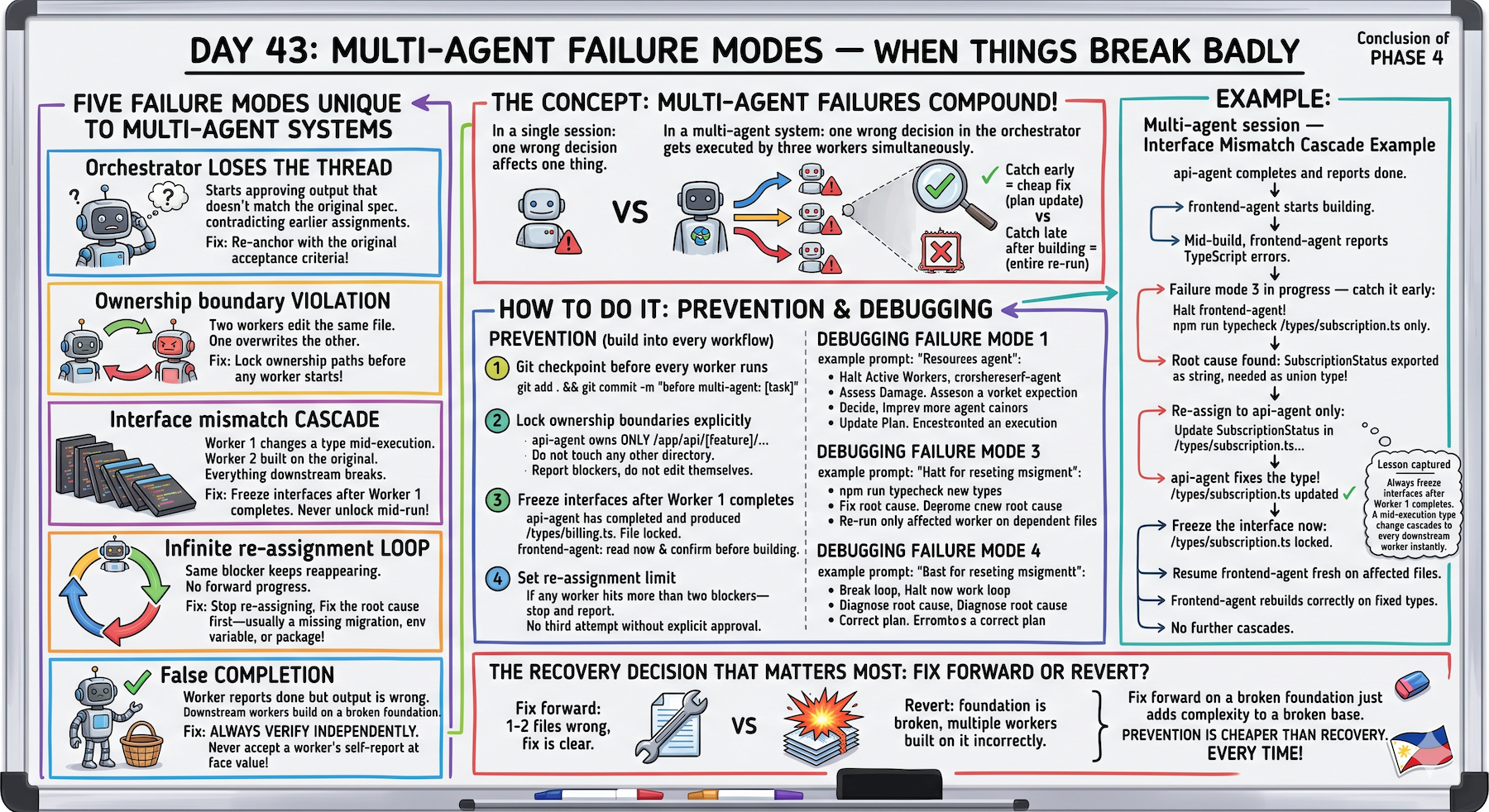
The interface mismatch cascade is the failure mode that bit me hardest in real usage.
Worker 1 made a small type change after Worker 2 had already started building on the original types.
By the time I noticed three components had type errors and the fix required partially re-running Worker 2.
The "freeze the interface after Worker 1 completes" habit eliminated this completely.
The infinite re-assignment loop is almost always caused by a missing dependency at the infrastructure level.
Missing database column. Missing environment variable. Missing package.
Fixing the infrastructure first instead of re-assigning the same worker is the escape hatch.
The revert-to-baseline decision is the hardest call in a bad session.
Fix forward feels faster.
But if the foundation is wrong, fix forward just adds complexity to a broken base.
Sometimes you have to revert. Accept it and move on.
The Recovery Decision That Matters Most
Fix forward or revert?
Fix Forward
- 1-2 files wrong
- Fix is clear
- Foundation is solid
Quick recovery. Low cost.
Revert
- Foundation is broken
- Multiple workers built on it
- Unclear how to fix forward
Clean slate. Higher cost but guaranteed solid ground.
Fix forward on a broken foundation just adds complexity to a broken base.
The hardest decision.
But the most important one.
Why This Matters
Multi-agent workflows fail in ways that are more expensive than single-session failures.
Not because they're harder to fix.
Because the failure multiplies across workers before you see it.
The prevention habits:
- Git checkpoints
- Ownership locks
- Interface freezes
- Re-assignment limits
These are cheap.
The recovery from a cascaded failure?
Expensive.
Building the prevention habits into every multi-agent session is the investment that makes the system reliable enough to trust with real work.
And trust is what determines whether you use it or not.
Multi-Agent Track Complete
Days 40-43 covered:
Day 40: Designing from scratch (principles + architecture)
Day 41: Orchestrator + Worker (most reliable pattern)
Day 42: Real projects (start to shipped)
Day 43: Failure modes (when it breaks badly) ← You are here
From design → implementation → production → recovery.
Complete.
What's Next
Day 44 preview:
Mastery Patterns track starts.
Claude Code for Solo Founders — shipping faster with a one-person team.
From multi-agent systems to solo founder workflows.
Different scale. Different patterns.
Following This Series
Core 30 Days: ✅ Complete
Bonus Days: In progress
Phase 1 (Days 1-7): Foundations ✅ Complete
Phase 2 (Days 8-21): Getting Productive ✅ Complete
Phase 3 (Days 22-35): Power User ✅ Complete
Phase 4 (Days 36-39): Build In Public ✅ Complete
Phase 5 (Days 40-43): Multi-Agent Systems ✅ Complete
Phase 6 (Days 44+): Mastery Patterns ⬅️ Starting next
G
P.S. - Interface mismatch cascade: Worker 1 changes type mid-execution, Worker 2 built on original, everything downstream breaks. Prevention: freeze interfaces after Worker 1 completes, never unlock mid-run. This one habit eliminated the failure mode completely.
P.P.S. - Infinite re-assignment loop: same blocker keeps reappearing, no forward progress. Root cause almost always infrastructure-level: missing database column, missing env variable, missing package. Fix the infrastructure first, loop breaks immediately.
P.P.P.S. - Fix forward or revert: hardest call in a bad session. Fix forward if 1-2 files wrong fix is clear. Revert if foundation broken multiple workers built on it. Fix forward on broken foundation just adds complexity to broken base. Sometimes you have to revert. Accept it and move on.