Day 46: Building Your Workflow Library - Reusable Patterns That Travel With You
After 46 days of building with Claude Code, you have workflows that work. They live in your memory, in your session history, in your raw notes. Day 46 is about extracting them and making them permanent.
Hey, it's G.
Day 46 of the Claude Code series.
The difference between a developer who's used Claude Code for a week and one who's used it for a year isn't the tool.
It's the library they've built.
After 46 days of daily documentation, I have patterns that work. Commands that save time. Workflows that prevent bugs. Playbooks that ship features faster.
The problem: they live scattered across session logs, raw notes, and memory.
Day 46 is about extraction. Taking everything that works and making it reusable.
Not just for this project. For every project. Forever.
The Problem (Why Workflows Stay Scattered)
Here's what happens without a workflow library:
New project starts.
You spend an hour setting up Claude Code from scratch. CLAUDE.md from memory. MCP connections one by one. Commands copied from another project. Skills manually moved over.
Same setup. Same hour. Every project.
Feature builds.
You run through the same sequence: plan → build → test → document → ship.
But the steps aren't written down. So every feature, you reinvent them. Sometimes you skip a phase. Sometimes you forget the security review. Sometimes you ship without the pre-deploy check.
Not because you don't know better. Because it's not systematic.
Bugs happen.
You fix the bug. Test it. Ship it. Move on.
The lesson — what caused it, how to prevent it — stays in that session. Next similar bug, you start from scratch again.
The pattern repeats: You learn. You build. You move to the next project. The learning doesn't travel with you.
That's expensive.
The Concept (What a Workflow Library Actually Is)
A workflow library is different from a command library.
Commands automate individual prompts. Workflows automate entire processes — sequences of steps, decision trees, conditional logic.
A command says "do this."
A workflow says "when this situation arises, here's how to handle it from start to finish."
Three categories of workflows worth capturing:
1. Project Initialization Workflows
How you set up a new project for Claude Code.
The CLAUDE.md template. The MCP configuration. The initial slash command setup. The subagent definitions.
Done manually the first time — automated for every project after.
2. Feature Development Workflows
The full arc from GitHub issue to shipped feature.
Every phase. Every checkpoint. Every verification step. Tailored to your stack and your conventions.
3. Maintenance Workflows
The recurring tasks that keep a project healthy.
Monthly CLAUDE.md audits. Pre-release security sweeps. Dependency updates. Documentation reviews.
Done ad-hoc the first few times — scheduled and automated after.
The goal: when you start a new project, your library gives you a complete working system in under 10 minutes.
When you hit a familiar situation on any project, your library has the playbook.
How To Build It (Step-by-Step)
Step 1 — Create the library structure:
mkdir -p ~/claude-workflow-library
cd ~/claude-workflow-library

mkdir -p playbooks
mkdir -p templates
mkdir -p checklists

touch README.md
Your library structure:
~/claude-workflow-library/
├── playbooks/     ← end-to-end workflow guides
├── templates/     ← CLAUDE.md for different stacks
├── checklists/    ← verification before critical operations
└── README.md      ← what's in here and how to use it
Write the README:
# G's Claude Code Workflow Library

Built over 47 days of daily learning.
Part of the AI For Pinoys series: giangallegos.com

## What's In Here

/playbooks    → end-to-end workflow guides for common situations
/templates    → starter files for new projects
/checklists   → verification checklists for critical operations

## Quick Start For a New Project
1. Copy /templates/CLAUDE.md to your project root
2. Run /playbooks/new-project-setup.md
3. Copy /checklists/pre-deploy.md to .claude/commands/predeploy.md
4. Done — full system in 10 minutes
That's the foundation.
Step 2 — Build your core playbooks:
Start with the three playbooks you'll use most:
New Project Setup Playbook:
touch ~/claude-workflow-library/playbooks/new-project-setup.md
# New Project Setup Playbook

Run this at the start of every new project.
Target time: 10 minutes.

## Step 1 — Git baseline (1 minute)
git init
git add .
git commit -m "initial commit"

## Step 2 — CLAUDE.md (3 minutes)
Copy from /templates/CLAUDE.md
Fill in:
- Project Overview
- Tech Stack (exact versions)
- Key Folders
- Current Focus

Verify:
claude
> Summarize my CLAUDE.md — what do you know about
> this project and what are your rules?

## Step 3 — MCP connections (2 minutes)
claude mcp add-json github '[config]' --scope user
Verify: claude mcp list

## Step 4 — Slash commands (1 minute)
Already in ~/.claude/commands/ — nothing to do
Verify: ls ~/.claude/commands/

## Step 5 — Skills (1 minute)
Already in ~/.claude/skills/ — nothing to do
Verify: claude > What skills do you have available?

## Step 6 — Subagents (1 minute)
Already in ~/.claude/agents/ — nothing to do
Verify: claude > /agents

## Step 7 — Project session log folder (30 seconds)
mkdir -p docs/sessions

## Step 8 — First session commit (30 seconds)
git add .
git commit -m "add CLAUDE.md and project structure"

## Done — full system active in 10 minutes
This playbook turns "set up a new project" from a vague hour-long task into a checklist that takes 10 minutes.
Feature Build Playbook:
touch ~/claude-workflow-library/playbooks/feature-build.md
# Feature Build Playbook

Use for any feature that takes more than one session
or touches more than 5 files.

## Phase 0 — Prep
git add . && git commit -m "before session: [issue]"
claude
> /mcp — verify connections
> Read GitHub issue #[number]
> Flag any ambiguities before we start

## Phase 1 — Plan
> Use orchestrator to plan agent assignments
> Present plan before executing
> [Review and approve]

## Phase 2 — Build
Orchestrator assigns workers in sequence:
- api-agent (no dependencies — runs first)
- frontend-agent (needs api-agent types)
- test-agent (needs both workers complete)
- docs-agent (runs last)

Checkpoints after each worker:
- Verify file count
- Run typecheck on new files
- Check git status for scope creep

## Phase 3 — Review
> Run security-reviewer and performance-reviewer
> simultaneously on all new files
> Report findings before proceeding
> Fix all Critical issues
> Re-run reviewer on fixed files

## Phase 4 — Verify
> npm run build — must succeed
> npm run typecheck — zero errors
> Run tests — all passing

## Phase 5 — Document and Ship
> Use docs-writer skill on new endpoints/components
> /capture
> Use content-repurpose skill on session log
> Create GitHub PR
> Close GitHub issue
> /ship

## Phase 6 — Post
Post LinkedIn and X content from content-repurpose output
Every feature. Same workflow. Nothing skipped.
Bug Fix Playbook:
touch ~/claude-workflow-library/playbooks/bug-fix.md
# Bug Fix Playbook

Use for any bug reported by users or found internally.

## Step 1 — Understand the bug
> /debug
> Error: [full error + stack trace]
> Where: [file and function]
> Trigger: [what action causes it]
> Read all relevant files before suggesting a fix

## Step 2 — Fix
> Explain the root cause before fixing anything
> Show me the fix before applying it
> Fix only the root cause — not the symptoms

## Step 3 — Verify the fix
> Run the specific test that covers this behavior
> If no test exists — write one first

## Step 4 — Write a regression test
> Write a test that would have caught this bug
> before it reached production
> The test should fail on the old code
> and pass on the fixed code

## Step 5 — Check for related bugs
> Is this bug pattern present anywhere else
> in the codebase?
> Search for similar code and flag it.

## Step 6 — Document the lesson
> /capture
> Lead the session log with the lesson —
> not just the fix

## Step 7 — Ship
> /review
> /ship
> git commit -m "fix: [description] (#issue-number)"
Every bug fix now includes: fix the bug, prevent the bug, document the lesson.
Step 3 — Build your template library:
Take your best CLAUDE.md and genericize it:
# Copy your current best CLAUDE.md:
cp ~/projects/resiboko/CLAUDE.md \
   ~/claude-workflow-library/templates/CLAUDE-nextjs-supabase.md

# Open it and replace project-specific values with placeholders:
code ~/claude-workflow-library/templates/CLAUDE-nextjs-supabase.md
Replace:
- Project names →
[PROJECT_NAME] - Specific URLs →
[PRODUCTION_URL] - Specific file paths → generic examples
Keep:
- Structure
- Rules and conventions
- Behavior patterns
- Stack-specific best practices
Now you have a template. Copy it to new projects. Fill in the placeholders. Done in 3 minutes.
Create templates for different stacks:
# Firebase version:
cp templates/CLAUDE-nextjs-supabase.md \
   templates/CLAUDE-nextjs-firebase.md
# Edit for Firebase-specific conventions

# Generic TypeScript:
cp templates/CLAUDE-nextjs-supabase.md \
   templates/CLAUDE-generic-ts.md
# Strip to universal TypeScript conventions only
One template per stack you actually use.
Step 4 — Build your checklist library:
touch ~/claude-workflow-library/checklists/pre-release.md
# Pre-Release Checklist

Run before every production release.

## Code Quality
☐ npm run build — success
☐ npm run typecheck — zero errors
☐ All tests passing
☐ No console.log in committed code
☐ No hardcoded values that should be env vars

## Security
☐ security-reviewer run on all new files — clean
☐ New API routes — authenticated properly
☐ New Supabase tables — RLS policies set
☐ No secrets in git history
☐ .env files in .gitignore

## Database
☐ All migrations run on staging first
☐ New indexes added for new query patterns
☐ No breaking changes to existing queries

## Environment
☐ All new env vars added to Vercel production
☐ .env.example updated for teammates
☐ CLAUDE.md deployment section updated

## Documentation
☐ API docs updated for new endpoints
☐ README updated if setup changed
☐ CHANGELOG.md entry written

## Content
☐ Release announcement ready
☐ GitHub release notes written

Run: claude > /predeploy — for automated checks on
code quality, security, and environment items.
Copy this to .claude/commands/predeploy.md on every project.
Run /predeploy before every production deploy.
Step 5 — Version control your library:
cd ~/claude-workflow-library
git init
git add .
git commit -m "initial workflow library — 46 days of patterns"

# Push to GitHub (public or private):
git remote add origin [your-repo-url]
git push -u origin main
Now your library lives in git. Versioned. Backed up. Shareable.
The maintenance habit:
# After finding a better pattern:
claude
> We just found a better way to handle [situation].
> Update the relevant playbook in ~/claude-workflow-library/
> to capture this pattern for future projects.

cd ~/claude-workflow-library
git add . && git commit -m "update [playbook]: [what changed]"
git push
Update immediately. Not later. Now.
That's how the library stays alive.
Real Example (Using the Library on a New Project)
# Starting a brand new SaaS project:
mkdir ~/projects/new-saas && cd ~/projects/new-saas
git init

# Copy the right CLAUDE.md template:
cp ~/claude-workflow-library/templates/CLAUDE-nextjs-supabase.md \
   CLAUDE.md

# Fill in the placeholders — 3 minutes:
code CLAUDE.md
# Replace [PROJECT_NAME], [PRODUCTION_URL], etc.

# Run the new project setup playbook:
claude
> Read ~/claude-workflow-library/playbooks/new-project-setup.md
> Run through each step for this project.
> Report completion of each step before moving to the next.
Claude runs through all 8 steps:
Step 1: git baseline ✓
Step 2: CLAUDE.md verified ✓
Step 3: GitHub MCP connected ✓
Step 4: 12 commands available ✓
Step 5: 5 skills available ✓
Step 6: 3 agents available ✓
Step 7: docs/sessions folder created ✓
Step 8: initial commit ✓

All steps complete. Full Claude Code system active.
Total time: 9 minutes.
Status: full Claude Code system active on new project.
First feature — use the feature build playbook:
claude
> Read ~/claude-workflow-library/playbooks/feature-build.md
> We are building [first feature].
> Follow the playbook from Phase 0.
Claude follows the phases. Every checkpoint. Every verification. Nothing skipped.
New project. Full system. 9 minutes. First feature building.
That's the unlock.
Why This Actually Matters
The workflow library is the thing that makes everything else compound.
Every pattern you capture becomes available on every future project.
Every playbook you write removes decision-making overhead from future sessions.
Every template you refine means future projects start stronger than current ones.
Most developers build the same setup from scratch on every project — spending the same hour configuring the same things.
A workflow library means you spend that hour once.
Every project after that inherits 46 days of learning before the first line of code is written.
What compounds:
- Week 1: You have one CLAUDE.md. You write it manually each time.
- Week 4: You have a template. New projects take 10 minutes.
- Week 12: You have playbooks. Features ship faster.
- Week 24: You have checklists. Production bugs drop.
- Week 52: You have a library that represents a year of learning.
New developers starting with your library on Day 1 inherit what took you a year to build.
That's what a workflow library does.
What Goes in Your Library (The Essentials)
Playbooks you'll use most:
- new-project-setup.md
- feature-build.md
- bug-fix.md
- database-migration.md
- api-integration.md
Templates you'll need:
- CLAUDE-[your-primary-stack].md
- CLAUDE-generic-ts.md
- .claude-commands-template/
Checklists that prevent disasters:
- pre-release.md
- pre-deploy.md
- security-audit.md
- monthly-maintenance.md
Start with these. Add more as patterns emerge.
The Habit That Keeps It Alive
The library only stays valuable if you maintain it.
The rule:
When you find a better way to do something — update the library immediately.
Not later. Not next week. Now.
# Right after the session where you discovered the pattern:
cd ~/claude-workflow-library
code playbooks/[relevant-playbook].md
# Update with the new pattern
git add . && git commit -m "update: [what improved]"
git push
Three minutes. Pattern captured. Available forever.
That's the habit.
My Raw Notes (Unfiltered)
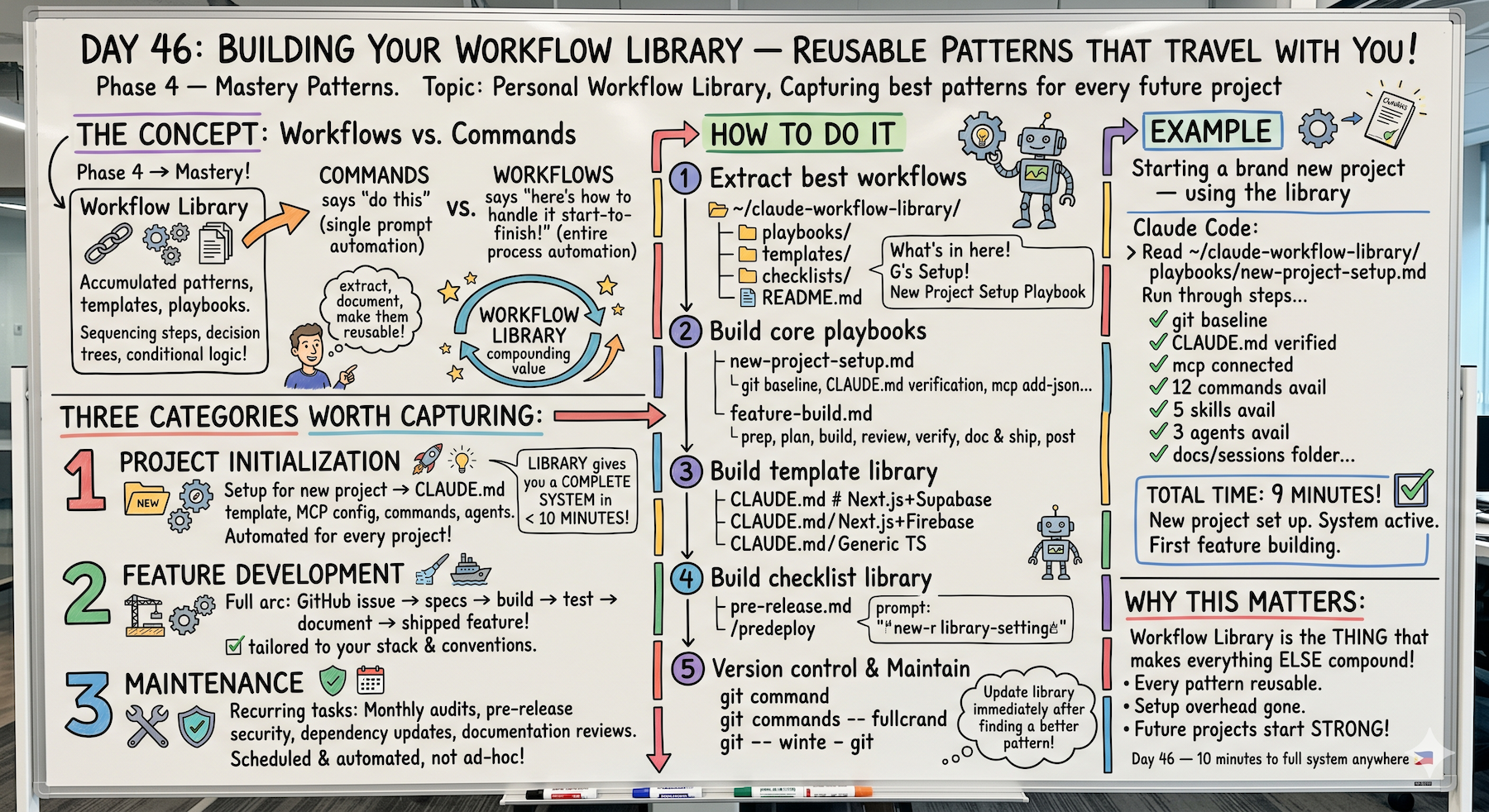
The playbook idea came from realizing I was running the same sequence of prompts on every new feature and reinventing the steps each time. Writing it down once as a playbook and reading it at the start of each feature session means I never skip a phase.
The pre-release checklist caught a missing RLS policy on a new table on the first real use — would have been a security issue in production.
The template library is the thing I wish I had on Day 1 — starting every project with a proven CLAUDE.md instead of building from scratch saves an hour of setup every time.
The key habit for keeping the library alive: update it immediately after finding a better pattern — not later.
Tomorrow (Day 47 Preview — The Final Lesson)
Topic: Where Claude Code Is Going — what's next, how to stay ahead, and what 47 days of daily learning actually built.
This is the last day of the series. We're closing it out.
Following This Series
47 days. Daily documentation. From setup to mastery patterns.
We've covered:
- Foundation (Days 1-10): Setup, prompting, CLAUDE.md, file systems, terminal commands
- Workflows (Days 11-20): Planning, testing, documentation, debugging
- Advanced Patterns (Days 21-35): MCP, Skills, Subagents, Multi-agent systems
- Mastery (Days 36-46): Real projects, failure modes, solo founder workflows, stack integration, workflow library
Day 47 tomorrow: The final lesson.
G
P.S. - Every project after today inherits everything you've learned. That's what 46 days of building produces.
P.P.S. - If you've built your own workflow library, what's in it? Drop it in the comments. I want to see what patterns other people have captured.
P.P.P.S. - The three files worth building today: new-project-setup.md, feature-build.md, and pre-release.md. Everything else builds from these.