Day 45: Claude Code + Your Existing Tools — Supabase, Firebase, Vercel Integration
Claude Code doesn't replace your tools. It works with them. But there's a difference between "works with" and "deeply integrated." Here's how to wire it into your actual stack.

Hey, it's G.
Day 45 of the Claude Code series.
Most people set up Claude Code to understand their codebase.
Fewer set it up to understand their infrastructure — the database schema, the deployment pipeline, the third-party services, the environment configuration.
That gap matters.
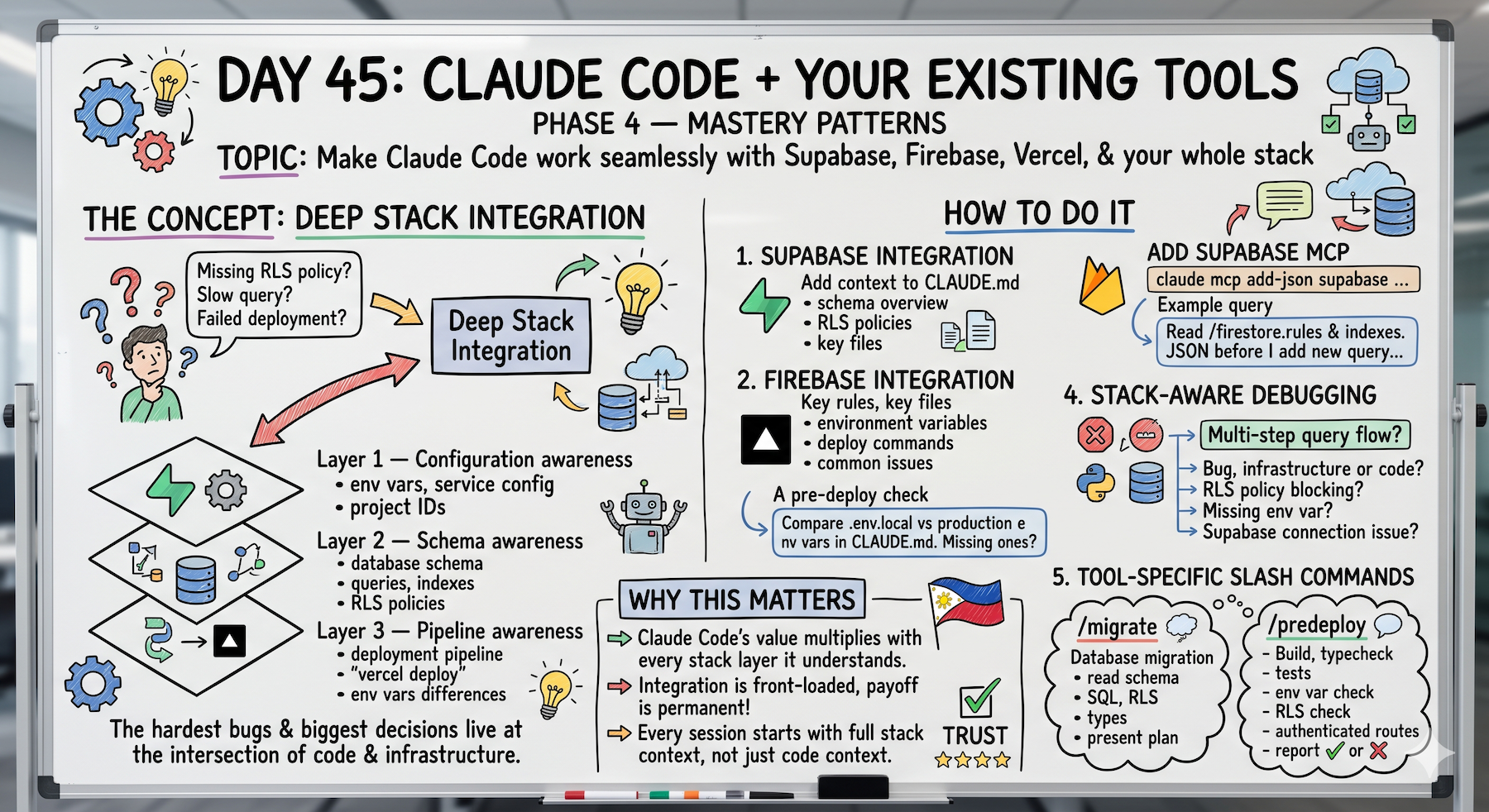
The hardest bugs and the most important decisions live at the intersection of code and infrastructure.
A query that's slow because of a missing index.
A deployment that fails because of a missing environment variable.
An auth flow that breaks because of a Supabase RLS policy.
Claude Code can't help with these if it doesn't know the infrastructure exists.
Today's about closing that gap.
The Problem (Why Code-Only Context Isn't Enough)
Here's what happens without stack integration:
Bug: Query returns no results but should return data.
You: "Claude, this query isn't working. Fix it."
Claude Code (code-only context): Reads the query. SQL looks correct. TypeScript looks correct. Suggests: "Maybe the data doesn't exist?"
Reality: The data exists. But your Supabase RLS policy is blocking the query silently. The code is fine. The infrastructure is the problem.
Without stack awareness, Claude Code can't see it.
Another example:
You: "This works locally but fails in production."
Claude Code (code-only context): "I can't see production logs. Can you paste them?"
Reality: Missing environment variable in Vercel. Claude Code knows your code runs process.env.RESEND_API_KEY but doesn't know whether that variable exists in production or not.
The pattern repeats:
- Slow queries → missing database index
- Deployment failures → missing env var
- Auth bugs → RLS policy mismatch
- API errors → Vercel edge runtime restrictions
All infrastructure problems. None visible to code-only context.
The Concept (Three Layers of Stack Integration)
Deep stack integration has three layers:
Layer 1 — Configuration Awareness
Claude Code knows your environment variables, your service configuration, your project IDs.
Not the secret values — but the structure.
It knows what environment variables exist, what services they connect to, and what happens if they're missing.
Layer 2 — Schema Awareness
Claude Code knows your database schema.
For Supabase or Firebase this means it can write queries, suggest indexes, and spot RLS policy gaps without you explaining the schema every session.
Layer 3 — Pipeline Awareness
Claude Code knows your deployment pipeline.
It knows what happens when you run vercel deploy, what environment variables need to be set in production, and what the difference between your local and production configs is.
When Claude Code has all three layers, it can debug across the entire stack — not just the code.
Supabase Integration (How To Actually Do It)
Step 1: Add Supabase context to CLAUDE.md
## Database (Supabase)

Schema overview:
- users: id, email, created_at, team_id, role
- teams: id, name, created_at, owner_id
- subscriptions: id, team_id, stripe_customer_id,
                 status, plan, current_period_end
- invitations: id, team_id, email, token,
               accepted_at, expires_at

RLS policies:
- users: can only read/write own row
- teams: members can read, only owner can update
- subscriptions: team members can read,
                 only system can write
- invitations: team admins can create,
               anyone with token can read

Key Supabase files:
- /lib/supabase.ts → client config (server + browser)
- /utils/db/ → all database query helpers
- /types/database.ts → generated types from schema

Never write raw SQL in components — use helpers in /utils/db/
Never bypass RLS — always use the authenticated client
This goes in your CLAUDE.md once. Every session after that, Claude knows the schema.
Step 2: Stack-aware debugging
Now when you hit a Supabase bug:
claude

> This query is returning no results but should return data.
> Read /utils/db/teams.ts to see the query.
> Check: is the authenticated user hitting an RLS policy?
> What RLS policies apply to this table and
> could any of them block this specific query?
Claude reads the query. Checks against the documented RLS policies. Spots the mismatch.
Before schema awareness: "The query looks correct."
After schema awareness: "The query is correct but your RLS policy blocks users from reading teams they're not members of. The user isn't in memberIds[]."
That's the difference.
Step 3: Supabase MCP for live schema access (optional but powerful)
If you want Claude Code to read your actual live schema instead of relying on CLAUDE.md documentation:
claude mcp add-json supabase \
  '{"type":"http","url":"https://mcp.supabase.com/mcp",
  "headers":{"Authorization":"Bearer YOUR_SUPABASE_PAT"}}' \
  --scope user
Now Claude Code can query your actual schema in real time:
claude
> Read the current schema for the subscriptions table.
> Are there any missing indexes for the queries
> we run most often?
Claude reads the live schema. Analyzes your most common queries. Suggests missing indexes.
No manual documentation needed. Direct schema access.
Firebase Integration (Same Principle, Different Tool)
Add Firebase context to CLAUDE.md:
## Database (Firebase/Firestore)

Collections:
- users/{userId}: profile, email, teamId, role, createdAt
- teams/{teamId}: name, ownerId, memberIds[], createdAt
- subscriptions/{teamId}: plan, status, stripeCustomerId
- content/{contentId}: title, body, authorId, teamId,
                        published, createdAt

Security rules location: firestore.rules
Key rules: users can only read/write own doc,
           team members can read team doc,
           only owner can update team doc

Key Firebase files:
- /lib/firebase.ts → app initialization
- /lib/firestore.ts → db instance + helpers
- /utils/db/ → all collection query helpers

Never use admin SDK in client components
Always use security rules — never disable them
Now before adding any new Firestore query:
claude
> Read /firestore.rules and /firestore.indexes.json.
> Before I add a new query for [feature] —
> check if the security rules allow it and
> if we need a new composite index.
Claude checks the rules first. Flags if the query would be blocked. Flags if a composite index is needed.
Catches the bug before you write the code.
Vercel Integration (Production Environment Awareness)
Add Vercel context to CLAUDE.md:
## Deployment (Vercel)

Project: [project-name]
Production URL: https://[your-app].vercel.app
Preview URLs: auto-generated per PR

Environment variables:
Local (.env.local):
- NEXT_PUBLIC_SUPABASE_URL
- NEXT_PUBLIC_SUPABASE_ANON_KEY
- SUPABASE_SERVICE_ROLE_KEY
- STRIPE_SECRET_KEY
- STRIPE_WEBHOOK_SECRET
- RESEND_API_KEY

Production (set in Vercel dashboard):
All of the above — values differ from local

Deploy command: vercel deploy --prod
Preview deploy: vercel deploy (automatic on PR)

Common deployment issues:
- Missing env var in Vercel → build succeeds locally,
  fails in production
- Supabase connection pooling → use transaction mode
  for serverless functions
- Edge runtime restrictions → no Node.js APIs in
  /app/api/ routes using edge runtime
Now before every deploy:
claude
> Before I deploy to production:
> Read .env.local and compare against the env vars
> documented in CLAUDE.md.
> List any env vars that are in .env.local but
> might be missing from the Vercel production config.
> Flag any common deployment issues to check.
Claude compares local against production config. Flags missing env vars before you deploy.
This has saved me twice in the first week of using it.
Works locally. Deploy to production. Feature silently breaks. Missing env var in Vercel.
Now it gets caught before deploy.
Stack-Aware Debugging (The Real Unlock)
When a bug could be code or infrastructure:
claude

> This bug might be in the code or in the infrastructure.
> Error: [paste error]
>
> Check both:
> 1. Is this a code bug in [relevant files]?
> 2. Could this be an RLS policy blocking the query?
> 3. Could this be a missing environment variable
>    in production?
> 4. Could this be a Supabase connection issue?
>
> Diagnose each possibility before suggesting a fix.
Claude checks all layers. Code. Schema. RLS. Environment. Infrastructure.
Gives you a diagnosis that covers the entire stack.
Supabase-specific debugging:
claude
> This query is returning no results but should return data.
> Read /utils/db/subscriptions.ts to see the query.
> Check: is the authenticated user hitting an RLS policy?
> What RLS policies apply to this table and
> could any of them block this specific query?
This is the one that saved me the most debugging time.
Supabase RLS bugs are notoriously hard to spot.
The query looks right. The code looks right. But the policy is blocking it silently and returning empty results.
Having Claude check RLS before suggesting a fix changed how fast I resolve these.
Vercel-specific debugging:
claude
> This works locally but fails in production.
> Read the error from the Vercel logs: [paste logs]
> Check: is this a missing env var, an edge runtime
> restriction, or a connection pooling issue?
Claude knows the common Vercel failure modes. Checks each one. Narrows it down.
Environment Parity (Keep Local and Production in Sync)
Add this to your weekly routine:
claude
> Compare .env.local against the env vars listed
> in CLAUDE.md under "Deployment".
> Flag any that exist locally but might not be
> set in production.
> Flag any new services we've added that need
> production env vars I might have forgotten.
Run this every Monday. Catches drift before it causes production bugs.
Before adding any new third-party integration:
claude
> I'm adding [service] to the project.
> What environment variables will it need?
> Add them to:
> 1. .env.local (with placeholder values)
> 2. .env.example (documented for teammates)
> 3. CLAUDE.md deployment section
> 4. A checklist of what to add in the Vercel dashboard
Claude handles all four places at once. Nothing gets missed.
Tool-Specific Slash Commands (Reusable Workflows)
Supabase migration helper:
Create ~/.claude/commands/migrate.md:
I need to run a database migration.

Before touching anything:
1. Read the current schema from CLAUDE.md
2. Understand what change is needed
3. Write the migration SQL
4. Check if any RLS policies need updating
5. Check if any TypeScript types need regenerating
6. Check if any existing queries will break

Present the migration plan and SQL before running anything.
Flag any risks — especially RLS policy gaps or
breaking changes to existing queries.
Wait for explicit approval before executing.
Now every migration follows the same safe process:
claude
> /migrate
> I need to add a content_views table.
Claude reads the schema. Proposes the table. Writes the migration SQL. Checks RLS. Flags risks. Waits for approval.
Clean every time.
Vercel pre-deploy checklist:
Create ~/.claude/commands/predeploy.md:
Pre-deployment checklist before pushing to production:

1. Run npm run build — must succeed
2. Run npm run typecheck — zero errors
3. Run all tests — all passing
4. Check .env.local vs CLAUDE.md deployment section
   — any missing production env vars?
5. Check git diff — anything that shouldn't be in
   this deploy?
6. Check for console.log statements in new code
7. Check for hardcoded values that should be env vars
8. Any new Supabase tables — RLS policies set?
9. Any new API routes — authenticated properly?

Report each check as ✓ or ✗ with details on failures.
Do not approve deployment if any ✗ items are unresolved.
Now before every production deploy:
claude
> /predeploy
Claude runs the full checklist. Reports ✓ or ✗ on each item. Blocks deploy if anything fails.
This is now the last thing I run before every production deploy.
Caught a missing env var twice. Caught a console.log in production code once. Caught a new table with no RLS policy once.
All before deploy. None in production.
Real Example (Stack-Aware Feature Build)
cd ~/projects/resiboko
claude

# Adding a new Supabase table:
> I need to add a content_views table to track
> which content items each user has viewed.
>
> Before we build anything:
> 1. Read the current schema from CLAUDE.md
> 2. Propose the table structure
> 3. Write the migration SQL
> 4. Write the RLS policies
> 5. Check if we need any new indexes
> 6. List what TypeScript types need updating
Claude reads the existing schema. Proposes:
Table: content_views
Columns: id, content_id (fk), user_id (fk),
         viewed_at, view_duration_seconds

Indexes:
- content_id (for "views per content" queries)
- user_id + content_id (for "has user viewed" queries)

RLS:
- users can insert own views
- content owner can read views on their content
- no updates or deletes

Migration SQL: [shows actual SQL]
You review. Looks right.
> The table structure looks right.
> Run the migration on local Supabase instance.
> Confirm it succeeds before we write any code.
Migration runs. Success ✓
Now build the feature on the confirmed schema:
> /plan for the content_views feature
> [approve]
> [build]
Pre-deploy check before shipping:
> /predeploy
All checks pass ✓
Deploy.
Schema designed. Migration run. Feature built. Pre-deploy passed. Clean.
That's the workflow.
Why This Actually Matters
Claude Code's value multiplies with every layer of your stack it understands.
A Claude Code that only knows your TypeScript code helps with one layer.
A Claude Code that knows your database schema, your RLS policies, your deployment pipeline, and your environment configuration helps with all of them simultaneously.
The integration work is front-loaded — a few hours of CLAUDE.md updates and MCP configuration.
The payoff is permanent.
Every session after that starts with full stack context, not just code context.
The bug that integrating the stack prevents most:
Supabase RLS blocking a query silently.
Code looks right. Query looks right. But the policy is blocking it and returning empty results.
Claude Code now checks RLS before suggesting any Supabase fix.
That one change cut my Supabase debugging time in half.
My Raw Notes (Unfiltered)
The RLS policy awareness is the one that saved me the most debugging time. Supabase RLS bugs are notoriously hard to spot — the query looks right, the code looks right, but the policy is blocking it silently. Having Claude check RLS before suggesting a fix changed how fast I resolve these.
The /predeploy command is now the last thing I run before every production deploy — caught a missing env var twice in the first week of using it.
The environment parity check as a weekly habit is something I added after deploying to production and discovering a feature that worked locally was silently broken in prod because of a missing env var I forgot to add to Vercel.
Tomorrow (Day 46 Preview)
Topic: Building Your Workflow Library — reusable patterns, commands, and systems that travel with you across every project forever.
What I'm testing: How to build once, use everywhere. The commands and workflows that are worth making permanent.
Following This Series
Daily updates for 30 days. Each day builds on the last.
We've covered setup, prompting, file systems, terminal commands, CLAUDE.md, workflows, testing, multi-agent systems, solo founder operations, and now stack integration.
Day 46 tomorrow: Your permanent workflow library.
G
P.S. - Your tools don't change. Your context does.
P.P.S. - If you're using Claude Code with Supabase, Firebase, or Vercel, what's your integration setup? Drop it in the comments. I want to learn from people who've wired this deeply into their stack.
P.P.P.S. - The /migrate and /predeploy commands are worth building today. They'll save you more time than any other custom commands in your library.