Day 37 (Bonus): Documenting Your Claude Code Workflow As You Ship
Capture process in real time while Claude has context. Session documentation → docs + content. Memory fades. Details matter. 60-second prompt changes everything.
Hey, it's G.
Day 37 of the Claude Code series.
Phase 4: Build In Public continues.
Yesterday was about the mindset shift.
Today is about the mechanics.
How do you actually capture your process in real time so your content is always accurate and your audience always learns something real?
The answer isn't "write better notes after the session."
It's: ask Claude to document the session while you're still in it.
The Problem (Memory Fades, Details Get Lost)
Here's what happens when you try to document later:
During the Session
You're building.
Deep in the work.
Making decisions.
Trying things.
Solving problems.
After the Session
You sit down to write about it.
"What did I actually do?"
You remember the outcome.
You remember it worked.
You don't remember the three things you tried that didn't work first.
What You Write
"Built a dark mode toggle today. Works great."
Generic. Forgettable. Not useful.
What You Could Have Written (If You Captured It)
"Dark mode toggle took three attempts. First try: state in parent component, re-rendered everything on toggle. Second try: Context API, over-engineered for a boolean. Third try: simple localStorage hook, 15 lines, perfect. The lesson: start simple."
Specific. Memorable. Actually useful.
The difference between those two?
Capturing the process while it's happening.
Not reconstructing it from memory after.
The Concept (Real-Time Session Documentation)
Claude Code was there for the entire session.
It saw what you built.
It saw what you tried first.
It saw what didn't work.
It knows the story.
So at the end of the session, don't ask it to summarize what you built.
Ask it to document how you built it.
The Shift
Generic question:
What did we build today?
Result: Feature announcement. No context. No story.
Documentation question:
Document this session:
- What was the original problem?
- What approaches did we try?
- What didn't work and why?
- What did work and why?
- What was the key decision that unlocked it?
Result: Complete narrative. Context. Lessons. Real content.
That's the difference between content people scroll past and content people save.
How Real-Time Documentation Works
At the End of Every Session
claude
Before we close this session, document what happened:

1. What problem were we solving?
2. What was our first approach?
3. What didn't work about it?
4. What did we try next?
5. What was the final solution?
6. What was the key insight?
7. What would someone building this learn from our process?

Write it as a story, not a changelog.
Claude gives you the narrative.
Because it was there.
Because it remembers the git diffs.
Because it saw the failures before the success.
The Three Documentation Prompts You Need
1. Session Story (What Happened)
Document this session as a story:
- What we set out to build
- What challenges came up
- How we solved them
- What we learned

Write it like you're explaining to another developer
who wants to understand the process, not just the result.
Output: Complete narrative ready for blog post or LinkedIn.
2. Technical Decisions (Why We Did It This Way)
Document the key technical decisions we made:
- What options did we consider?
- Why did we pick this approach?
- What tradeoffs did we accept?
- What would we do differently at scale?

Be specific about the reasoning.
Output: Technical depth for developer audience.
3. Lessons Extract (What Others Should Know)
What are the three most valuable lessons from this session
that would help someone else building something similar?

Not generic advice — specific insights from what we just did.
Output: Actionable takeaways for content.
Combining With Phase 4 Content Generation
Yesterday you learned the 6-step Build In Public loop.
Today: add real-time documentation before content generation.
Updated Loop
1. Read GitHub issue
2. Build the feature
3. Run pre-release checks
4. Document the session ← NEW
5. Use docs-writer skill (with session doc as input)
6. Use content-repurpose skill (with session doc as input)
7. Close the loop
Why this matters:
When docs-writer and content-repurpose have the session story, they generate better output.
Not generic. Specific.
Not announcements. Stories.
Complete Real Session Example
Building a feature with real-time documentation.
The Issue
cd ~/projects/my-app
claude
Read GitHub issue #62 — "Add user avatar upload"
Summarize before we start.
GitHub MCP reads issue:
Users should be able to upload profile avatars.
Support: JPG, PNG, WebP
Max size: 2MB
Store in Cloudinary
Display in navbar and profile page
Confirmed. Let's build.
The Build
/plan
Plan approved.
Building starts.
First approach: direct Cloudinary upload from browser
Works.
But upload widget is heavy (300kb).
Feels slow.
Second approach: upload to our API, API uploads to Cloudinary
Better.
But need to handle file validation on server.
And progress indicators.
And error states.
Final approach: signed upload URLs from Cloudinary
Browser gets signed URL from our API.
Uploads directly to Cloudinary with that URL.
No file passing through our server.
Progress tracked client-side.
Perfect.
Feature complete.
Pre-Release Check
Run security-reviewer on the new files.
Any issues?
Clean.
Real-Time Documentation (The New Step)
Before we move to docs and content, document this session:

1. What problem were we solving?
2. What was our first approach?
3. Why didn't that work?
4. What was our second approach?
5. Why was the final approach better?
6. What was the key technical decision?
7. What would someone building this learn?

Write it as a story.
Claude generates:
## Avatar Upload Implementation — Session Documentation

**Problem:** Users need profile avatar upload with good UX and
reasonable server load.

**First Approach:** Cloudinary upload widget directly in browser.
- Pros: Easy integration, handles everything
- Cons: 300kb bundle size, slow initial load
- Why we moved on: UX felt sluggish on slow connections

**Second Approach:** Upload to our API, API forwards to Cloudinary.
- Pros: Full control, can add custom validation
- Cons: Files pass through our server (bandwidth + processing),
  harder to track upload progress
- Why we moved on: Unnecessary server load for a proxy operation

**Final Approach:** Signed upload URLs from Cloudinary.
- How it works: Client requests signed URL from our API,
  uploads directly to Cloudinary using that URL,
  Cloudinary returns asset details, we store reference in DB
- Pros: No file through our server, native progress tracking,
  secure (signed URLs expire), scales infinitely
- Cons: Slightly more complex flow (but worth it)

**Key Decision:** Choosing signed URLs over upload widget or
API proxy. The insight was: we don't need to touch the file,
we just need to authorize the upload. Cloudinary handles the
rest. This saved bandwidth and gave us better UX.

**What Someone Building This Would Learn:**
When integrating file uploads, ask: does this file need to
pass through my server? If no (and it's usually no for images),
use signed URLs or presigned uploads. Save your server for
things only your server can do.
This is what Claude saw during the session.
This is the real story.
Now we have something worth sharing.
Documentation (With Session Context)
Use the docs-writer skill to update API docs.

Context from session:
[paste session documentation above]

Read the new route files before writing.
User-facing language.
docs-writer generates:
## Avatar Upload

Upload profile avatars using secure, direct-to-cloud uploads.

**Endpoint:** `POST /api/avatar/sign`

Returns a signed upload URL valid for 5 minutes.

**Supported formats:** JPG, PNG, WebP (max 2MB)

**Usage:**
1. Request signed URL from `/api/avatar/sign`
2. Upload directly to returned Cloudinary URL
3. Cloudinary processes and returns asset details
4. Store avatar URL in user profile

Files never pass through our servers —
uploads go directly to Cloudinary for optimal performance.
Accurate. Context-aware. Explains the why.
Content Generation (With Session Context)
Use the content-repurpose skill.

Feature: Avatar upload with signed URLs

Context from session:
[paste session documentation]

Make the LinkedIn post story-driven:
- The three approaches we tried
- Why signed URLs won
- The lesson about not proxying files

Generate: LinkedIn post, X post
content-repurpose generates:
LinkedIn Post
Three ways to handle avatar uploads.

I built all three today before landing on the right one.

Approach 1: Cloudinary upload widget in the browser.
Easy. Works. But 300kb just for an upload UI.
Felt slow on slower connections.

Approach 2: Upload to our API, API forwards to Cloudinary.
Full control. Custom validation.
But every avatar passes through our server.
Bandwidth cost. Processing overhead. Harder progress tracking.

Approach 3: Signed upload URLs.
User requests signed URL from our API.
Uploads directly to Cloudinary with that URL.
Cloudinary returns asset details.
We store the reference.

No file touches our server.
Native progress indicators.
Secure (URLs expire in 5 minutes).
Scales infinitely.

The lesson?

When integrating file uploads, ask: does this file
need to pass through my server?

For images? Usually no.

Save your server for things only your server can do.

Shipped with Claude Code in 45 minutes — including
trying the two approaches that didn't make the cut.

Building in public, one feature at a time.

Read how: giangallegos.com
X Post
Avatar uploads: tried 3 approaches today

1. Cloudinary widget (300kb, slow)
2. Proxy through API (bandwidth drain)
3. Signed URLs (perfect)

Lesson: files don't need to touch your server

Let Cloudinary do what Cloudinary does best

Shipped in 45 min with @AnthropicAI Claude Code

#BuildInPublic
Notice the difference?
Not: "Added avatar upload ✅"
Instead: The story of trying three approaches and why the third one won.
That came from real-time documentation.
Not from memory.
Close the Loop
Update CHANGELOG.md — "Added avatar upload with signed URLs (#62)"
Close issue #62: "Shipped — avatar upload live"
/ship
Done.
Feature shipped. Story captured. Content posted. Issue closed.
All from one session with real-time documentation.
Why Real-Time Documentation Matters
Memory Is Unreliable
You built three solutions.
By tomorrow you'll remember: "I built avatar upload."
You won't remember the two that didn't work.
You won't remember why they didn't work.
You won't remember the insight that led to the third approach.
Real-time documentation captures it while it's fresh.
While Claude still has the diffs in context.
While the reasoning is still clear.
Stories Require Details
Generic post: "Added feature X."
Story-driven post: "Tried approach A. Didn't work because Y. Tried B. Better but Z. Landed on C because [insight]."
The second one teaches.
The second one resonates.
The second one requires details you won't remember later.
Content Quality Compounds
When docs-writer gets session context, docs get better.
When content-repurpose gets session context, posts get better.
Better input = better output.
Real-time documentation is better input.
The Documentation Habit
At the end of every session, before generating content:
Document this session:
1. What problem were we solving?
2. What approaches did we try?
3. What worked and what didn't?
4. What was the key insight?
5. What would someone else learn?

Write it as a story.
60 seconds of prompting.
Claude writes the documentation.
You use it for docs and content.
This is how you build in public with accuracy.
This is how you share real lessons, not generic announcements.
This is how your content actually helps people.
What This Enables
1. Technical Blog Posts
Session documentation becomes blog posts.
Copy the session doc.
Add code examples.
Publish.
2. "How I Built X" Threads
Session documentation becomes X threads.
Break into tweet-sized chunks.
Add the key insight as the hook.
Post.
3. Video Scripts
Session documentation becomes YouTube scripts.
Read it as narration.
Screen record the relevant parts.
Ship.
4. Case Studies
Multiple session docs become case studies.
"How we built feature X" over 3 sessions.
Shows the full journey.
Real learning.
All from documenting while you build.
Not reconstructing from memory after.
My Raw Notes (Unfiltered)
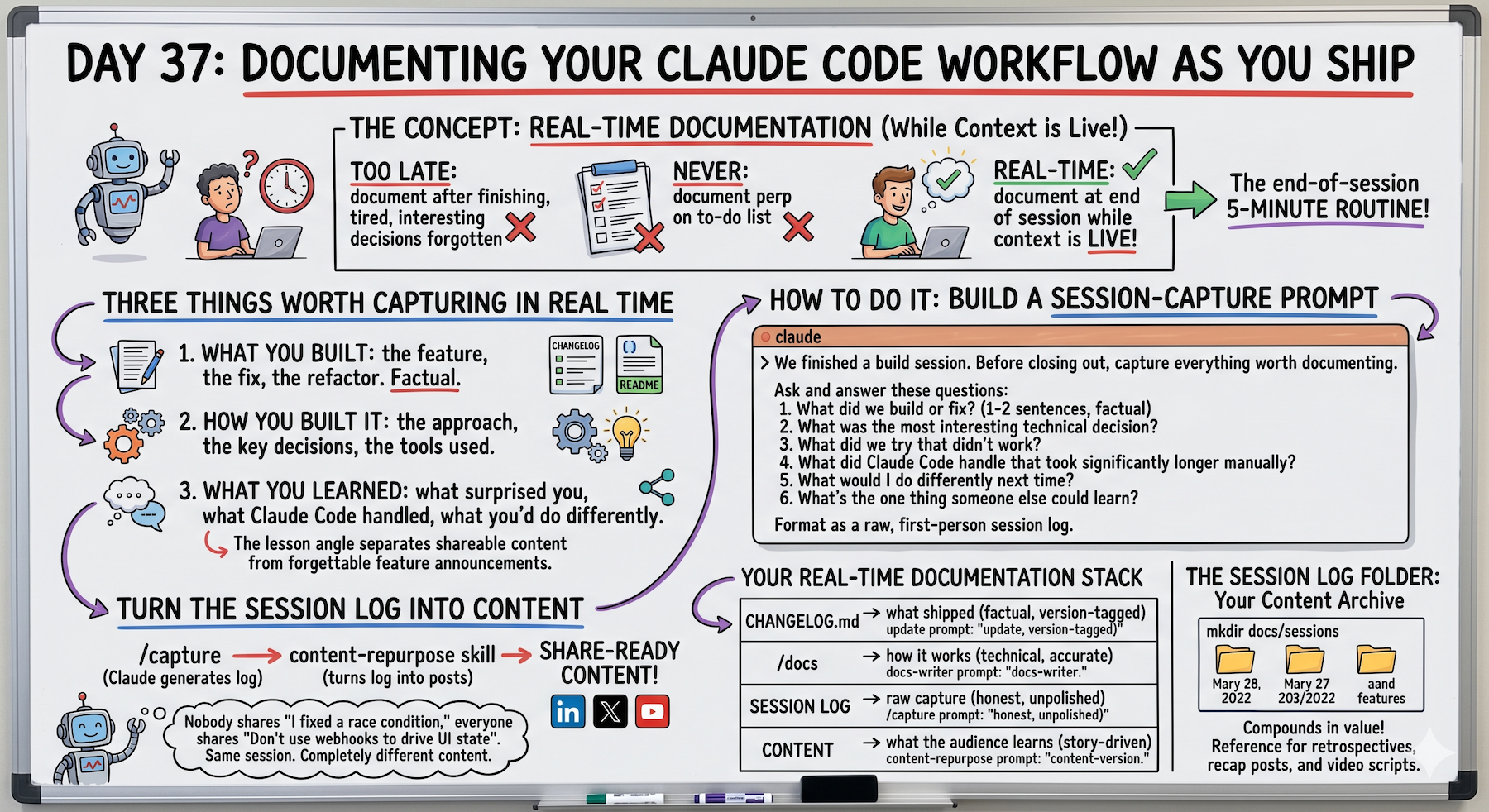
The real-time documentation prompt is the unlock I didn't see coming.
Asking Claude to document the session while I'm still in it means I capture the actual process — not the sanitized version I'd write from memory later.
The three-approaches example (avatar upload) is real.
I tried the widget. Too heavy.
I tried the API proxy. Unnecessary server load.
Signed URLs was the third attempt and the right one.
Without real-time documentation, I would've posted: "Added avatar upload."
With it, I have a story about choosing the right architecture.
That's the difference between content people scroll past and content people save.
The 60-second documentation prompt at the end of every session adds basically no time but changes content quality completely.
This is sustainable build in public.
Phase 4 Taking Shape
Day 36: The mindset shift (content as byproduct)
Day 37: The mechanics (real-time documentation)
Day 38 preview: Turning sessions into content formats (blog posts, threads, videos)
The system is forming.
Build → Document (real-time) → Generate (content) → Share
Each day adds one piece.
Following This Series
Core 30 Days: ✅ Complete
Bonus Days: In progress
Phase 1 (Days 1-7): Foundations ✅ Complete
Phase 2 (Days 8-21): Getting Productive ✅ Complete
Phase 3 (Days 22-35): Power User ✅ Complete
Phase 4 (Days 36+): Build In Public ⬅️ Building the system
G
P.S. - The documentation prompt: "Document this session: 1) What problem? 2) What approaches? 3) What worked/didn't? 4) Key insight? 5) What would someone learn? Write as story." 60 seconds. Changes everything.
P.P.S. - Memory fades. Details get lost. The difference between "Added feature X" and "Tried A, B, C — here's why C won" is real-time documentation while Claude still has the context.
P.P.P.S. - Session documentation becomes: blog posts, X threads, video scripts, case studies. One documentation step, multiple content outputs. That's the leverage.