Day 38 (Bonus): Sharing Your Claude Code Setup With Your Community
Open source your Claude Code setup. CLAUDE.md templates, slash commands, custom skills. Share the generic, protect the specific. Process over outputs.
Hey, it's G.
Day 38 of the Claude Code series.
Phase 4: Build In Public continues.
Days 36 and 37 were about capturing and sharing what you build.
Day 38 is about sharing the tools you build with.
There's a different kind of value in opening up your actual Claude Code setup.
Not just "here's what I shipped."
"Here's exactly how I work."
Your CLAUDE.md.
Your slash commands.
Your custom skills.
These are the result of dozens of hours of iteration.
Sharing them gives your community a shortcut and builds trust in a way feature announcements never do.
The Problem (Sharing Outputs, Hiding Process)
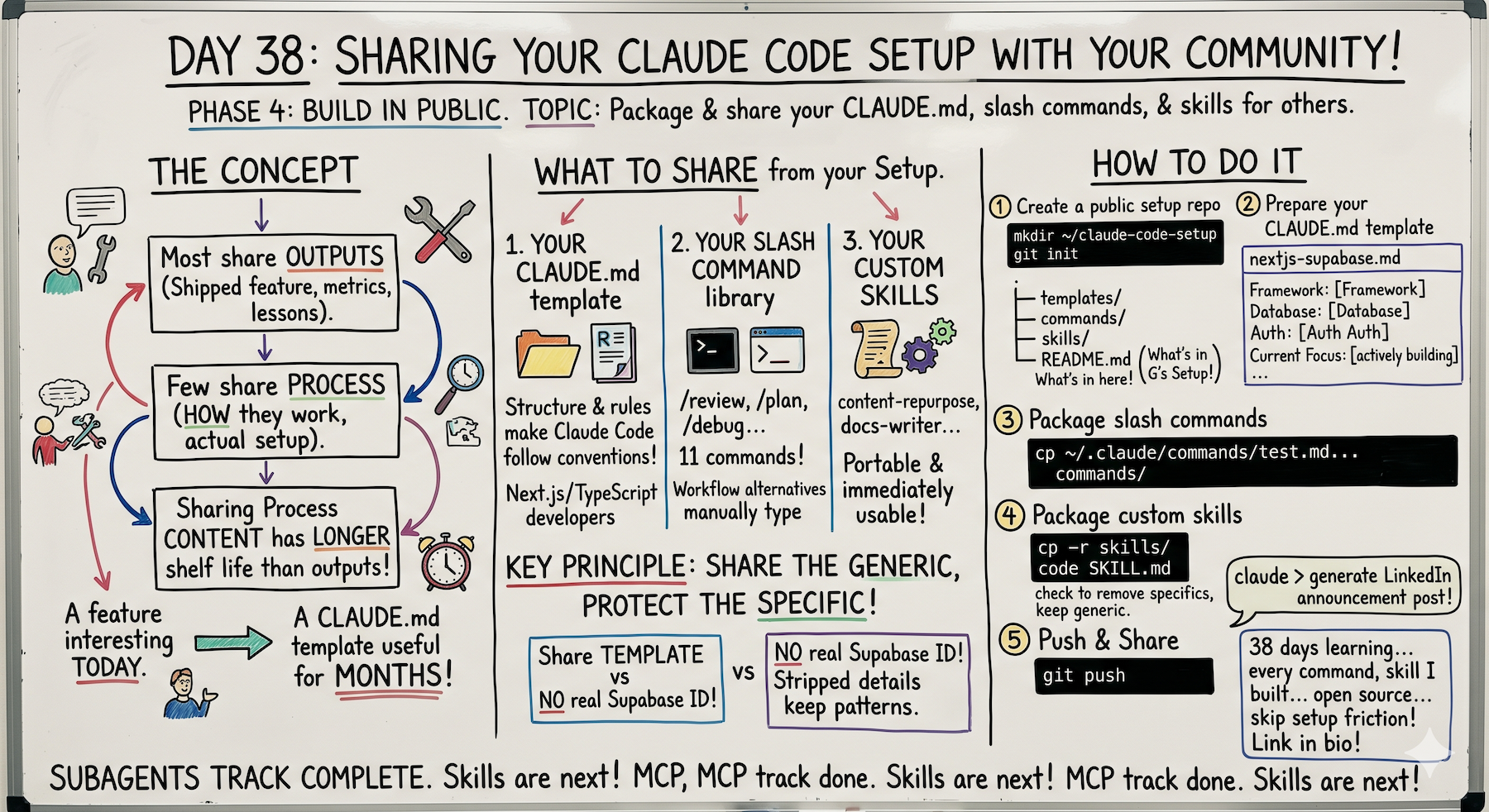
Most developers who build in public share outputs.
What they shipped.
What they learned.
What the numbers look like.
Fewer share process.
How they actually work.
What tools they use.
What their setup looks like under the hood.
Why Process Matters More Than You Think
Output content has a short shelf life.
"I shipped feature X today" → interesting today, forgotten tomorrow.
Process content has a long shelf life.
"Here's the CLAUDE.md template that makes every session faster" → useful for months.
Outputs are singular.
Process is reusable.
The Concept (Share the Tools, Not Just the Results)
Sharing your Claude Code setup is sharing process.
Three things worth sharing from your setup:
1. Your CLAUDE.md Template
The structure and rules that make Claude Code follow your conventions.
Useful for anyone working on a similar stack.
2. Your Slash Command Library
The commands you've built up over 38 days.
Each one represents a workflow someone else probably runs manually.
3. Your Custom Skills
Especially the content-repurpose skill and any project-specific ones.
These are portable and immediately usable.
The Key Principle (Share the Generic, Protect the Specific)
Your CLAUDE.md template is shareable.
The version with your actual Supabase project ID and internal API endpoints is not.
Strip the project-specific details.
Keep the structure and the patterns.
Example:
Private version:
Database: Supabase project ID abc-123-xyz
Internal API: https://api.internal.mycompany.com
Public template:
Database: Supabase (PostgreSQL)
Internal API: [YOUR_INTERNAL_API_URL]
The structure teaches.
The specifics stay private.
How To Share Your Setup
Step 1: Create a Public Setup Repo
mkdir ~/claude-code-setup
cd ~/claude-code-setup
git init
Structure it clearly:
mkdir -p commands skills templates

touch README.md
Your README:
# G's Claude Code Setup

My personal Claude Code configuration — CLAUDE.md templates,
slash commands, and custom skills built over 38 days of
daily learning.

Part of the AI For Pinoys community series:
giangallegos.com

## What's In Here
- /templates → CLAUDE.md templates for different project types
- /commands → slash command library
- /skills → custom skills

## How To Use
1. Clone this repo
2. Copy the commands you want to ~/.claude/commands/
3. Copy the skills you want to ~/.claude/skills/
4. Use the CLAUDE.md templates as a starting point

## Stack
Built for: Next.js, TypeScript, Supabase, Tailwind, Vercel
Works for: Any JS/TS project with minor adjustments
Clear structure.
Clear instructions.
Clear value.
Step 2: Prepare Your CLAUDE.md Template
Create a generic version:
touch ~/claude-code-setup/templates/nextjs-supabase.md
Your template:
# [Project Name] — CLAUDE.md Template
# Source: giangallegos.com | AI For Pinoys
# Stack: Next.js 14, TypeScript, Supabase, Tailwind, Vercel

## Project Overview
[What this project does — replace with your description]

## Tech Stack
- Framework: Next.js 14 (App Router)
- Language: TypeScript 5.x (strict mode)
- Database: Supabase (PostgreSQL)
- Auth: Supabase Auth
- Styling: Tailwind CSS v3
- Deployment: Vercel

## Folder Structure
- /app → all routes and pages (App Router)
- /app/api → all API routes
- /components → shared components
- /components/ui → base UI components
- /lib → third-party client configs
- /utils → pure helper functions
- /types → TypeScript type definitions
- /hooks → custom React hooks

## Coding Conventions
- Functional components only — never class components
- Named exports only — never default exports
- TypeScript strict mode — never use `any`
- Tailwind for all styling — no inline styles
- Components under 150 lines — split if larger
- One component per file
- Async/await only — never .then() chains

## Behavior Rules
⚠️ NEVER install dependencies without asking
⚠️ NEVER run database migrations without asking
⚠️ NEVER push to git without instruction
⚠️ NEVER modify /lib files without flagging it
- Run freely: npm run dev, build, lint, typecheck

## Commands
- `npm run dev` → start local server
- `npm run build` → production build
- `npm run lint` → run ESLint
- `npm run typecheck` → TypeScript check

## Current Focus
[Replace with what you're actively building]
Notice the placeholders:
[Project Name]
[What this project does]
[Replace with...]
These signal: customize this for your project.
The structure stays. The details change.
Step 3: Package Your Slash Command Library
Copy your best commands:
cp ~/.claude/commands/review.md ~/claude-code-setup/commands/
cp ~/.claude/commands/plan.md ~/claude-code-setup/commands/
cp ~/.claude/commands/debug.md ~/claude-code-setup/commands/
cp ~/.claude/commands/refactor.md ~/claude-code-setup/commands/
cp ~/.claude/commands/test.md ~/claude-code-setup/commands/
cp ~/.claude/commands/ship.md ~/claude-code-setup/commands/
cp ~/.claude/commands/capture.md ~/claude-code-setup/commands/
cp ~/.claude/commands/standup.md ~/claude-code-setup/commands/
11 commands.
11 workflows someone else runs manually.
Now automated.
Step 4: Package Your Custom Skills
Copy your skills, but review first:
cp -r ~/.claude/skills/content-repurpose ~/claude-code-setup/skills/
Before committing, strip project-specific details:
code ~/claude-code-setup/skills/content-repurpose/SKILL.md
Remove:
- Specific URLs
- Internal tool names
- Private information
- Hardcoded project details
Keep:
- Voice rules
- Platform guidelines
- Output format
- Workflow structure
Example edit:
Before:
Always end LinkedIn posts with:
"Read more at giangallegos.com"
After:
Always end LinkedIn posts with:
"Read more at [YOUR_BLOG_URL]"
The workflow is shareable.
Your specific URL is customizable.
Step 5: Push and Share
cd ~/claude-code-setup
git add .
git commit -m "initial claude code setup — 38 days of iteration"
git remote add origin [your github repo url]
git push -u origin main
Now generate the announcement:
claude
Read through this entire repo.

Generate a LinkedIn post announcing I'm open-sourcing
my Claude Code setup after 38 days of daily learning.

Cover:
- What's in the repo (commands, skills, templates)
- Who it's for (Next.js/TypeScript developers)
- What problem it solves (hours of setup saved)
- Link to the repo
- CTA to giangallegos.com for the full series

Make it story-driven — not a feature list.
Claude generates the post.
Setup shared. Community equipped. Content posted.
Complete Real Example (Open Sourcing Your Setup)
Full session preparing and sharing your Claude Code setup.
Check for Private Details
cd ~/claude-code-setup
claude
Read everything in this repo.

Check for any project-specific details that
shouldn't be public:
- Real API endpoints
- Internal project names
- Private URLs
- Hardcoded credentials

List anything that needs to be genericized
before I push this public.
Claude scans and reports:
Found one issue:

content-repurpose/SKILL.md line 47 references
giangallegos.com as the CTA destination.

Consider making this a placeholder so others
can customize it.
Fix it:
Change the CTA URL in the content-repurpose skill
to [YOUR_BLOG_URL] so others can customize it.
Fixed.
Generate the Announcement
Use the content-repurpose skill to announce
this repo going public.

Story: 38 days of daily Claude Code learning.
Everything I built up — CLAUDE.md templates,
11 slash commands, 3 custom skills — now open source.

Who it helps: developers starting with Claude Code
who don't want to spend weeks figuring out setup.

Make the LinkedIn post lead with the time saved —
not the feature list.
LinkedIn post generated:
38 days of daily Claude Code learning.

Every template, command, and skill I built —
now open source for the community.

Here's what took me weeks to figure out:

**CLAUDE.md templates**
The structure and rules that make Claude Code
follow your conventions automatically.

No more re-explaining your coding style every session.

**11 slash commands**
/review → pre-commit code review
/plan → feature brief before building
/debug → systematic bug diagnosis
/refactor → cleanup with safety checks
/test → test generation strategy
/ship → final checks before deploy
/capture → session documentation
/standup → end-of-day summary

Every repeated prompt — saved permanently.

**3 custom skills**
content-repurpose → turn builds into posts
code-review → enforce conventions
docs-writer → documentation from code

Workflows that run consistently without re-explaining.

The principle I used:
Share the generic. Protect the specific.

Templates go public.
Real project details stay private.

If you're starting with Claude Code — clone this.
Skip the 38 days of setup iteration.
Start from day 38.

GitHub: [repo link]

That's what the AI For Pinoys community is for 🇵🇭

Building in public, sharing generously.

Read the full 38-day series: giangallegos.com
Post-ready.
Story-driven, not feature-list.
Value-first, not announcement-first.
Push It Public
git push
Post the content.
Done.
Setup open sourced.
Community has a shortcut.
Content posted.
One session.
Keeping It Updated As You Learn
After every new command or skill worth sharing:
cp ~/.claude/commands/new-command.md ~/claude-code-setup/commands/

cd ~/claude-code-setup
git add .
git commit -m "add [command name] — [one line description]"
git push
Monthly update post:
claude
Read the git log for this repo for the past month.

Write a "what I added to my Claude Code setup" post.

Use the content-repurpose skill for all platforms.
The repo stays alive.
You get recurring content without new work.
Community sees continuous improvement.
Why This Matters
Open sourcing your Claude Code setup does two things at once.
1. It Gives Your Community Something Immediately Useful
A shortcut past the setup friction that stopped many of them from getting started.
They clone. They copy. They use.
No weeks of iteration. No figuring it out from scratch.
2. It Builds Your Reputation
Not as someone who just talks about building.
As someone who actually shares how they do it.
The developers who build the most loyal audiences aren't the ones with the most impressive outputs.
They're the ones who share the process generously enough that their audience feels like they're learning alongside them.
Not just watching from a distance.
What People React To Most
From sharing my setup, here's what gets the biggest response:
The Slash Command Library
People don't realize how much time they spend retyping the same prompts.
Until they see a library of alternatives.
"Wait, you can save prompts?"
Yes. And you should.
The /capture Command
From Day 37.
Probably the most useful single command in the whole library.
60 seconds of documentation at the end of every session.
People copy this one immediately.
The CLAUDE.md Template
Developers see it and realize: "I've been re-explaining my conventions every session."
The template fixes that.
Once.
My Raw Notes (Unfiltered)
The "share the generic, protect the specific" principle is the one that makes this feel safe to do.
My CLAUDE.md with real project details stays private.
A template version that anyone can use goes public.
The slash command library is the thing that gets the most reaction when I share it.
People don't realize how much time they spend retyping the same prompts until they see a library of alternatives.
The monthly update post habit keeps the repo alive and gives you recurring content without new work.
The /capture command from Day 37 is worth including in the public repo.
It's probably the most useful single command in the whole library.
Sharing process builds trust faster than sharing outputs.
Outputs say "look what I did."
Process says "here's how you can do it too."
That's the difference.
Phase 4 Expanding
Day 36: Build In Public mindset (content as byproduct)
Day 37: Real-time documentation (capture while fresh)
Day 38: Share your setup (process over outputs)
Day 39 preview: Personal Claude Code system (pulling it all together)
The pieces are connecting.
Build → Document → Share → Equip
Following This Series
Core 30 Days: ✅ Complete
Bonus Days: In progress
Phase 1 (Days 1-7): Foundations ✅ Complete
Phase 2 (Days 8-21): Getting Productive ✅ Complete
Phase 3 (Days 22-35): Power User ✅ Complete
Phase 4 (Days 36+): Build In Public ⬅️ Building the system
G
P.S. - Share the generic, protect the specific. Templates go public. Real project details stay private. Command structure goes public. Internal API details stay private. That's how you share safely.
P.P.S. - The slash command library gets the biggest reaction. People don't realize how much time they waste retyping prompts until they see saved alternatives. /capture is probably the most copied.
P.P.P.S. - Process content has longer shelf life than output content. "I shipped X today" → forgotten tomorrow. "Here's my CLAUDE.md template" → useful for months. Share the tools, not just the results.